Is this really Pci-e 2.0? Judging by the speeds, it seems to work on Pci-e 1.1.
What does DiskInfo report?
@Dagal, you are right!
DiskInfo says: Transfer Mode: PCIe 1.0 x4 (current mode), PCIe 4.0 x4 (supported mode), but the board definitely supports PCIe 2.0. The thing is, this is the only PCIe slot, which recognizes the nvme on my mainboard 
I am using PCIe slot: PCIEX4_1 right now (seems like this slot only supports 1.0), PCIEX16_1 is the graphics card
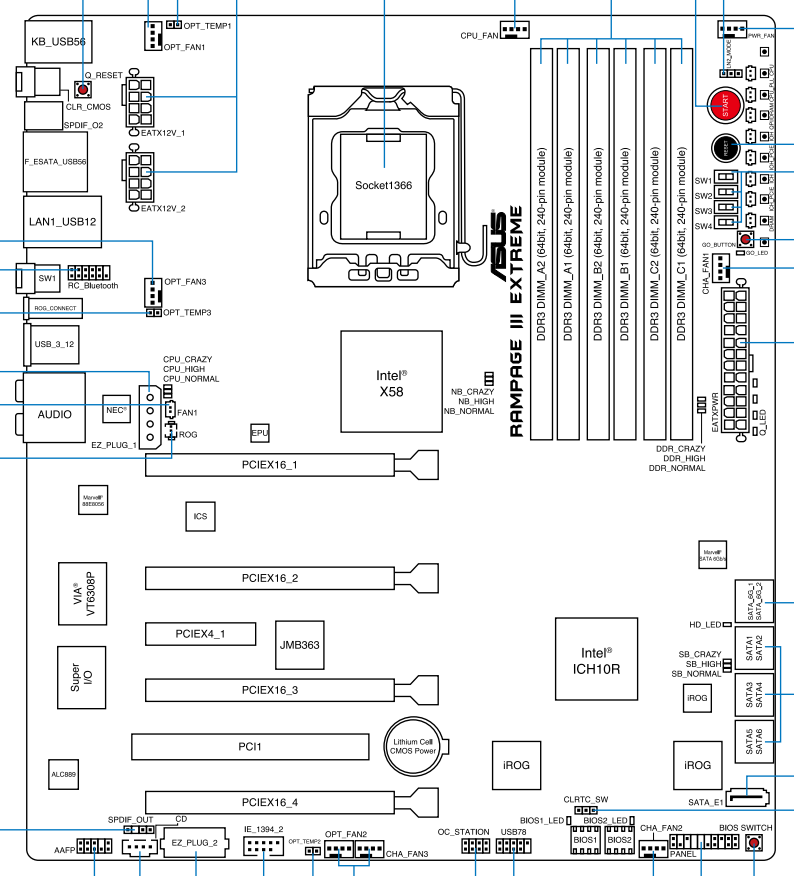
I see I have reached the issue now you discussed above with Slava_1988…
 That’s what I found for my board:
Expansion Slots: 4 x PCIe 2.0 x16 , support x16; x16/x16; x16/x8/x8 and x8/x8/x8/x8 configurations
1 x PCIe x4
1 x PCI 2.2
Where can I download the source code for OpRomCfg.exe file?
Alright, after some reading. I think I managed to finagle my first ever modded Bios.
I’ll be sure to back my stuff up before I flash this, but if anyone would have a looksie if I was meant to do what I should have, here it is.
FirstMod.zip (1.0 MB)
Edit: Ok yea, I knew that was too easy. I wasn’t successful and I’m not sure where I went wrong. Still unable to boot from NVMe.
@Nonimo
What exactly have you done and what happened?
If you want help, you should give us some information (e.g. HardwareIDs of your device’s specific NVMe Controller, pictures showing the content of your mainboard BIOS and the insertion of the NVMe Option ROM).
So I used Ethaniel’s NvmeOpRom and customized it with my nvme controller IDs.


I then followed your guide with Modding Award/Phoenix BIOS with CBROM to integrate the custom NvmeOpRom.

Then I prepared a usb to first save my current BIOS and then flashed it with a seperate usb holding the custom BIOS. I was still unable to boot my nvme that has the windows clone on it. Then I attempted to see if I could fresh install windows on it with a usb and it would give me the same restriction about changing a controller in the BIOS to install it so I aborted.
I reverted back to my last BIOS and had a bit of a scare because i forgot to change the sata type lol.
But yea, I’m not entirely sure where I went wrong.
@Nonimo
Thanks for your reply and the additional information.
Since I don’t have any own experience with this specific method to get non-UEFI BIOS bootable off an NVMe SSD, I hope, that someone else will help you (e.g. @Dagal, @ismailTPC_Hastanesi, @MeatWar or @Koekieezz).
Good luck!
I see that @Dagal has a different Oprom that he used for the Nvme. I tried to mod this with my own IDs but it’s telling me “Option ROM last image indicator must be set.”

How would I go about configuring this one?
Hi. I haven’t done this in a while.
Try it. I’ve prepared this NVMe.bin file for NVMe (PCI\VEN_1987&DEV_5013)
NVMe.rar (9.9 KB)
1 Like
Thank you for the help. However it looks like it’s still not possible to boot from my nvme. It only just sees it as storage. With multiple bootloaders not working, nor this with this mobo, I might have to just throw in the towel and buy a new mobo.
After updating the BIOS with the NVMe module, it should appear in the BIOS. Try installing the adapter with the NVMe drive in different slots. For example, in my case, it only worked in one of the three slots.
I’ll try that when I have a chance to. I didn’t think to try that since I had a graphics card on the other slot.
There’s also a common misconception that the reason NVME doesn’t work in the second slot on older motherboards is because the chipset uses shared PCI Express x8+x8 lanes. The drive in the second slot also didn’t work for me. As an experiment, I bought a PCI-E adapter and inserted two NVME drives into it. Of course, both drives didn’t work; only the first one worked. The lanes were divided evenly, and this worked. This further proves that the problem lies in the second slot, due to the chipset splitting the PCI-E x8 lanes.
For the second slot to work, all eight lanes must be used.
1 Like

Isn’t this highly reduces bandwidth for GPU? Also your motherboard have free SATA6 ports and PCIe 2.0 x1 slot. Could you please read my post because I think this might be relevant to you, though for now there’s no solution: [Problem] ReBAR / LargeBAR on LEGACY systems
Basically this platform has some locked capability for PCIe Large-BAR which unfortunately no one unlocked yet…
Hello, I’ve been trying to get this to work on a AMI BIOS (ASUS M5A97 R2.0) because I would like to legacy/MBR boot on my PCIe to NVMe adapter. The drive is an Kioxia KXG6AZMV256G (OEM). Previously I had modded my bios successfully using this guide with the “NvmExpressDxe_5.ffs“ module however as I understand it, this can only boot UEFI/GPT.
I have copied the Hardware IDs (VEN 1179 DEV 011A) and used the OpRomCfg.exe to modify the NvmeOpRom.bin file, and also using MMTool 4.50 using the “Link Present” option. These are definitely the correct values from the storage controller.
Next I use AFUWinx64 to first flash the unmodified .CAP bios and then the modified .ROM bios with /GAN one after the other without rebooting between them. After rebooting and entering the bios there is no option for the NVMe (with or without CSM) it doesn’t show up at all. I tried different slots (MB has 2 16x slots, bottom one runs in 8x mode) have tried my adapter in either one.
Fastboot is also off. I have lniked the latest bios for this motherboard and see if anyone would be kind enough to mod it for me but I believe I’m doing it correctly.
As far as I know, your motherboard supports UEFI BIOS, and the NvmeOpRom.bin module is meaningless for your motherboard. It’s only usable for older, non-UEFI AMI and AWARD BIOS versions.
If your modification is correct, you should see a drive name in the BIOS as PATA:SS, or something similar.
Also, I can’t see the BIOS file you’re working with.
The official Asus BIOS file is useless.
Dear @Dagal,
The NVMe.rar (9.9 KB) module you provided in post 249 appears to be correctly configured, but there’s a problem with the final byte.
I should point out that it should be “08” not “88”.
If this module is added to the BIOS in this state, the motherboard will not recognize the NVMe M.2 SSD drive after each reboot, and the drive will only be visible after a full shutdown.
In short, the drive will disappear from the BIOS when the user reboots the motherboard.
I previously explained this in detail HERE.
Yes the previous mod did work and the drive showed up as PATA SS but like I said, could only boot GPT/UEFI. The end goal for me is to install Windows XP 32 bit on this system as a retro rig as someone earlier in this thread got it to work with this mod which is why I’m wanting to switch to this one if it allows MBR booting from drives other than Samsung 950 Pro.
Also here the Samsung 950 Pro bootrom was used to boot Windows XP with freeldr.
I can’t attach my bios unfortunately as a new user but I followed the OP instructions.
Dear @ismailTPC_Hastanesi
Let me ask what you’re thinking about when you say that in NVMe with (PCI\VEN_1987&DEV_5013) the last byte should be “08” instead of “88”.
And I didn’t use NvmeOpRom.bin. For NVMe OROM, I use the one from the Samsung 950 Pro.
Pardon my English.
1 Like