Got it working doing what you said but i used normal nvme driver instead. Thanks Fernando for your time and help!.
I left the working bios that is in use right now:
hp 14-ax026la nvme.rar (3.7 MB)
@Crijopoga
Congratulations - it is fine, that you succeeded despite all specific BIOS and tool problems.
Enjoy it being able to boot off an NVMe SSD!
If you want to help other users with a similar mainboard, you can offer your modded BIOS within >this< Forum Category.
1 Like
I’m trying to insert an NVMe DXE driver into my ZX H61C B75 motherboard BIOS using UEFITool NE Alpha 72, but the “Insert into…” option is greyed out / disabled.
I need to add NVMe support so I can boot Windows from my NVMe SSD, but NE Alpha doesn’t allow insertion.
What I’ve tried:
- Opened the BIOS in UEFITool NE Alpha 72 → “Insert into” option not available.
- Tried to insert inside the DXE driver volume but still blocked.
- My NVMe SSD is not detected as a boot option in UEFI.
Question:
What is the correct way or tool to insert the NVMe DXE driver into my BIOS so I can boot from NVMe on my ZX H61C B75?
Hi
Use UEFITool_0.28.0_win32
@rqyqne
Welcome to the Win-Raid Forum!
I have moved your request into this already existing thread, where you can find the solution for your problem.
By the way - the UEFITool’s NE Alpha variants cannot be used for your desired task.
Good luck!
Hi, I’ve followed the step-by-step guide above up to the stage of flashing the modded BIOS, but PATA still isn’t detected in the BIOS, even though the SSD is already installed.
For your info, my computer is an Asus AIO V241ICR-R.
Since CSMCORE wasn’t available in MMTools, I chose DXECORE as the location to insert the NVMe module.
For flashing, I used the trick mentioned here with AFUDOS, and it worked successfully.
Where do you think I went wrong?
Show us a cap screen of its location or share the mod file.
A dump after flashing the mod can reveal the new module presence…or not if the flash seems done correctly but was not written…
EDIT: Yes… besides no visible CSMCORE, the insertion on vol.3 seems the correct place, no abnormal padding in UEFItool vs original 0405 CAP from Asus.
…But i found this info and…
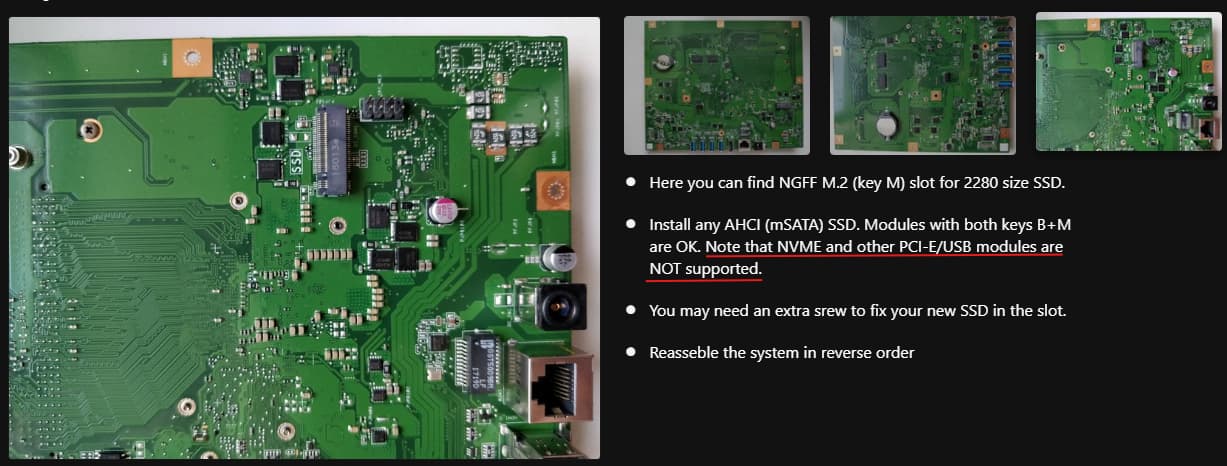
So it seems, only M.2 PCIe AHCI (SATA) disks and not M.2 PCIe NVMe disks.
Modded Files
Okay, thank you for the clarification. I think I’ll just keep using the HDD since I don’t have a SATA SSD yet.
Hello everyone. I seen a information about dont use Uefi tool for MSI boards. I have 0.28 version, should i find another application to mod my bios files? I want to add nvme support and change splash screen of my bios. How i can archive this?
I want to add;
Nvme support
4g decoding
Tpm 2.0 (if possible)
and change Splash
My board is MSI Z97 PC MATE
@s4n0
Welcome to the Win-Raid Forum!
Where did you see this information? If it would be better to use another UEFITool version for MSI mainboards, I would have mentioned it within my guide (initial post of this thread).
I saw it on a youtube video, they suggesting MMTool or something but i dont know which one is the right version. I read your guide, its very confusing to be honest. I did mod my Asus Z87 motherboard bios with UEFITOOL but i havent touch anything else. I want to step up my modding and add new features. Is there any videos about this so i can understand better.
You should better ask the maker of the video than us.
By the way - the BIOS modding tools, which are able to insert the NVMe module into an AMI UEFI BIOS without native NVMe support, are listed within my Guide.
Feel free to write a better (less confusing) guide, but remember: Each mainboard BIOS is different and may require another procedure!
Good luck!
I cannot write better guide, im at stage to learn instead of teaching. English not my native language also. Thank you for your efforts with the guide and answering messages. I really apperciate it 
Hello new guy here, This bios link does not work anymore, But I need this exact one, Can anybody help me find this ? ( Gigabyte 990fxa-ud3 rev4.0 for NVME support custom bios )
@Mook
Welcome to the Win-Raid Forum!
This thread has been started by me for users, who are willing to do the required BIOS modification themselves.
If you want to get an already NVMe modded BIOS for your mainboard, you should start a request thread within >this< Forum Category.
Good luck!
Can you please check my bios file, i also put original in zip.
i use MMTool 4.50.0.23 and APTIO 4 ChangeLogo
Added nvme module 5 and change logo exact dimensions with original jpg file. i make my jpg file little smaller than original so size dont increase because of me
https://www.mediafire.com/file/ksmzxjyrvmk8bhf/s4n0-bios.zip/file
1 Like
@s4n0
I do not recommend to flash your modded BIOS.
Reason: You added an NVMe module, although the source file already contained such module.
Can these two modules conflict?
Yes! It is never a good idea to insert a second BIOS module for the same purpose.
Furthermore the original BIOS has full NVMe support (consisting of 3 DXE driver modules), whereas the NVMe modules we are offering don’t offer all features (e.g. showing the NVMe disk drive by its real name within the BIOS).