[Problem] Aptio Setup Forms Listing Missing in AMITSE DXE

Hi team,

I’m trying to mod my G532 BIOS. I am using AMIBCP or UEFI Editor online.
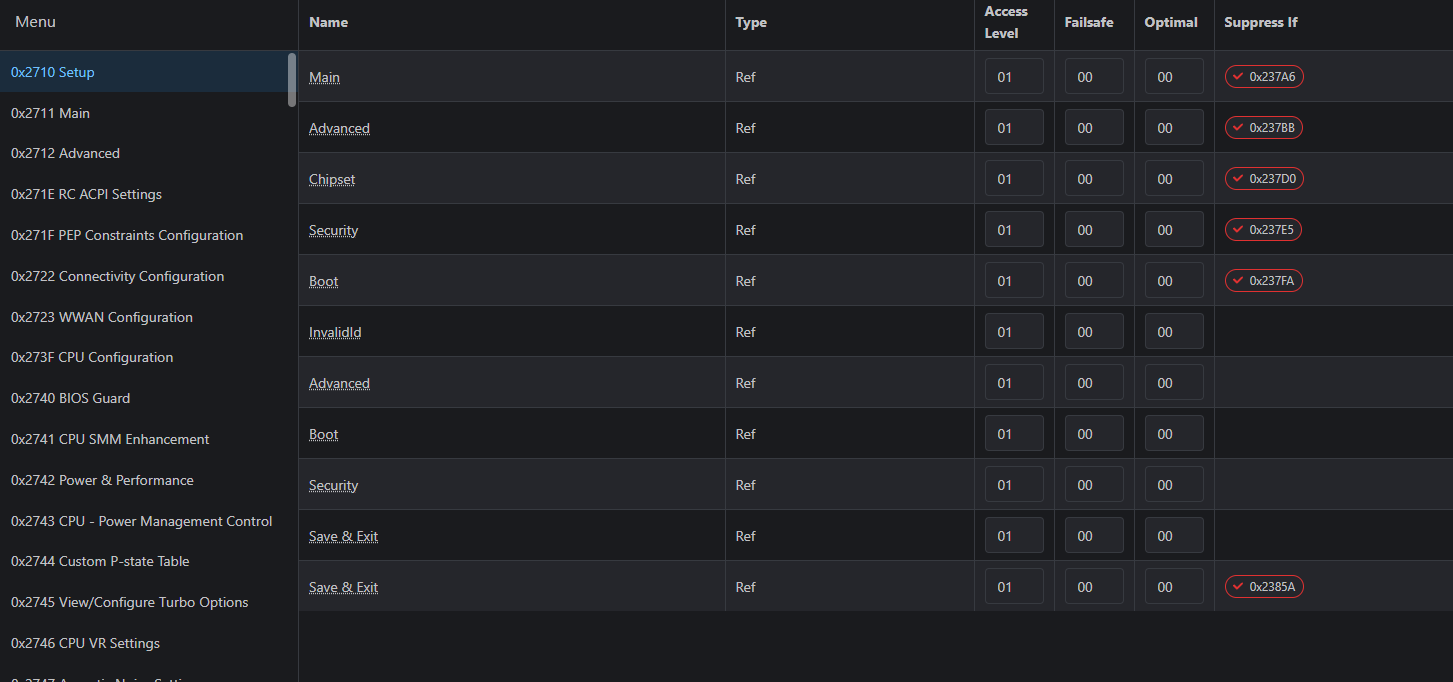
In this BIOS, the MENU doesn’t exist.
Everything is in SETUP with “Suppress If”.
I tried to delete the “Suppress If” for the chipset and edited the Access Level as well. However, nothing changed (except if the access level is 09, the BIOS freezes when trying to access advanced settings (F7 key)).


In older BIOS versions like FX506, there is a MENU with pointers like 0x2712 for Advanced settings, which we can change to access more options.


Did someone resolve this? Has anyone successfully shown the chipset or advanced menu?
Here is original BIOS and original SCT file and IFR. Can someone see if I made an error?

BIOS.zip (9.6 MB)

Thanks in advance :heart:


Edit by Fernando: Thread moved into the “BIOS Problems” Category and title customized

1 Like

Do someone know about this issue ?

Asus moved the data to a different module. This is getting more common in modern devices.
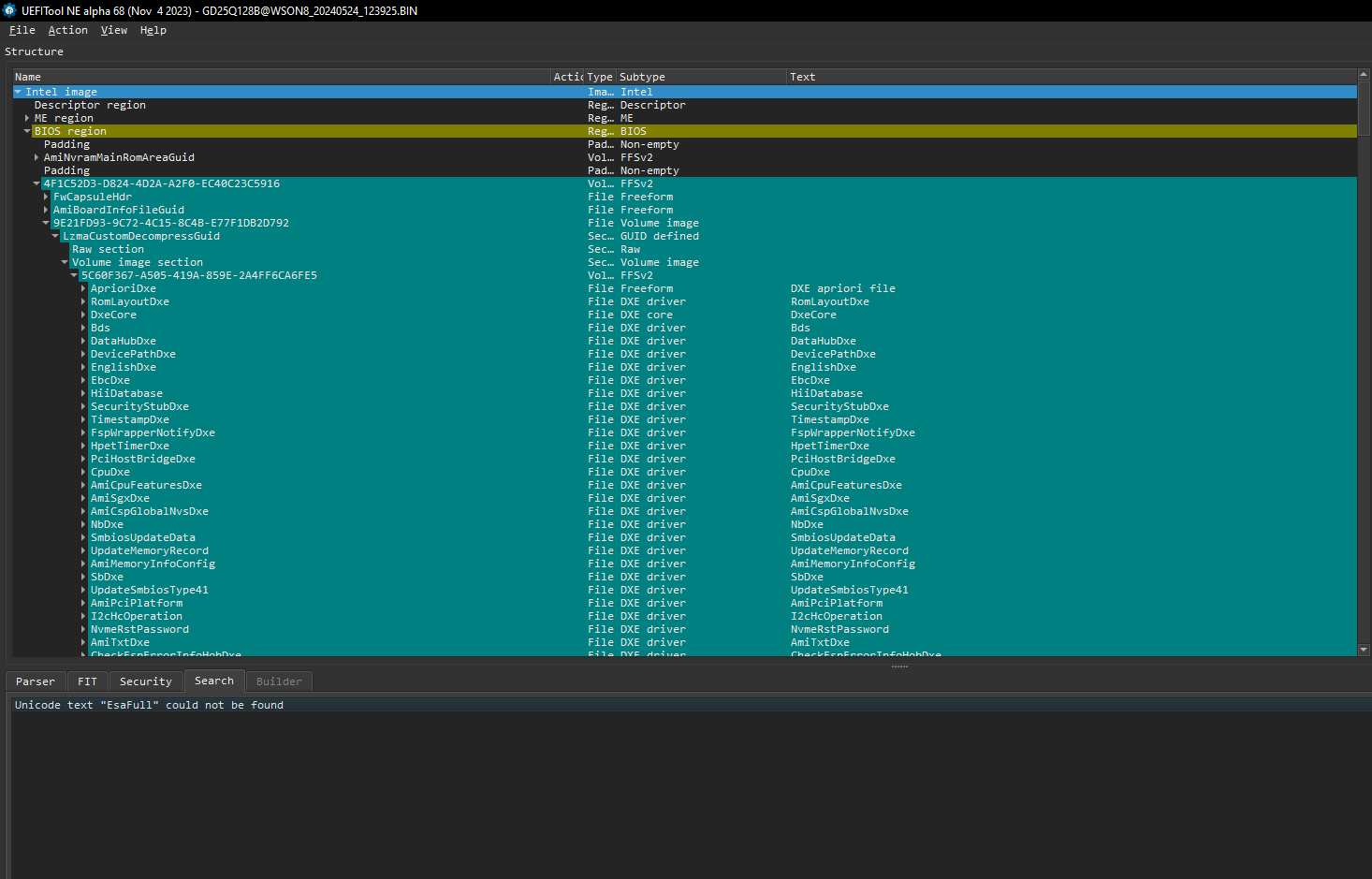
You should extract EsaFull module and use it instead of AMITSE.

1 Like

Thanks for your reply, am I doing wrong ?
Seems that EsaFull doesen’t exist

Check underneath amitse.

Got the same problem with different laptop model. Can’t do it.

Fortunately, I can simply use SREP so I decided not worth the hassle.

I don’t know how I didn’t see it the first time! But thanks
AMITSE and EsaFull are different.
I don’t see pattern or something like this.
AMITSE is here to allow the Access Level, but where can I find it in EsaFull if it’s replacing AMITSE ?
Section_PE32_image_EsaFull_body.zip (1.6 MB)

If UEFI Editor can’t read EsaFull, edit the module manually.
List of blocked forms is at FD7C0. List of allowed is at FD5F0.

Thanks that helped me !
I found a pattern of 4A 10 59 7B 0D C0 58 41 87 FF F0 4D 63 96 A9 15 (don’t know what is is)
FormId (invert HEX) and a list of 00 before the next pattern
So, I added the Chipset section (invert HEX) which the FormId can be found in the UEFI Editor, or IFR text.

Now the Chipset section is in the BIOS.
But I have one more question.
Following your instructions the allowed list start at FD5F0 and the blocked at FD7C0.


But the Form ID 27 10 is the Setup menu and think it is allowed, or am I wrong?

And how can you find how start allowed and blocked parts ?
Is it this separator ?

Thanks in advance for your reply

You are wrong. Setup form is not available on the bios top bar by default.

It’s not separator, it’s PCI Subsystem Settings.

Form ID 2710 is usually included in blocked. That’s how you can find it.

1 Like

[ASUS Rog ally 2023]
Please give this a chance before scrolling away.

Recently I’ve been trying to Mod my asus rog ally 2023 bios to enable AMD CBS, along with some other many options.
I’ve been using UEFI-Editor to do most of my edits, as amibcp keeps crashing with this device’s specific bios for some reason.

-Settings are in different places not just the ones listed in the tutorial in uefi editor github (AodDxe, CbsSetupSmmPhx, CbsSetupDxePHX) all include editable settings that parse fine in uefi editor, and ifrextractor was able to extract, thing is its confusing me so much I don’t know how to edit/reveal the options without entirely breaking the bios? Why are the settings in different parts?

My questions are:
My previous dumb attempt (in summary, bios menu completely doesn’t load after flashing my modified version). I still don’t know what could have caused this, other than unsupressing everything maybe…
But changing access values to 05 without touching the suppressing area also happened to cause a similar issue (Bios menu loads, but freezes as soon as i enter advanced menu) Just like this forum, it also talks about a new pattern with asus newer bios, could this correlate in my case? I can’t find EsaFull in my modules list, but I did find it via GUID “A2DF5376C2ED49C090FF8B173B0FD066”

UEFI-Editor refuses EsaFull, ifrextractor can’t find anything in it, I don’t even know what it is. Maybe I misunderstood or missed something

Please, if anyone could help me learn and modify/enable some hidden settings, I can greatly improve battery life, reduce temps, increase fps, overclock, undervolt (unsure) but mainly AMD CBS Support, and maybe more options. These kinds of tweaks are my favorite, I bought this device on the second hand market because it had a bios issue to begin with, fixed it with @‎sparo (Big thanks)
If you know any tutorials/prerequisites I could be missing before diving deeper into this, please include them as well

I’m getting into this because I like tampering with bios :> and this device has a handful of issues on its own:

-Lots of overheating

-Fast battery drain

-Broken SD card slot and SD card after regular use (heatsink near SD chip)

SSD Failed, looking at it, some components were slightly out of place, but I managed to revive it by adding flux and blasting it with a heat gun, surprisingly that worked perfectly. My guess is heating caused solder to weaken? Cracked solder? Factory fault? Unsure. For now it’s stable, 99% health on crystaldiskinfo and passed benchmarks
(Only stores games though)

Edit: Files of what I did, or attempted at least :broken_heart:

2edit.rar (677.2 KB)

Nonetheless I’m glad I bought this and have been wanting it for ages, worth every penny and i’m thankful to have it.
Many thanks to everyone! :grin:


Edit by Fernando: Thread moved into the “BIOS Modding Problems” Category and title customized

Hey man, could you look at this post please?

Edit by Fernando: Wording of the link corrected

ok, I’ll message you later.

1 Like

Thank you soo much, really appreciate your help :folded_hands:

NEWS!!!
I managed to actually flash a bios that works, without abnormalities or corruptions!!!

HOWEVER, I enabled a bunch of options (listed in file changelog.txt) but only “Trusted Computing” setting was actually unhidden. The good settings remained hidden for some reason :broken_heart:

But I got into the advanced menu with no issues, all options aren’t bugging everything is decent so far

I’m gonna look for reasons/solutions to what’s going on here (why changing access to 05 only worked with some options)

i’m mainly curious now to why the options are scattered around in some other modules/sct files, and how do i rebuild the file to include changes from all modules, not just setup sct

edit : check attached files above for changelog.txt

@loic2907 @rwonke @Sweet_Kitten
I would rather like to merge this old thread with >this< new one.
If you should agree, please propose a short, but meaningful title.

@Fernando
Yes, merge please. I can’t open the new thread you referring to because the link is not interactive for me, so I propose a title based on ths thread contents. How about “[Problem] Aptio Setup Forms Listing is Missing in AMITSE DXE” ?

1 Like

Hi fernando,

I also can’t click the attached link,
As for the title, I’m not really sure because I can’t point out what the problem is exactly, so i’ll leave it upto you guys. As for the merge, if you think it’s convenient its ok with me

Thanks!

@rwonke
Which attached link of which post doesn’t work?

@Fernando

This one

It must be <a href="https://google.comorsomething">.

1 Like