@Raxis Here you go: HM6D4-090-ERYING_upd.rar (6.2 MB)
Since we know that using MMTool sometimes does change/destroy the original FIT Table, for future reference if you want to do it on your own, based on this info here’s how to fix FIT Table after you add/delete/replace microcodes:
- Open the original bios dump file alongside with the edited bios file in Hex tool (like HxD)
- After you search FIT Table in the original bios, it should be your “canvas” template, proceed open UEFITool and open your modded bios with UEFITool (for viewing, i suggest the latest UEFITool NE)
- Now, search for FIT in the modded bios and see the the Address per microcode in UEFITool, and since in Hex tools it was read as little endian, you write them down backwards, so for example in UEFITool the address of the microcode was shown as FFA80400h, in Hex tool you write them as 00 04 A8 FF, it should be like this:
- And that should be it, basically you’re fixing/correcting the address of the microcodes.

IF you do add/remove/replace the FIT Table:
- The total length of the FIT table are from the FIT Table itself (in this case, from 5F) down to the very last line, in this image it is pointed with the green line. The red square is the FIT Table total addresses, and says it’s 09, which means the total length is 9 addresses (as the green line already pointed out):
- If the address changes, and the FIT Table order is messed up, block the original FIT Table from the very first byte (5F in this case) down to the last offset, in this case from 2FD800 down to 2FE1F, copy them, and in the modded bios, block the same length of the FIT Table as the original, and then you Paste Write it. IF you do have a longer FIT Table (in case you did add microcodes) or the FIT Table weren’t adjusted at all after you’ve added new mCode, just block the full address (from 0x00 to 0x0F) of the already available bios and copy it, then block the FF’s below the mcode that was already available, and paste write it. If there are any non microcode table below the microcode table, just do the same as “adding” a new microcode address to the FIT Table, but this time, block all the non microcode addresses. Basically, this is a method to readjust/relocate the position, and the same could be applied if you did delete a mCode (which is the reverse of what i did tell). it should be like this:
- And after you fix the position, you need to re write the addresses, for example i did add 1 mCode, it became 10 addresses, then i would edit it to 0A which is 10 in hex.

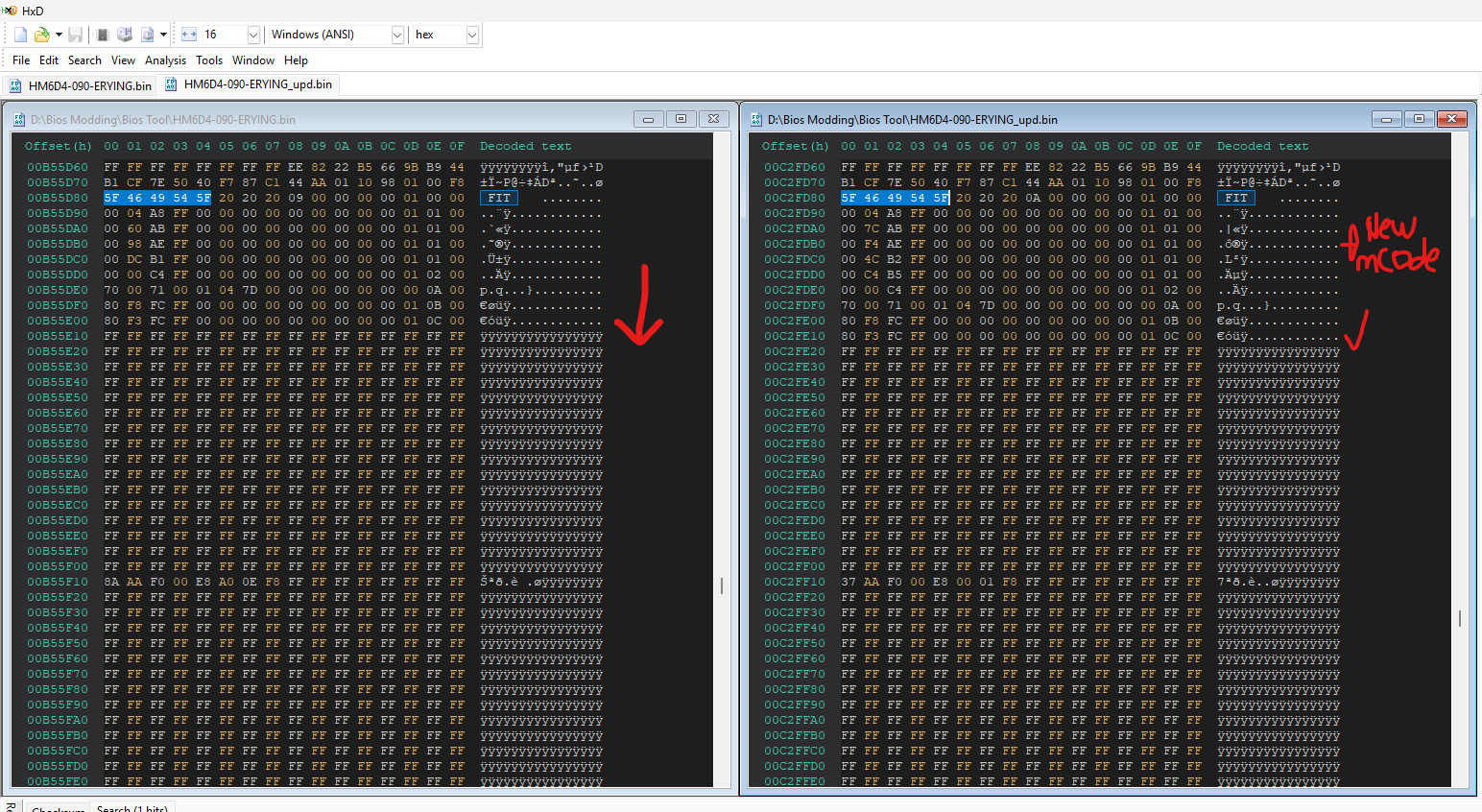
Im sorry if the explanation and the screenshots are messy, im bad at explaining things, but i do hope you do understand  .
.