Thank you so much! The bios worked, bios and in-os checks confirm it now uses the latest microcode and latest me drivers. tpm is also working great. I saw that @Koekieezz also added nvstrapsrebar but my bios already has rebar settings and support so i only needed the latest microcode and me fw. Still a thankyou to you both @Koekieezz and @Raxis for helping me this quickly with something that would have taken me much longer to figure out. Much appreciated. Oh and also, my board had no issues with long memory retraining, it also had no problems with xmp profiles, and since it comes with a cmos reset button, i wouldn’t even have had to remove it. although it would have been easy to remove on this board. Only thing i had to figure out was why i couldn’t click “prepare tpm” in the windows tpm.msc but it appears that when i clear the tpm windows prepares the tpm automatically on next boot, hence the greyed out “prepare tpm”. Thanks again and have a great day!
no problem @Koekieezz taught me how to fix the fit table in this post, I only know what works for these boards because I have one, hes the bios guru of awesomeness
and the nvrebar mod @Koekieezz is talking about allows rebar for older nvidia gpus - 2000 series and 1660 etc, I didn’t add it because I’ve not got one to test
@Raxis @Nezney
Hello, bro, i need help. After some unsuccessful BIOS adjustments, something went wrong, and my motherboard got stuck in a reboot loop. I have the same TOPC board with the 13980HX and DDR4. I tried using your modified BIOS, but the reboots persisted, and the ME version shows as 0.0.0.0. What should I do? I’ve tried various things, but nothing helps.
Hi! Could someone more knowledgeable than me help me add the latest microcode to the BIOS of an Erying 13980HX DDR5 board? The microcode I need to fix my issue is 0x12B or newer.
The problem is that with C-states enabled, Windows freezes upon startup and fails to boot
It only works when C-states are disabled.
From what I’ve read on forums, this issue is resolved by updating to microcode 0x12B or newer, but I don’t have the skills to modify the BIOS myself. If anyone can help, I’ve provided the latest BIOS version for my motherboard sourced from the official Erying website which currently contains microcode 119.
Thanks!!
that sounds like you don’t have the same board, these MODT boards make different versions, you need to flash the original bios back onto it
thats not a backup of your bios thats pulled from the erying website, so on your head be it if it doesn’t work and you have to buy a bios flasher.
Seeing as all I know about your board is its a 13980hx and ddr5 I updated the microcode for the 13980hx only(that bios has 6 or more other cpus listed)
13980hxddr5erying.zip (8.2 MB)
also the microcodes 12B and after are to prevent degredation of the cpu, they don’t fix an already degraded CPU so theres a good chance your cpu is toast already.
13980hx is a 13900k slapped in a laptop bga package so it suffers from the same cpu degrading as a 13900k if you don’t have an updated microcode from the get go.
good luck to you
The BIOS I’m sharing from the Erying website is the one I currently have installed. Here’s a screenshot so you can see my CPU ID revision and current microcode.
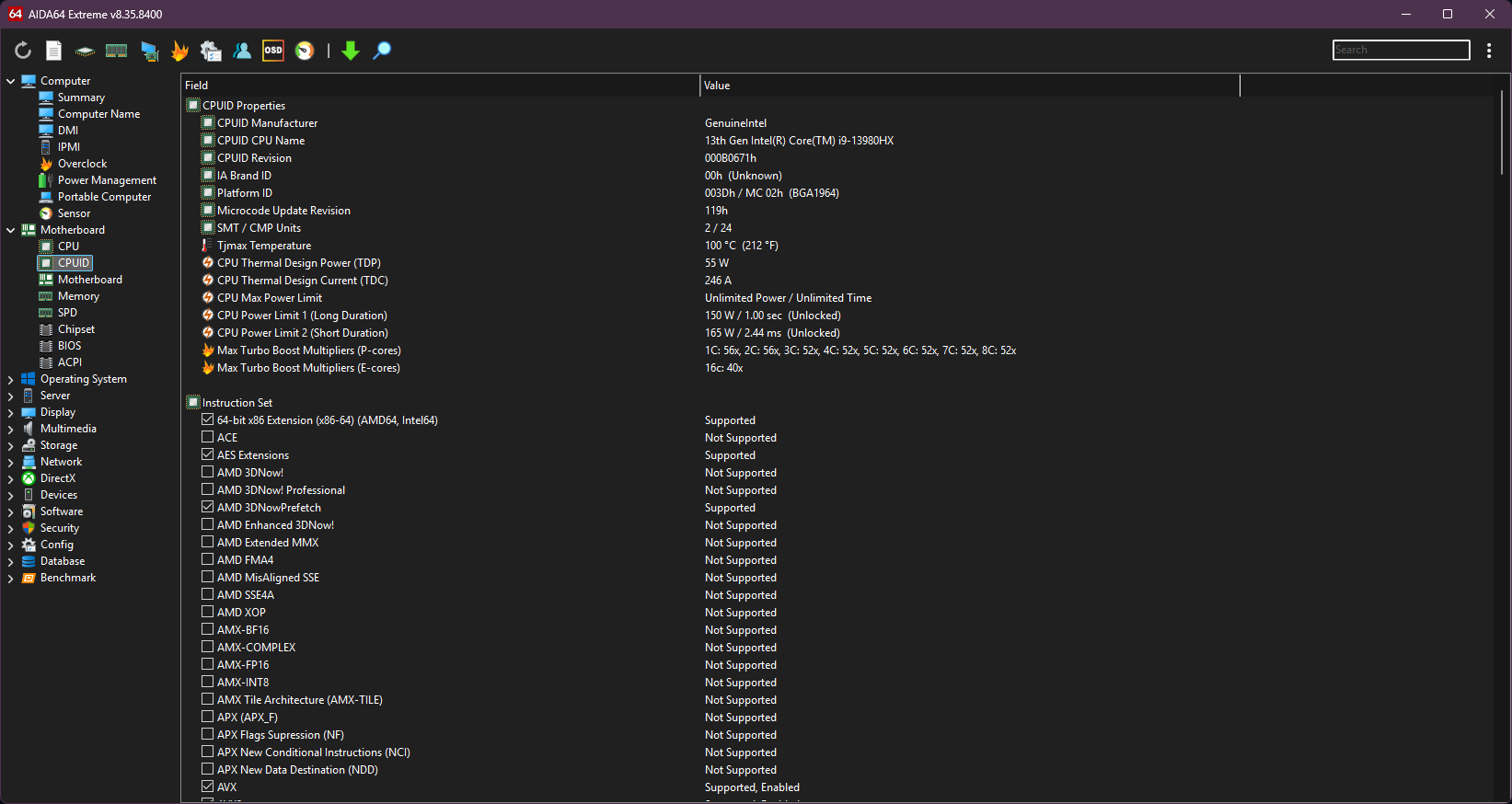
I’ll see if the problem is solved, but I’m afraid not. As you rightly say, my CPU must already be worn out.
I bought the motherboard a year ago, and from day one I’ve had to disable the C-states for it to work.
I’ve tried different BIOS versions from the Erying website for my model, a Polestar 13th i9-13980HX DDR5 4DIMM, and I have the same problem with every version I’ve tried.
Thanks for modifying the BIOS.
Is there a problem if the order of the microcodes in my installed BIOS doesn’t match the one you modified?
Here are some screenshot.
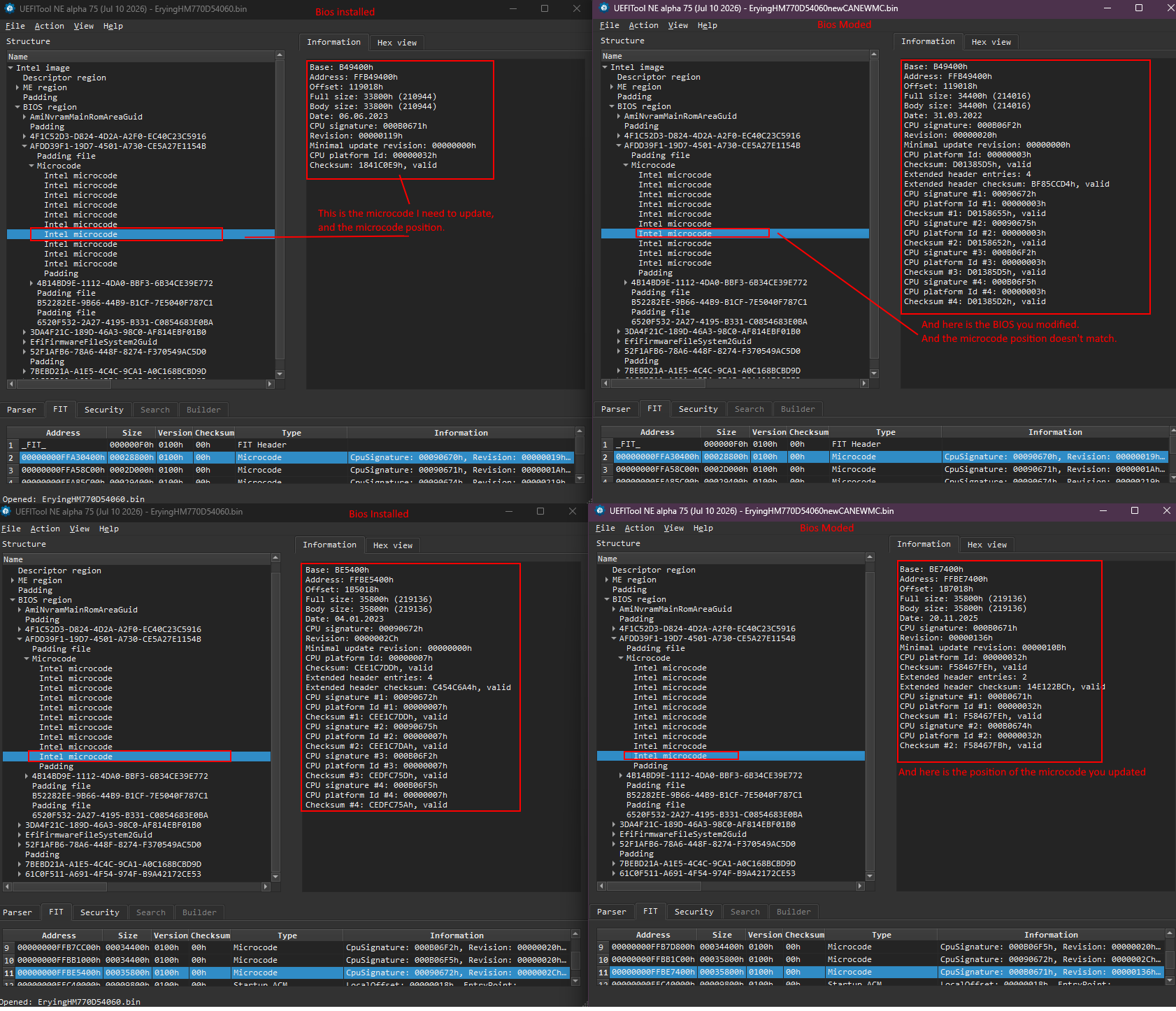
That’s exactly what I mean, the position of the microcode for my CPUID in the first image—the one I need to update—doesn’t match the position of the microcode in the second image (the one you updated for me).
Is there a problem if the microcode order doesn’t match, or is it safe to flash the BIOS?
The thing is, I’ve hit a dead end with this motherboard. I’ve tried flashing various BIOS versions—both from the official site and modified ones from forums—but the result is always the same: reboots. Sometimes the BIOS screen opens, but it reboots again after just 2–3 seconds. Even though the settings look like the defaults, the problem persists. Any ideas?
no it doesnt matter what order its in, those microcodes are for other cpus, looks like erying really chucked shit at the wall with that bios, it has 10 different microcodes for different cpus/platforms on it lol, only one updated is 0671 plat 32 to version 136(because 137 doesnt work on these modt boards all the time), update your csme aswell
you sure its not memory training and then you took lots of steps to fix an issue that wasnt one?
first boot on an modt board - black screen for ages(up to a minute), followed by it rebooting itself sometimes twice before it comes up - thats the memory training.
if it stays black try 1 stick then manually change the speeds and timings in the bios.
sounds like you turned it on, it was memory training and rebooted, you freaked out and powered it down early then started breaking things
do you have a backup of the original bios?
@Raxis I am certain this isn’t a memory training issue. Let me describe how it all started. I was undervolting and overclocking the processor using Intel XTU, but I noticed that every time I turned the PC on, I had to reopen the program and activate the profile to apply those settings. I decided to move those settings directly into the BIOS and enabled WDT in the process. Windows booted up fine, and I ran a stability benchmark; the temperatures and clock speeds looked perfect. However, the moment I stopped the benchmark, Windows froze completely. I turned off the PC, and upon restarting it, the endless reboot loop began. I suspected the saved BIOS settings were the culprit, so I tried resetting them by removing the battery and clearing the CMOS, but that didn’t solve the problem. Later, I bought a programmer and flashed various BIOS versions, hoping for a change. The RAM is detected and goes through memory training; whenever the BIOS screen actually loads, it shows a base memory frequency of 2400 MHz and timings of 17-17-17… I have attached the original BIOS dump for you.
backup_old_2.zip (8.5 MB)
Thanks a lot for the quick reply. I’m going to flash the BIOS to see if that fixes the issue, if not, at least I’ll have the updated microcode.
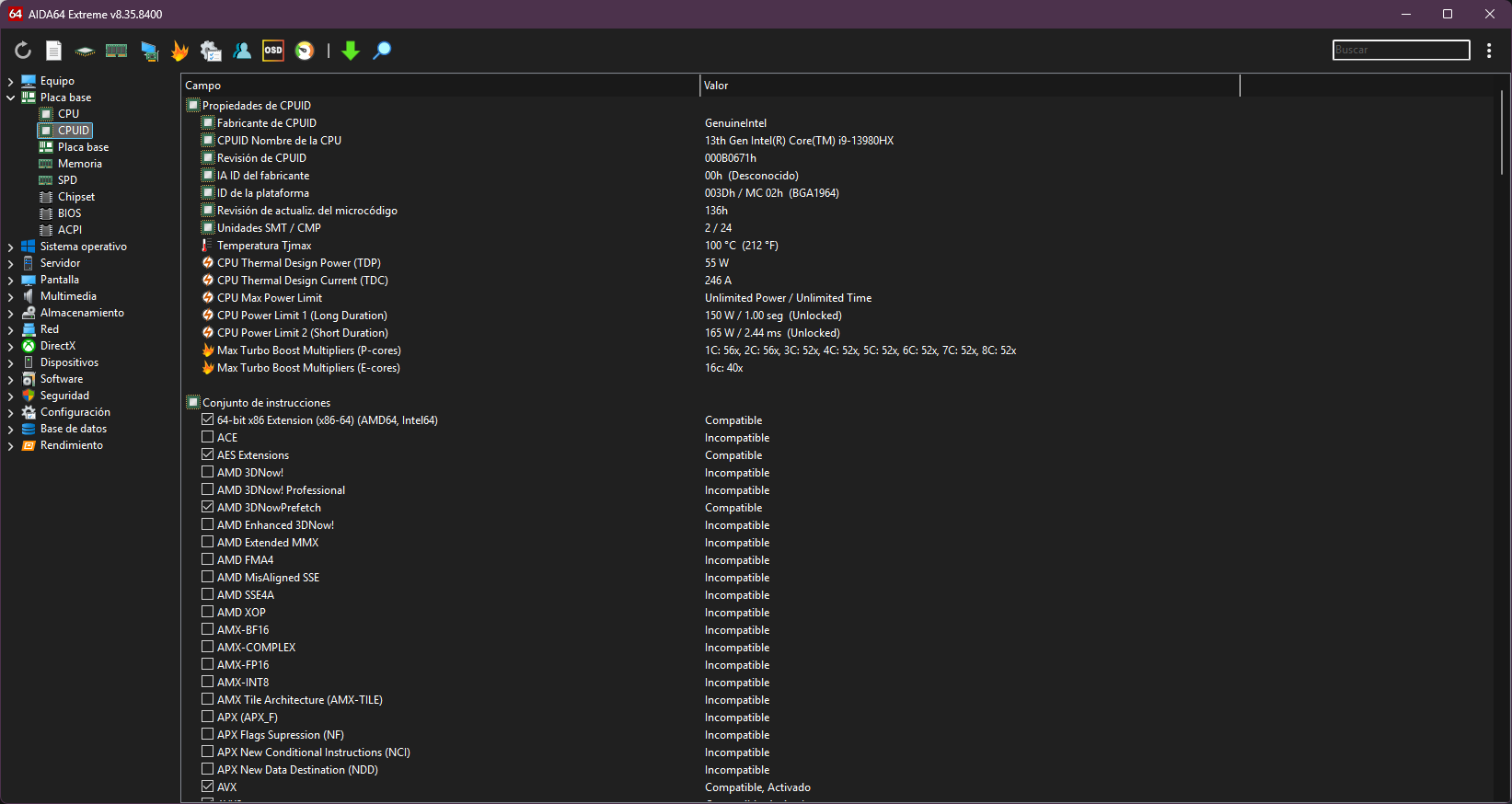
I flashed the BIOS you modified for me, and the flashing process went smoothly, but the C-state issue hasn’t been resolved. As you rightly pointed out, the CPU must be fried—hahaha.
I’m going to keep C-states disabled and just deal with the higher temperatures.
Thanks a lot for the help.
Plohospaaltopc E1.1MC136.zip (8.5 MB)
Turns out your TOPC board is different to the other guys, edition 1.1, his is a 1.5
heres a copy of your original with the new cpu microcode
ok so XTU is running as a service and as soon as you boot its setting its unstable overclock and putting you into a boot loop?
damn thats almost as bad as ryzen master for amd lol
if you can try running safe mode with networking and uninstalling XTU’s leftovers, apparently thats a common problem(its meant to stop changing settings after a crash but sometimes it gets stuck in that state)
@Raxis The thing is, it’s impossible. The reboot happens before Windows even has time to load. Sometimes it doesn’t even reach the BIOS itself.
But i’ll try your Bios
@Raxis it’s not working. The same reloads….
that doesn’t surprise me all I did was update your microcode, that doesn’t fix whatever you’ve done to your pc, is your me version still showing 0.0.0.0?
No. 16.1.30.2264
Then your bios is back and it’s time to start diagnosing the actual problem
Try a Linux live usb to see if it boots