But I would still like to know more about the new 64GB MMIO region patch. Is it really only for certain Z170/Z270 boards? And will this get us any performance boost?
Im guessing (since im really not in touch with Kuri0 himself for a while), the old patch was meant to patch a certain bios who didn’t implement the MMIO region above 64GB, while starting from Haswell LGA 1150, the Physical Address Bit has been increased from 36 Bit (Max 64GB for all map), from sandy and ivy, to 39 bit, which make the usable region is about 512GB in overall. The NBPei on Skylake chipsets was already corrected to use the whole Physical Address supported by the cpu (Hand-Off Block), so it is the job for PciHostBridge to handle the MMIO that could be used. Some bios of the board didn’t implement it correctly, so the patch was done to replace the stock one to support the size it was need to be patched.
Performance boost doesn’t have any relation to this since.
Anyway, did the Z170 Deluxe bios i did gave works fine? And what about the Z170 Pro Gaming, did you figure that out? I included some updates in the bios modules (Mcode, iRST to ver 15.9, both Lan EFI Drivers, etc).
1 Like
I already modded my Bios years ago with CoffeMod and ReBar, but I had the annoying issue that I always needed to start my computer twice to get it booting up (first turn on, hold the power button for a few seconds and then turn on again). I just accepted the issue, but when I saw this “new” MMIO region patch, I thought that now is the time to do the complete modding again until I got annoyed about the pad file issue.
I checked your file with UBU and CoffeeTime before I flashed, so I already figured your updated Bios modules! Since I have this Notebook QQLP Mutant CPU I also applied the PCIe 1440 fix and added the MAC, SN and UUID data. In UBU I even updated RAW GOP VBT SKYLAKE to 231 and OROM VBIOS SKL-AML to 1065.
It worked so far, but later this day the PC suddenly booted to the OS without showing the Bios splash screen and I was not able to get into the Bios anymore! (reboot to UEFI didn’t worked as well!). I just remembered that my 1440 CPU needed the Corporate ME in disabled state and I changed this as well. So yes, this caused problems, but my PC is now booting normally so far!
The Z170 Pro Gaming Bios is not needed anymore, someone asked for it but they already replaced this board.
Thank you for your kind help and explanations!
1 Like
On my Sabertooth X99, I tried everything and it didn’t work, always getting the error “Failed to write ReBarState UEFI variable GetLastError: 5 You can close the app now Bios 2101”.
@Merlina try to downgrade your bios to any bios, then use bios flashback to flash this bios:
X99ST_Complete.rar (9.5 MB)
And run rebar state again.
Hello @Merlina Did you apply the patches to the file after the ReBAR mod?
Hello!
I use a Gigabyte Z370PD3 motherboard. Its firmware has above 4G decoding and Resizable BAR.
I don’t use EFI Module.
Let me ask. How do I understand from these screenshots whether Resizable BAR works or not with the Radeon R7 350 dinosaur? Or are these driver bugs on Win11?
Thanks/


@Zaver If you see there is still 256MB Memory Region in Vulkan tab on gpuz (regardless the Memory #), it means Rebar is activated, but the driver won’t use it.

to Solve this, you need to check these Dwords in Computer\HKEY_LOCAL_MACHINE\SYSTEM\CurrentControlSet\Control\Class\{4d36e968-e325-11ce-bfc1-08002be10318}\000x, with X representing which index did your gpu driver are registered, if there are missing Dwords from the list below then add them, and set them to 1 if the Dwords are available but set on 0
- KMD_RebarControlMode
- KMD_RebarControlSupport
- KMD_EnableReBarForLegacyASIC
To add a Dword, just right click the empty space and choose DWORD (32 Bit), and rename it to the one of the list above (only add the missing ones!):
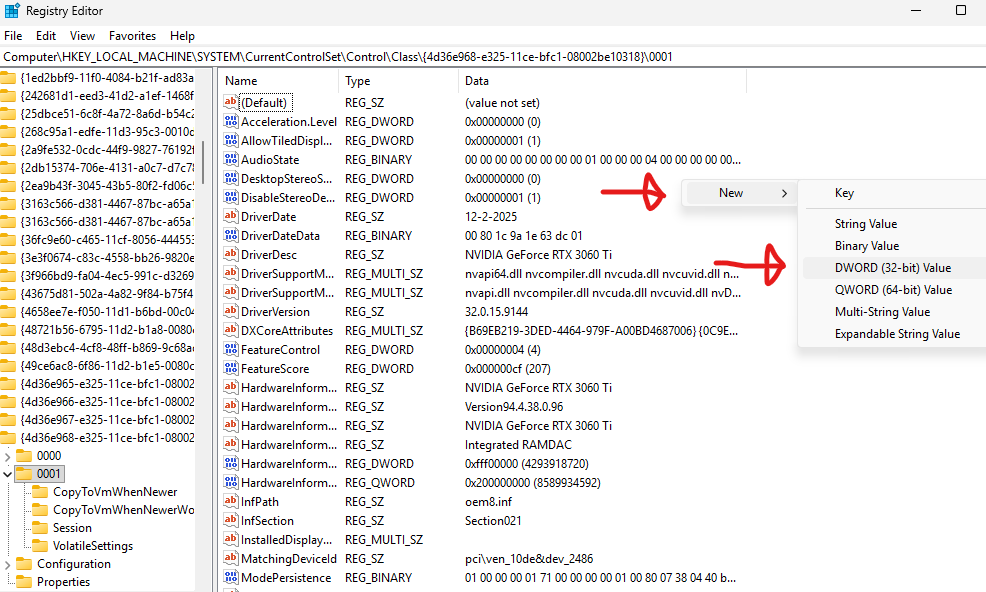
Double click the Dword you’ve just made and rename, and then put the value 1, and press ok:

And then reboot 
1 Like


A little disclaimer, GCN 4.0 (polaris) and below (GCN 1.0-3.0) at 4GiB Bar Size usually have bugs during most gaming session, but 2GiB usually doesn’t have one. @LyGhT Here have a Firepro S9300x2 (both vbios are flashed with Fury Nano vbios), and Rebar ASIC (which is the old rebar for GCN gpus) and it bugged most of the game he played, due to 4GiB vram per gpu. I think if GCN card that are naturally 8GB (not 4GB x2 as in dual gpus) will handle Rebar ASIC just fine.
But hey, if you get no bugs at 2GiB size (and Resizable BAR is enabled in Adrenalin), enjoy!!
1 Like
Ok. I will test it.
Of the games I only have Forza Horizon 4, which supports Resizable BAR/
Once again, thank you very much @Koekieezz
1 Like
Hello!
Yes, when Resizable Bar is enabled, there are problems on the Radeon R7 350 and this is not surprising, since it is a dinosaur. Motherboard Gigabyte Z370PD3/
- for example, some old games on openGL do not start/
- the AMD settings Adrenalin Edition interface does not work/
- FurMark_2.10.2_win64 does not start/
- FurMark_1.39.3.0 works, here:
rebar_off

rebar_on

In Forza Horizon-4 FPS ~35, there is no noticeable difference.
Of course, if you use a 3D accelerator like RX6700XT, there will be no such problems and everything should work.
The driver used is
because it is newer than on the AMD website/
Maybe this information will be useful to someone.
Thank you.
Update.
Since this topic is about Resizable BAR BIOS EFI Module,
I also used ReBarDxe.ffs and ReBarState.exe latest versions. I set the memory size to 2^11=2048Mb. This did not improve the result for the dinosaur Radeon R7 250/350.
Thanks.
At least some haswell boards still had this issue…
It was a known issue listed for some haswell boards (mine included).
Maybe the full transition to 39 bit only happened later?
I dont think so? could you check on HwInfo64 → Main Window → Processor → Select your processor → scroll to the very bottom to see your Physical Address Size, its like this:

Hello. I downloaded the bios (motherboard MPG Z390 GAMING PRO CARBON AC) from msi website, using the “7B17v1D” version. When I opened the file (E7B17IMS.1D0) in “UEFITool 0.28.0”, I got the message '“parseFile: non-empty pad-file contents will be destroyed after volume modifications”. I read that this might make modification unsafe?
I’m probably not qualified to fix the issues if it refuses to boot.
Hi
Maybe one of the users modified the bios for MSI b85 g43 gaming?
https://download-2.msi.com/bos_exe/mb/7816vC8.zip
I am running a modified version of NVIDIA V100 SXM2 and having some issues. Maybe they are caused by Above 4G.
I managed to unhide the PciSubsystemSetting folder and Above 4G decoding used UEFITool 0.28.0 to insert ReBar.ffs. NO patches would take so I when I flashed my bios chip and booted and tried to install drivers for A380, I would get a black screen and error 43. Chatting with AI found that I can soft patch that with Clover but I am missing the ReBarDxe.efi file, I can’t find that anywhere, all I can find is .ffs. Does anyone know where I can get it or has it? I looked in xCuri0’s github but even the source code folder is missing this.
My bios mod is halfway working and need this to soft patch the rest, anyone else successfully gotten an x79 extreme4 board to allow ReBar to work?
Hi!
This page has clear instructions:
GitHub - xCuri0/ReBarUEFI: Resizable BAR for (almost) any UEFI system
Check/
Thanks/
I’m not very good with this kind of stuff, I can somewhat make sense of the directions that’s why I got to where I got now, but its taken 2 weeks now and Im at my limit, I will keep trying and if I can’t get it to work I’ll just wait and buy an RTX 4060 or something that can work in my Jellyfin server without ReBar or 4G and is compatible with my old motherboard.
Hello!
also check:
- the system must boot in UEFI (disable CSM support)/
- all disks must be in GPT format.
Thanks/