On new ASUS motherboards, there is an option in the BIOS that allows you to enable / disable Resizeable BAR.
After flashing this mod, if it is possible to turn it off in the BIOS? Or will he always be?
@Dagal you have to turn it on using ReBarState it’s off by default
@Kuri0 Is it possible to make settings to enable / disable Resizable BAR in the menu in the BIOS, like in the original?
@Dagal to my knowledge no but maybe someone else here will know how to add entry to bios settings
ReBarState.exe doesn’t work for me.
Obtained SE_SYSTEM_ENVIRONMENT_NAME
ReBarState variable doesn’t exist / Disabled. Enter a value to create it.
Failed to write ReBarState UEFI variable
GetLastError: 5
Flashed via AFUWIN. 4G enables, CSM disabled. Patchs was applied.
Any suggestions? Board Asus X99 Deluxe. Bios 4101.
Tried also on linux, get Segmentation fault error.
i know my motherboard is not that x99 , but i have one Asus x99 pro usb 3.1 , and i need to activate my 4g , and the resizable bar , but i don’t know how i can do this , i’ve tried to change the bios by myself , But I was afraid of changing the bios and having a problem happen, because I want to be sure of what I’m going to do , edit 1 : i have the bios X99-PRO-USB31-ASUS-3801
Hello @Rewter,
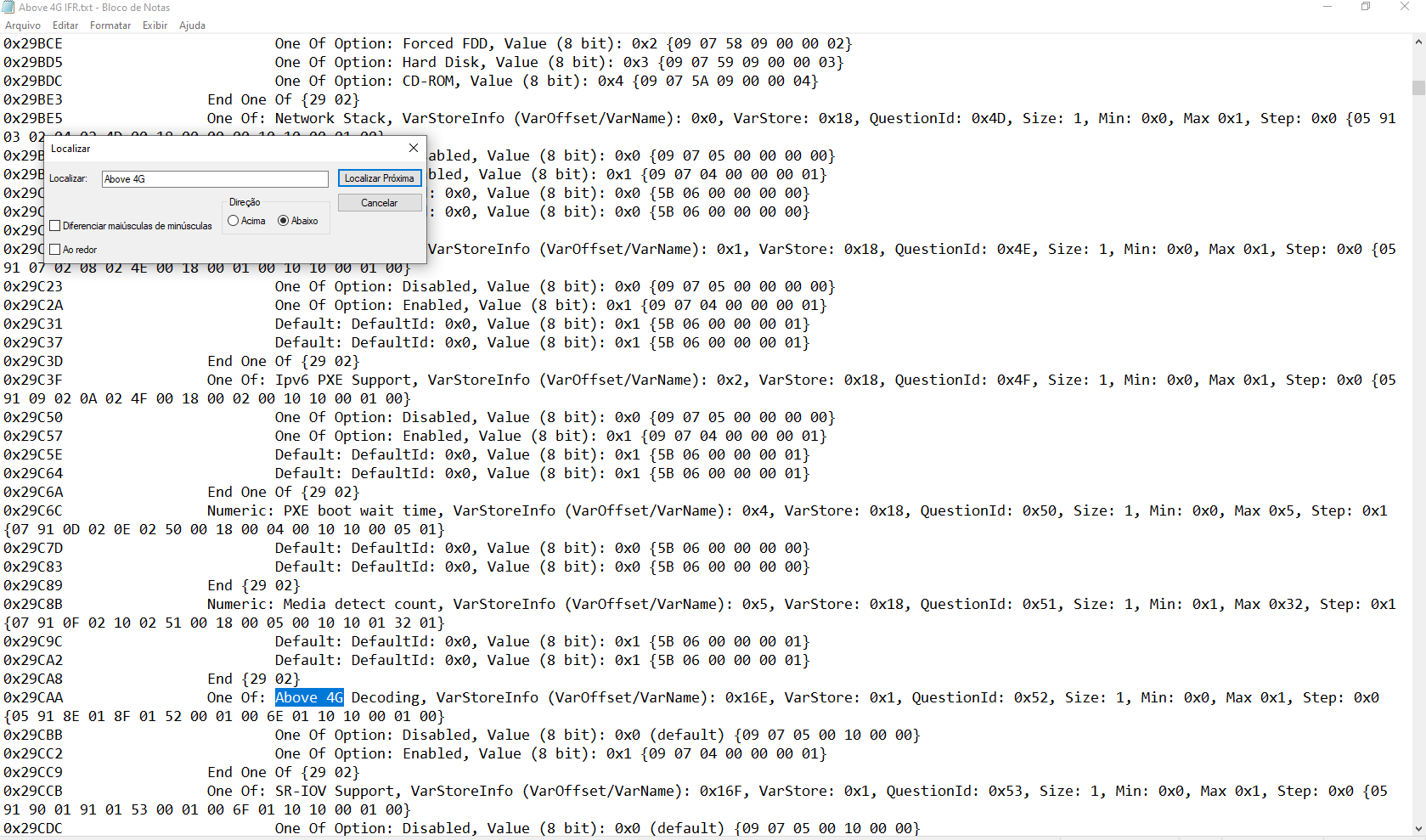
Looking at the file, Above 4G Decode option is in the Setup>Boot section of the BIOS setup.
Is it hidden for you?
Best regards,
-68k
yes i have found it on a section of my bios “X99-PRO-USB31-ASUS-3801” its hidden for me , i have to extract the info from , i need to know how i can flash the bios mod and activate this steps 'cause my motherboard have this features, but like i said it’s hidden
I found this forum post. Any chance you can do this for the Asus X99-AII ?
You could try this for X99-A II (use asus bios flashback): X99A2Rbar.rar (6.1 MB)
In case above 4g decoding is hidden, the offset is at : 0x16D, tutorial same as the previous post, pretty much just follow the steps, do 0x0, reboot then 0x1, and reboot, aand above 4g decoding should be on.
And to set rebar size, use the RebarState.exe from here or if you use GTX 16 and RTX 2000 series you could use this instead
DWYOR.
hey your modded bios for x99 deluxe works for my rebar state but i have an asus x99 A usb3.1 mobo and they are slightly different so it messes up my pcie slots and my nvme drive will not show up i have tried to mod the bios with uefi tool with rebar state dxe and the patches the bios is running on the computer right now but without rbar when i run rebar state it gives me error 5 can you mod the bios for this one
X99-A-USB31-ASUS-4101.zip (7.9 MB) that is the unmodded bios from asus or do you have any ideas thanks in advance any help is appreciated am trying to use a intel gpu without rebar and it sucks
I’m trying to get Resizable BAR working on my ASUS X99 Deluxe motherboard with a Xeon E5-2699 v3 CPU and RTX 2080 Ti GPU, but I’ve run into a problem.
I’ve successfully modified the latest BIOS (4101) by adding the ReBarDxe driver, flashed it using a hardware programmer, and set all recommended BIOS settings (Above 4G Decoding enabled, CSM off, Secure Boot off, UEFI mode). I also set the BAR size with ReBarState.exe.
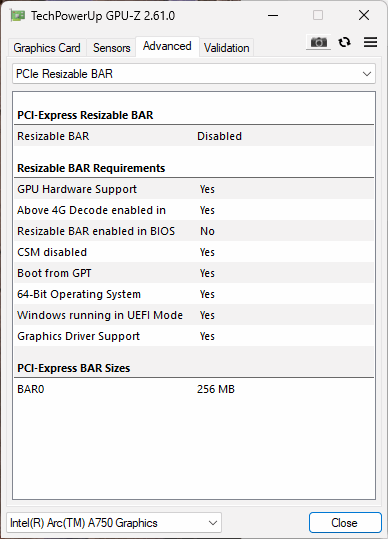
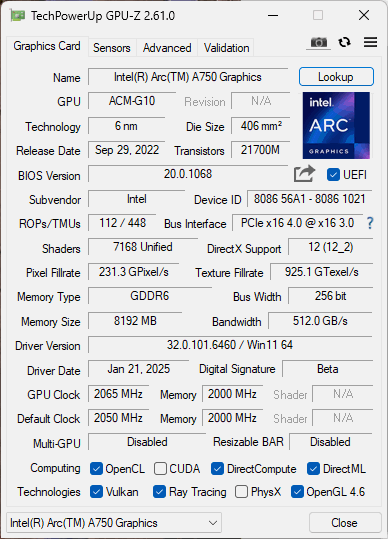
However, GPU-Z still says “Resizable BAR enabled in BIOS: No,” and the BAR remains at 256MB. Also, there’s no visible BIOS menu for Resizable BAR.
If anyone has faced a similar issue or managed to enable Resizable BAR on this motherboard and CPU combination, I’d greatly appreciate your advice or suggestions.
Thanks a lot!
1 Like
Hello everyone,
It honestly feels like I’m cursed. I’ve spent more than 20 hours trying to make Resizable BAR work.
I have tried absolutely everything I could find and imagine – flashed dozens of BIOS versions, inserted drivers correctly, configured BIOS settings, disabled Secure Boot — but it still doesn’t work.
I sincerely thank you for your recent advice — I’m now trying the new method with NvStrapsReBar.
I carefully followed the instructions, inserted the driver properly, flashed and configured the BIOS, disabled protections, but now the new problem is:
When I run the NvStrapsReBar tool in Windows, it throws an error: “Access denied”.
So again, I fix one problem, but another one appears immediately.
I’m completely exhausted, but I don’t want to give up yet.
Maybe someone has an idea what else could be wrong?
Thank you very much for any help.
Final solution and thanks:
After many days of testing, I finally managed to enable ReBAR on my X99 system with RTX 2080 Ti.
I tried about 12 different BIOS versions, applied the ReBAR whitelist patch using UEFIPatch 0.28.0,
inserted the correct NvStrapsReBar DXE driver (from GitHub), and flashed the BIOS using a programmer.
I carefully followed the instructions from the YouTube video:
" Resizable BAR for Turring GTX 1600 / RTX 2000 GPUs - Easier Way" for DXE injection and patching.
Even after that, Resizable BAR still showed only 256 MB.
Finally, I managed to fully activate it by manually enabling ReBAR in NVIDIA Profile Inspector.
My working steps:
Patch BIOS ReBAR whitelist (using UEFIPatch 0.28.0).
Insert correct NvStrapsReBar driver into BIOS.
Flash BIOS using CH341A programmer.
BIOS settings: Above 4G Decoding = Enabled, CSM = Disabled, Secure Boot = Disabled.
Set BAR size to 16 GiB using NvStrapsReBar.exe (option 14).
Manually enable ReBAR with NVIDIA Profile Inspector.
Conclusion:
It was a combination of BIOS mod, driver injection, BAR size configuration, and driver-level enabling.
Special thanks:
68k-dude for the guidance and advice!
Author of the YouTube video for the clear explanation!
Thank you again — without your help, I probably wouldn’t have succeeded!
hi, i have the exact same motherboard but im having issues trying to mod the bios, i tried UEFI tool, and am unsure how to get MMtool, im new to this so im also trying to be careful when downloading from other links, i usually get errors relating to padding when trying to use UEFItool, what steps did you take, if you remember that is.
@NN2403 Do you still need it? I can do if you still need it.
i still need it, i just got off work, if possible also a detailed step by step since i tend to make mistakes i since i skim through things. currently using the rtx 3060 12gb that was originally from my gaming pc, to test out rebar functionality, for when i eventually go for a dual intel gpu setup (just to make sure, motherboard is the asus x99 Deluxe, im able to use the latest official bios without issues, i7 5960x)
@NN2403 Please try to flash this with Bios Flashback: X99Deluxe_Complete.rar (7.3 MB), and see if it boots normally? I suggest for you to downgrade bios to version 3802 normally through ez flash in the bios, boot once, and then proceed bios flashback this modded bios.
If it boots normally, try to enable Above 4G Decoding in Boot after disabling CSM, test if both lan works normally, and test if your previous OC and XMP works normally, and if you want, enable secure boot → set OS to Windows UEFI Mode → Install Secure boot keys. please test thoroughly 
If everything works as-is stock bios (OC and XMP works fine), can boot with above 4g decoding enabled after CSM is disabled), basically the same experience as stock bios, run this app as admin, type value 32, press enter, and reboot, check if rebar is working. If rebar is working normally, could you please take a screenshot similiar to this:

I will make a post once you’ve green lit that everything works as-is, and credit you for your screenshot