My first question.
I have a Fujitsu mini PC ESPRIMO Q900 Intel QM67 chipset
SATA port 0/1 should work with sata 3 speed
but not is only sata 2 (test with samsung SSD)
I reviewed the whole bios with AMIBCP & MMtool
but I do not see anywhere any option to change speed.
The motherboard is Aopen used by Fujitsu,
Aopen has a similar mini PC and I think the same motherboard but with different bios.(BIOS Date: 01/09/2014 13:40:40 Ver: i67QMx-DV(IVY) R1.03)
But I see that it is possible to choose the speed of sata in this bios .
Is it possible and how
to get support for Sata 3 in Fujitsu.
Is it possible and necessary to replace/add some bios module and if possible how
to get support for Sata 3 speed in Fujitsu ??
Thanks.
Edit by Fernando: Thread moved into the “BIOS Modding Requests” Category and title customized
@Matrix10 :
Welcome at Win-RAID Forum!
Since I don’t even know, whether it is possible at all, I cannot offer any guide about how to do it.
The SATA mode (SATA2/3) is determined by the mainboard’s chipset (= hardware) and not by the BIOS.
Regards
Dieter (alias Fernando)
Thank you for your reply.
That’s the problem
QM67 chipset specifications show that the first two ports are sata3 other sata2
But in practice it is not so .
Or somewhere I be wrong ??
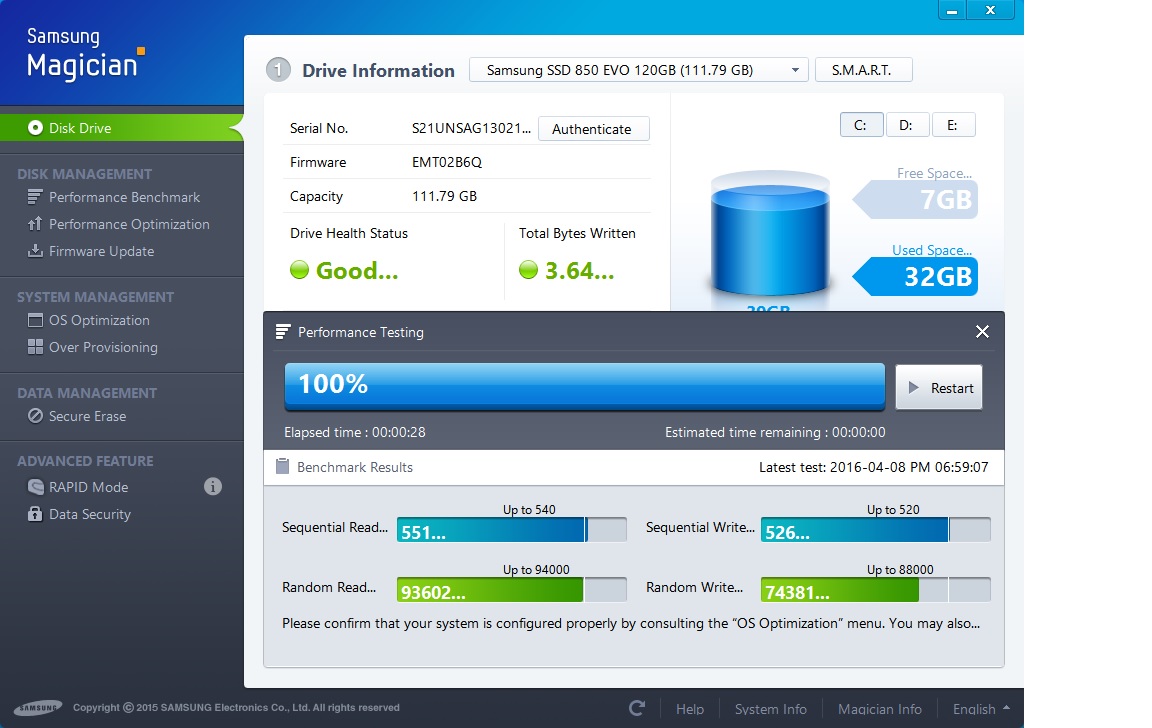
Thanks to Aopen for help with Bios modification.
I have also change processor from I5 to I7
Nice small PC.
Unfortunately i have not managed to get the information to change Sata speed of port 1 (OPTICAL BAY) FROM 3 Gb/s TO 6 Gb/s
Does anyone knows.
Does anyone know which module is responsible for Sata speed port 1
I have see in the data sheet LPC controler has a bits to enable SATA 6 Gb / s.
Changing Sata cotroller module does not help.
Which BIOS module is responsible for LPC ?
For info Aopen older Bios for MP67-D (IPB13 bios file) and older Bios for Esprimo Q900 (IPA103 bios file) both support 6 Gb/s on Sata 0 port
It is also possible to use on both bios from Fujitsu or from Aopen
The motherboard is the same.
To try again,if anyone knows and can help ??
I have a bios and PciInitDxe module that has enabled sata 3 (6 gb / s)
Port 0
But I have not yet found how to change Sata speed of port 1 (OPTICAL BAY) FROM 3 Gb/s TO 6 Gb/s (from sata 2 to sata 3)
In my zip both PciInitDxe modules (with sata 3 support 6 gb/s port 0 and with sata 2 3 gb/s port 0 )
Both files support sata 2 (3 Gb/s) port 1
PCI_INIT_DXE.ZIP (35.1 KB)
BIOS Files
Sata 2 port 0 and bios file sata 3 port 0
mainboard uses 6 Series Chipset Intel Corporation BD82QM67-SLJ4M
Which means that it is possible to have the speed of 6 Gb / s but only on port 0 and port 1.
It seems that the manufacturer limited the speed in the BIOS.
First for port 0
and later for port 0 and port 1
If I replace PciInitDxe with support for 6 gb/s i have 6 gb/s in both bioses but only port 0
BIOS
sata2port0.ZIP (1.6 MB)
sata3port0.ZIP (1.58 MB)
Since you didn’t yet get a reply, either nobody among our BIOS Gurus has read your questions or they don’t know the answers.
I recommend to contact the Support of your mainboard manufacturer.
Hello Fernando,
I have been in contact
But they do not want to give information or do not know .
I used I think all know tools for Bios .
I found the module and info on responsible bits in the datasheet
but do not know which way is calculated offset/adres in the module
for these bits support 6 gb/s sata 3
Note that in the Bios setup/config there is no option for sata speed.
http://www.intel.com/content/www/us/en/c…-datasheet.html
I was hoping that someone knows more.
If someone has an idea for testing.
I have the ability to program BIOS with programmer in case of mistakes.
Hello @Matrix10,
This is a very very old topic.
I would be grateful if you found a solution (alternative BIOS?) to get support for SATA-3, at least for Disk-0.
Thanks in advance.
That’s out of my memory now.
I remember that I replaced the bios and that only SATA 0
is supported
I think I may have put the Bios higher up in the post.
I also remember that I tried the bios from the AOpen miniPC MP67
and that it supported SATA 0
That mini PC seems to be the same as the Q900
Of course you have to know how to do a Bios update safely.
I am not responsible for that
Again
So I remember some older bios for Q900 supporting sata3
for internal disk 0 and also bios from the AOpen miniPC MP67 supporting sata 3
and that worked fantastically well for years.
Thanks for your reply in a years-old thread.
Dowloads for Esprimo Q900 older BIOS are truly impossible to find.
Would I have more luck with the AOpen bios?
FTS_AdminPackageCompressedFlashFiles_V4640R104_1063838.ZIP (5.0 MB)
Try this version
but at your own risk
Let me know if it worked
I have more versions but I think it was this one
You have to be really careful.
I upgraded/downgraded from windows OS
Thank you for all your advice (and files).
I wil try this as soon as I can set aside some time.
One question that comes to mind, (just out of curiosity): why would Fujitsu reverse their SATA capabilities frol II to III ?
I believe it’s because of the mechanical hard drive
I used two SSD drives, one internal (SATA3)
and one instead of a DVD with a SATA adapter
Later I also changed the processor to an I7 instead of an i5
That little PC still works great after many years.
Fast and silent.
Later I got a newer little PC Fujitsu esprimo g558
Both work great except that one has windows 11 and the other has windows 8
Thanks a million!
I have now used your flash utilities and the Q900 is now running SATA-3 @ 6 Gb/s.
(Where did you get this earlier BIOS version?)
I didn’t properly phrase my question: Why would Fujitsu downgarde SATA from v3 to v2, in their later BIOS?
Incidentally my Q900 is happily running Windows 11 (thanks to RUFUS), with 8 GB RAM, and a Crucial MX500. I believe it can handle 16 GB (but RAM is now quite expensive).
I got it second-hand, of course. The problems:
– The On-Off “touch-button” doesn’t work properly
– The DVD reader is very problematic.
Regards.
Glad you made it.
They originally used a mechanical hard drive which didn’t work well with Sata 3.
I my Q900 i have no DVD .
I bought a Chinese Dvd to Sata converter and I use it for another SSD (Sata 2)
But the SSD works fast.
I might change the OS from Windows 8 to Windows 10
because it’s free if I’m not mistaken.
I have Windows 11 on my other mini PC.
I also have questions for you.
I tried to upgrade windows 8.1 to Windows 10
but I didn’t succeed. I get a blue screen and an error
Maybe you know the reason?
Can you tell me how you installed Windows 11?
Did you upgrade or a clean installation?
Do you have a link with instructions.
And did you have to buy windows 11 for installation