Subject: Razer Blade Pro 2020 BIOS Flash Failed - FPT Error 167, now CH341A time?
Hey everyone,
I’ve gotten myself into a bit of a jam with my Razer Blade Pro 2020 and would appreciate some guidance from the experts here before I proceed. I made a rookie mistake and now I’m in recovery mode.
My Setup
* Laptop: Razer Blade Pro 2020
* Programmer: CH341A SPI Programmer + SOIC8 clip
* BIOS Files:
* An original bios 16mb signed from razer(Unfortunately not a backup of what was on my machine)
* A modified 16MB BIOS file. I extracted the BIOS from the official Razer updater and used UEFITool to enable the advanced menus.
The Story So Far
* I foolishly used aufwin64 first to read and backup which did the 12mb backup.rom
after changing the DCI? to then do the ru.efi variable change to the overclock and cfglock after I did more research i figured I needed to flash a backup file, which seems to have been a bad idea and started this problem. The machine is now in a bad state. I flashed the razer signed file with AMI TOOL and it did 75%
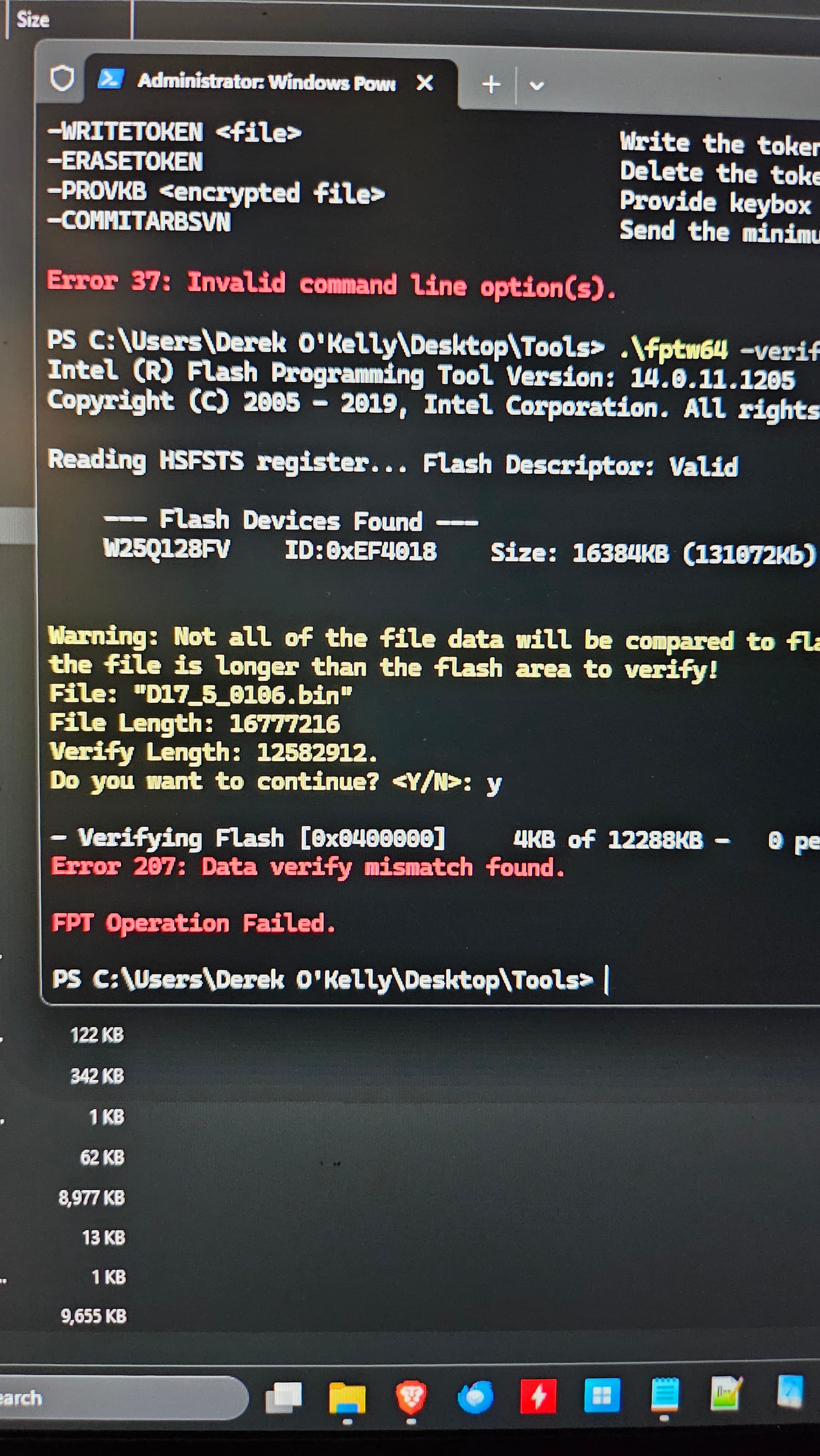
* I tried to recover using the Intel Flash Programming Tool (fptw64). When I try to flash my original 16MB backup, I hit a wall with Error 167: Protected Range Registers are currently set by BIOS, preventing flash access.
* This write protection seems to be the main issue. When I run a verify check (fptw64 -v -f my_backup.bin), it fails and reports a mismatch of around 4MB. My guess is that because the Flash Descriptor is locked, FPT can only access/verify the BIOS region, not the full 16MB chip (which includes the FD, ME region, etc.), hence the size difference.
My Plan
My next course of action is to bypass the software locks and flash the chip directly. I plan to use my CH341A programmer to write the modified 16MB BIOS (the one from the Razer updater with unlocked menus) directly to the SPI chip.
My Questions
Before I connect the clip, I’d like to ask:
* Is direct flashing with the CH341A the correct next step here? Given the FPT Error 167, it seems like my only option.
* .
* Is my understanding of the 4MB verify error correct? (That is, the locked Flash Descriptor is preventing FPT from reading the entire chip).
* Crucially, what machine-specific data (DMI, S/N, MAC address, UUID) do I need to transfer from my original 16MB backup to my new modified BIOS file before flashing?
IF any?
My read is no?
The bios will overwrite all 16mb
Research / Relevant Threads
I’ve been reading up on the incredible resources at the Win-Raid forums, which have been a huge help so far. For anyone else facing a similar issue, these are the threads I’ve found essential:
* General CH341A Guide: [GUIDE] The Beginners Guide to Using a CH341A SPI Programmer/Flasher (With Pictures!)
This link below is the excellent work done by @spak and the effort to actully decode whats going on in the bios.
below where the second comment is unbelievable detailed and its a shame its buried in the comments
* While for the same model but different SKU, this thread has great info on the general process and challenges of modding Razer BIOSes.
Do I still need to disable write protection when using the programmer or does it override all?
I have ru.efi loaded to a usb and was able to set DCI but seem to be stuck with a laptop I cant reboot till I sort the bios or at least get the relevant information out of it while I still have windows and the system available.
Thanks in advance for any advice you can offer!
DexElex
Edit by Fernando: Thread title specified and customized