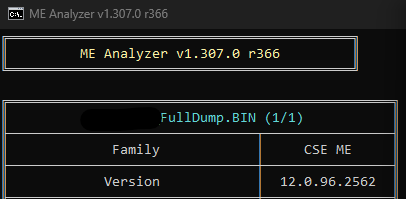
I tried that version, It doesn’t work, I think I need to downgrade the BIOS to an older version
Using FIT and ME image from BIOS update files I cleaned the dump without needing to sign anything or generate any keys
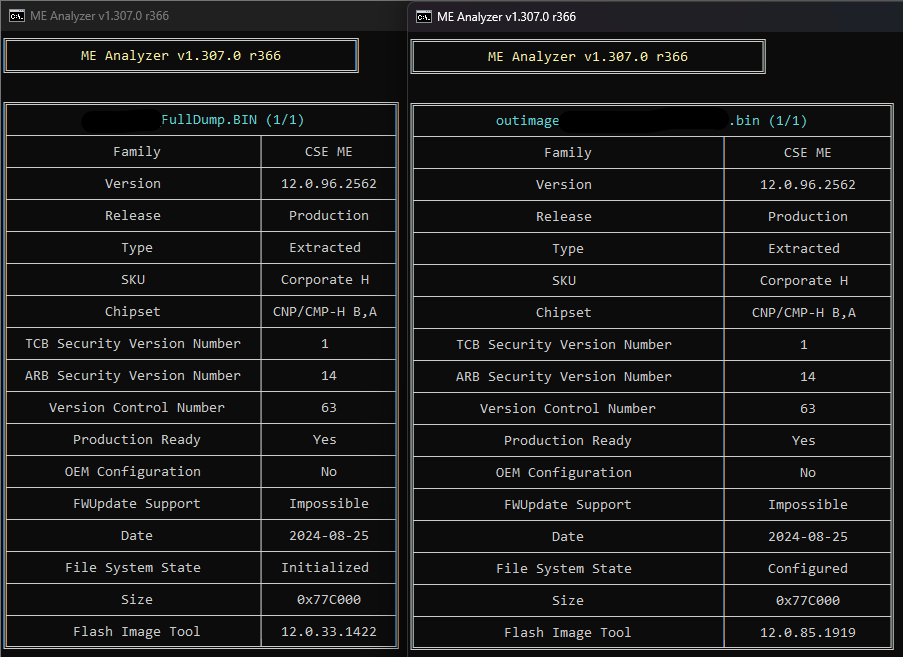
So, can you explain if the ME is v12, why use FIT v15??? Or am i seeing it wrong???
Or is this another system clean???
EDIT: Oh…ok, that will be clear now for anyone who’s following the thread.
Yes I can explain, these are two different devices, the other device needs FIT v15 but I cant open it in FIT v15, I will downgrade the Bios to 2024 or 2023 and try again.
I unlocked the ME region using hidden BIOS config and flashed the ME binary extracted from the BIOS update package for that system and it bricked it, after restart it wont boot or even power on
so far I had success with two systems, one with ME 11 and the other with ME 12…
I bricked the one with ME 15
Do I need to change this setting? sometimes its changed automatically, other times its set to no emulation

Do I need to do -greset if I am not going to use ME/AMT?
When I used FIT 11,12 and 15 I got ME Region from CSME 11 dump, and CSE Region and ME Sub Partition from CSME 12 and 15 dumps, I never got CSTXE or TXE from any dump.
What does TXE/CSTXE do? is TXE/CSTXE a successor of ME/CSME?
Sir… the Intel CS(ME) has evolved… we can say that till 11 its easy to users to deal with, later ones have more sub-modules requiring more configuration.
Bear in mind that this a is a factory operation and never was minted to public domain or to be a end user manipulation, needless to say that many tools here shared on the forum is for sure not very appreciated by Intel/OEMs, so consider it a bonus as well the contribution of our dear member Platomav.
CS(TXE) is a different branch and specific platform target.
More info…Google is your “friend”
I figured it out, the ME region was either corrupted or infected, I swapped it using UEFI Tool 0.28 and a dump I found on the internet, then I cleaned ME using FIT without errors
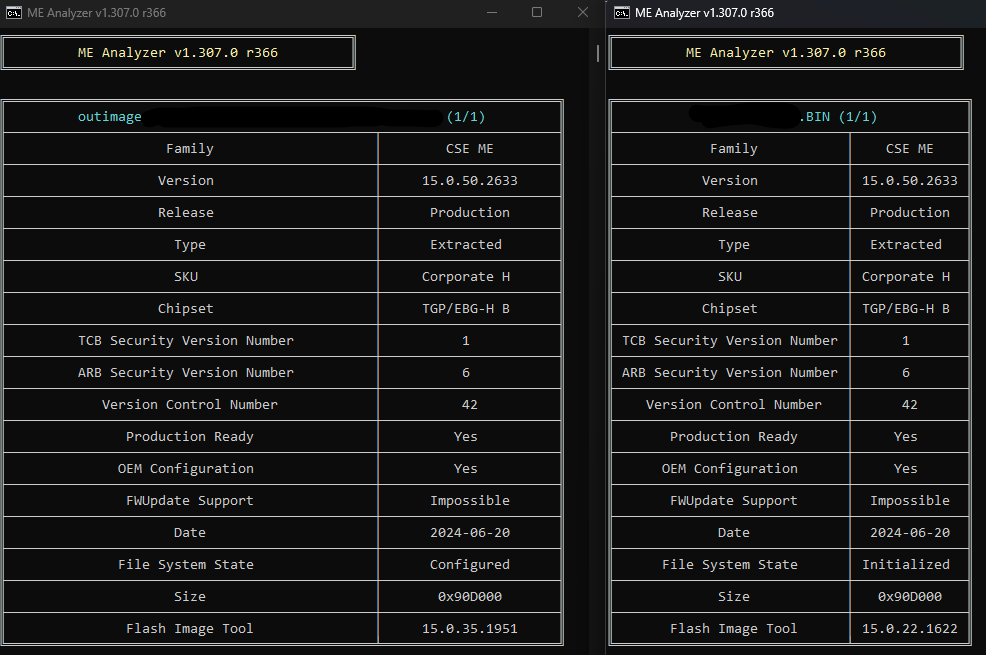
Note: BIOS downgrade didn’t solve the issue as the ME region was either corrupted or infected
Note: FIT tool used is more recent version compared to the one used for the stock DUMP
Update: system didn’t boot after flashing, I had to restore original dump
I found a solution to the FIT error on the forum here
But when I follow the guide the outimage.bin shows configured on MEAnalyzer and when the system boots with ME disabled, the new dump shows initialized, is this the old data carried over or is this automatic greset?!
We dont know what you’re doing…what system, what ME FW version, what images used properly and what “garbage” is on a probably already corrupted fw.
The guidance won’t work to fix user mistakes, tests/experiences.
Point D4 of this guide has all the info needed.
it’s CSME15
Thank You Very Much for This.
Please share more Pictures, information or document like this.
Hi, everybody!!
I am cleaning a ME 7 image, but when I use the fpt -greste command, I get an error message from the Flash Programming Tool: 205: Failure. Unexpected error occurred. I used both the DOS and Win64 versions to re-initialize the ME co-processor.
Could someone help me, please! I thank you very much in advance.
Hi
Can somebody help me to clean bios dump from HP fury 17.3 g8, change chipset and notebook is alive, but ME is corupted and going to recover, dump not open in any version od FIT 15 tool, try to clean and change bios region with HEX editor and no picture. Problem is probably with Boot guard profile 5 - FVME
Thanks
Hi, thank you very much for this great tutorial.
I tried to clear the ME region of this dump file but I failed, I don’t know where i missed something, could someone tell me where?
I took the closer CSME file i could find but perhaps it don’t work?
Here is before and after :
Thank you for your time.
Hello together.
thanks this tutorial i have already sucessfully cleaned a lot of MEs in the Versions 9 to 12.
My goal is always to reactivate the Intel-ME vPro-features like KVM etc, which always worked fine.
But now i am struggling at a BIOS from a DELL Precision 2340 compact.
this BIOS is at the moment in manufacturing-mode as it is a refurbished mainboard.
The BIN is taken as a chip-off dump by desoldering the chip
Obviously it is a ME-version 14.x.x.
As i learned here, it is signed, which affords the procedure of re-signing.
The procedure itself i understand.
now i have two problems an searching help.
the first is, that the areas of the boot partition table shown in the example-tutorial “cleaning 11-15”
the necessary “SMIP” partition, where the re-signed part has to be written back, i not can find in my analysis of the filesystem.
please find the output of the MEA -dfpt in the attaced txt. i will also try post it directly.
my first question is.
If there ist no SMIP parrtition, wher to rewerite the resingned part ?
question an problem two, also very importatnt.
in all BIOS files i reactivated the ME/vPro before without matter in which state the were, manufacturing mode, initialized, ME-blocked, etc… there was ALWAYS a menu “Managebility” which contained the ME-options.
in this BIOS there is no menu at all.
i will appreciate every help.
here the -dfpt output.
N:\3240c02>N:$$$$BIOS\000_INTEL_ME_TOOLS\000_MEAnalyser\MEA.py “N:\3240c02\3240c02.BIN” -html -dfpt -out N:\3240c02\log
Hello,
I’m working on a generic motherboard BPC-H510PM2G (with BIOS chip 25Q128ASIG) and I ran into a problem after a bad BIOS flash.
The board does power on, but shows black screen on boot (no video from iGPU, no boot from SSD/USB).
I dumped the current BIOS with a CH341A programmer and analyzed it with ME Analyzer v1.307 r371.
Here is the result of the ME region:
Family: CSE ME
Version: 15.0.40.2088
Release: Production
Type: Extracted
SKU: Consumer H
Chipset: TGP/EBG-H B
VCN: 31
Date: 2022-01-23
Size: 0x3BC000
FIT: 15.0.40.2090
Unfortunately, I couldn’t find this exact version (15.0.40.2088) in the public repository of clean Intel ME firmwares.
Could someone please provide a clean ME region for this version (15.0.40.2088 Consumer H, TGP/EBG-H B), or suggest a compatible newer one (e.g. 15.0.47.x) that I could use to rebuild my BIOS?
I can share my full dump if needed.
Thanks in advance for your support!
Its no mandatory to use same version, nearest/higher one, use this guide and resources from Intel (CS) Management Engine: Drivers, Firmware and Tools (2-15) - Special Topics / Intel Management Engine - Win-Raid Forum