Anyone that has modded their AM4 B450 MOBO/modified NvStarpsReBar.ffs
feel free to DM me to assist me if you are able to, thanks in advance!!
TL;DR - Is there anything different I should be using regarding Flash Programming Tool (v1.3) & any up-to-date steps/processes pertaining to this in 2025.
Again, I’m not entirely certain exactly the path to taken with my specific configuration due to the cluster of comments, updates, problems, and specific cases for specific components everyone has.
Just being ultra cautious here as a means of strictly doing what I need to do for myself so no unnecessary steps are applied to my situation.
Blockquote
-
Copy the Flashrom files named flashrom.exe and CWSDPMI.EXE into the root of the just created bootable USB Flash Drive.
-
Boot off the USB Flash Drive in LEGACY mode (CSM should be set within the mainboard BIOS to “ENABLED”).
-
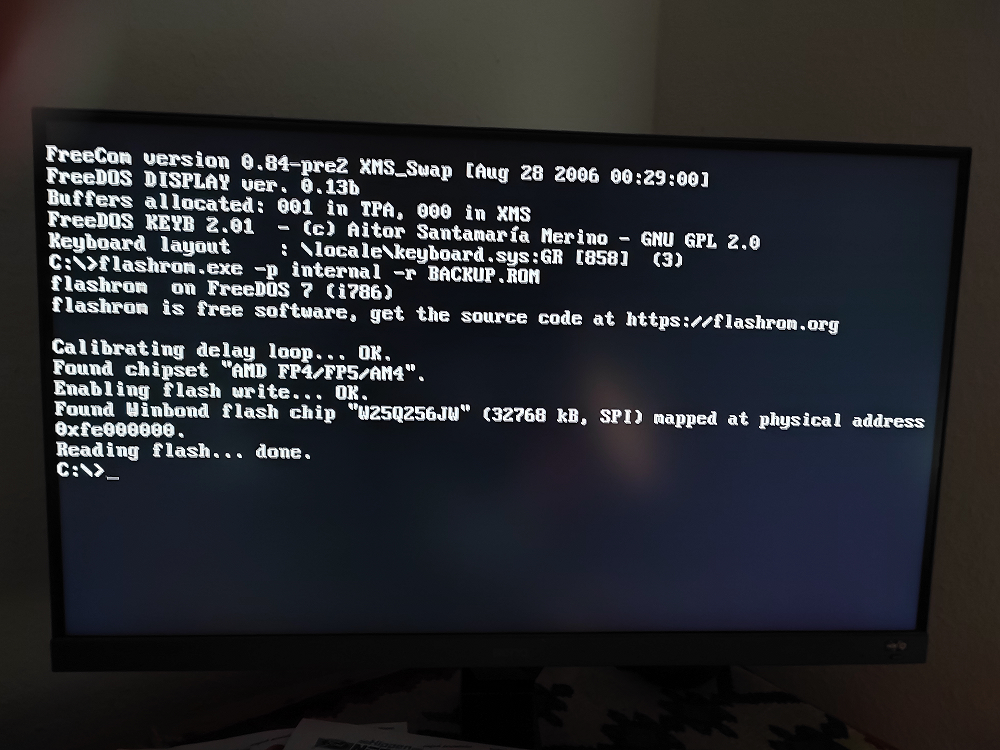
Once you have access to the DOS image, type
flashrom -p internal -r BACKUP.ROM
and hit the “Enter” key. Wait until the process has been finished.
You hopefully will see something like this on your desktop screen:
-
Now you can shut down your PC and remove the USB Flash Drive. Don’t forget to enter the BIOS during the next start of the PC and to restore your desired BOOT order and options.
-
The just created file named BACKUP.ROM is a clean complete BIOS Region dump of your mainboard and should be stored outside of your PC to be able to recover the original BIOS Region later on, if something should go wrong at any time.
Now you should use a copy of the backup.rom file as source for the UBU work updating the desired BIOS modules.
-
Once you have finished the desired UBU processing and saved the product as “BACKUP.ROM”, rename it to “MOD.ROM” and copy it onto the already previously used USB Flash Drive.
-
Boot off the USB Flash Drive in LEGACY mode again, type
flashrom -p internal -w MOD.ROM
and hit the “Enter” key.
Now wait until the erasing, flashing and verification process has been finished.
Users, who want to get a logfile about what exactly has been checked, detected and done by the tool, should execute the command with the suffix “ -o writelog.txt” (thanks to hancor for the info).
When mentioned to use FlashPrgTool v1.3, does the commands differ to FlashRomTool here?
as for the copying the program files:
- Copy the Flashrom files named flashrom.exe and CWSDPMI.EXE into the root of the just created bootable USB Flash Drive.
is this the same process with FlashPrgTool?
I cannot find any .exe nor CWSDPMI.EXE files.
They are all H, C, SH, TMPL, RULES [file types]