I succeeded  the problem was the “dirty” me data region which has to be replaced
Let me summarize the whole process
Download Tools and Firmware Repos as advised in Intel (CS) Management Engine: Drivers, Firmware and Tools (2-15) and [Guide] Clean Dumped Intel Engine (CS)ME/(CS)TXE Regions with Data Initialization
Be realy sure to this the versions matching to your system. In my case it be CSME 12
Create a folder on C:\ or D:\ without any blank spaces in the name.
(1) First step is to create a copy of your SPI / BIOS Chip
FPTW64.exe -d HolyBackup.bin
Intel (R) Flash Programming Tool Version: 12.0.85.1919
Copyright (C) 2005 - 2021, Intel Corporation. All rights reserved.

Reading HSFSTS register... Flash Descriptor: Valid

    --- Flash Devices Found ---
    ID:0xC84019    Size: 32768KB (262144Kb)


- Reading Flash [0x2000000] 32768KB of 32768KB - 100 percent complete.
Writing flash contents to file "HolyBackup.bin"...
Memory Dump Complete
FPT Operation Successful.
Be sure to copy this file to an external storage. It could be your life saver
(2) Use MEAnalyser to gather information from this dump
╔═══════════════════════════════════════════╗
║         ME Analyzer v1.307.0 r374         ║
╚═══════════════════════════════════════════╝

╔═════════════════════════════════════════════╗
║              complete.bin (1/1)             ║
╟─────────────────────────────┬───────────────╢
║            Family           │     CSE ME    ║
╟─────────────────────────────┼───────────────╢
║           Version           │  12.0.97.3000 ║
╟─────────────────────────────┼───────────────╢
║           Release           │   Production  ║
╟─────────────────────────────┼───────────────╢
║             Type            │   Extracted   ║
╟─────────────────────────────┼───────────────╢
║             SKU             │  Corporate H  ║
╟─────────────────────────────┼───────────────╢
║           Chipset           │ CNP/CMP-H B,A ║
╟─────────────────────────────┼───────────────╢
║ TCB Security Version Number │       1       ║
╟─────────────────────────────┼───────────────╢
║ ARB Security Version Number │       15      ║
╟─────────────────────────────┼───────────────╢
║    Version Control Number   │       70      ║
╟─────────────────────────────┼───────────────╢
║       Production Ready      │      Yes      ║
╟─────────────────────────────┼───────────────╢
║      OEM Configuration      │       No      ║
╟─────────────────────────────┼───────────────╢
║       FWUpdate Support      │   Impossible  ║
╟─────────────────────────────┼───────────────╢
║             Date            │   2025-05-26  ║
╟─────────────────────────────┼───────────────╢
║      File System State      │  Initialized  ║
╟─────────────────────────────┼───────────────╢
║             Size            │    0x77C000   ║
╟─────────────────────────────┼───────────────╢
║       Flash Image Tool      │  12.0.33.1422 ║
╚═════════════════════════════╧═══════════════╝
╔═════════════════════════════════════════════╗
║         Power Management Controller         ║
╟─────────────────────────────┬───────────────╢
║            Family           │      PMC      ║
╟─────────────────────────────┼───────────────╢
║           Version           │ 300.2.11.1025 ║
╟─────────────────────────────┼───────────────╢
║           Release           │   Production  ║
╟─────────────────────────────┼───────────────╢
║             Type            │  Independent  ║
╟─────────────────────────────┼───────────────╢
║         Chipset SKU         │       H       ║
╟─────────────────────────────┼───────────────╢
║       Chipset Stepping      │       B       ║
╟─────────────────────────────┼───────────────╢
║ TCB Security Version Number │       3       ║
╟─────────────────────────────┼───────────────╢
║ ARB Security Version Number │       3       ║
╟─────────────────────────────┼───────────────╢
║    Version Control Number   │       0       ║
╟─────────────────────────────┼───────────────╢
║       Production Ready      │       No      ║
╟─────────────────────────────┼───────────────╢
║             Date            │   2020-02-06  ║
╟─────────────────────────────┼───────────────╢
║             Size            │    0x14000    ║
╟─────────────────────────────┼───────────────╢
║       Chipset Support       │      CNP      ║
╚═════════════════════════════╧═══════════════╝

Press enter to exit

C:\Clean\MEA>
As mentioned in the linked post you need some information about versions and platforms your host uses. If you see “File System State” Initialized it could be the reason why ME / AMT wont show up on boot.
(3) Modify and Create the new SPI Dump
Use FIT to open the SPI Dump
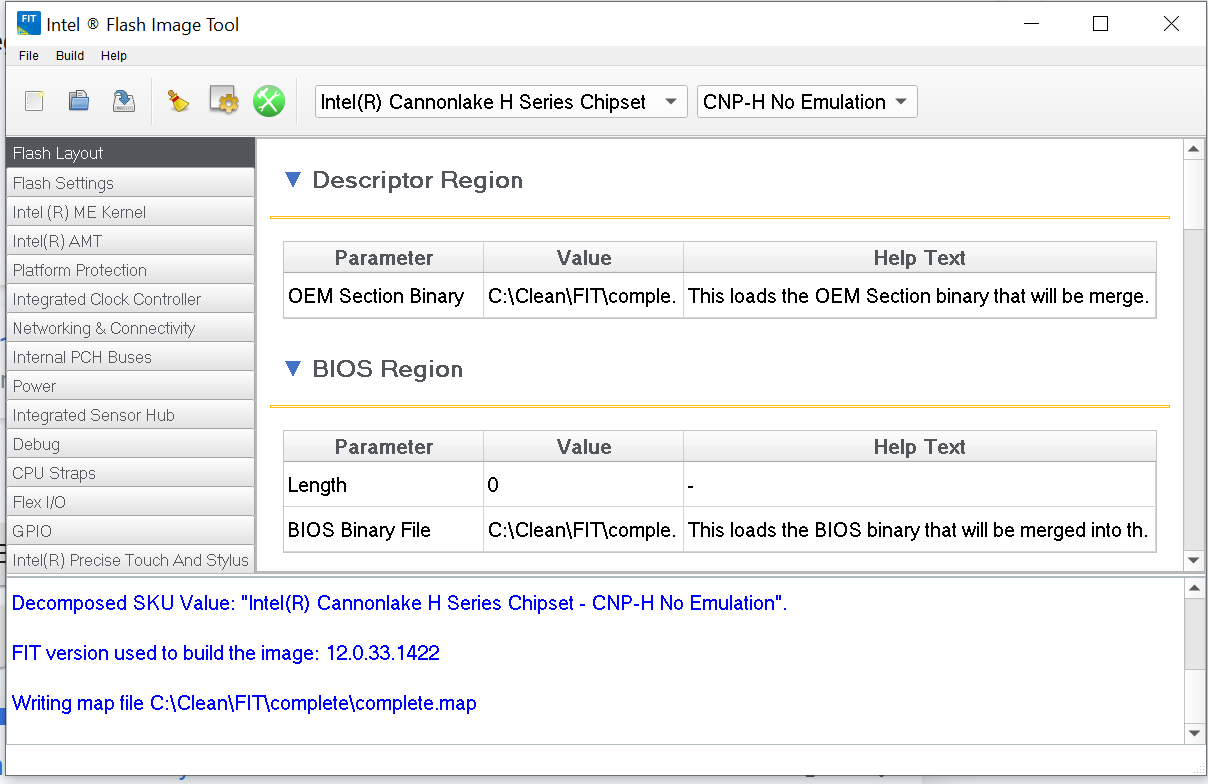
Now, activate the AMT Features

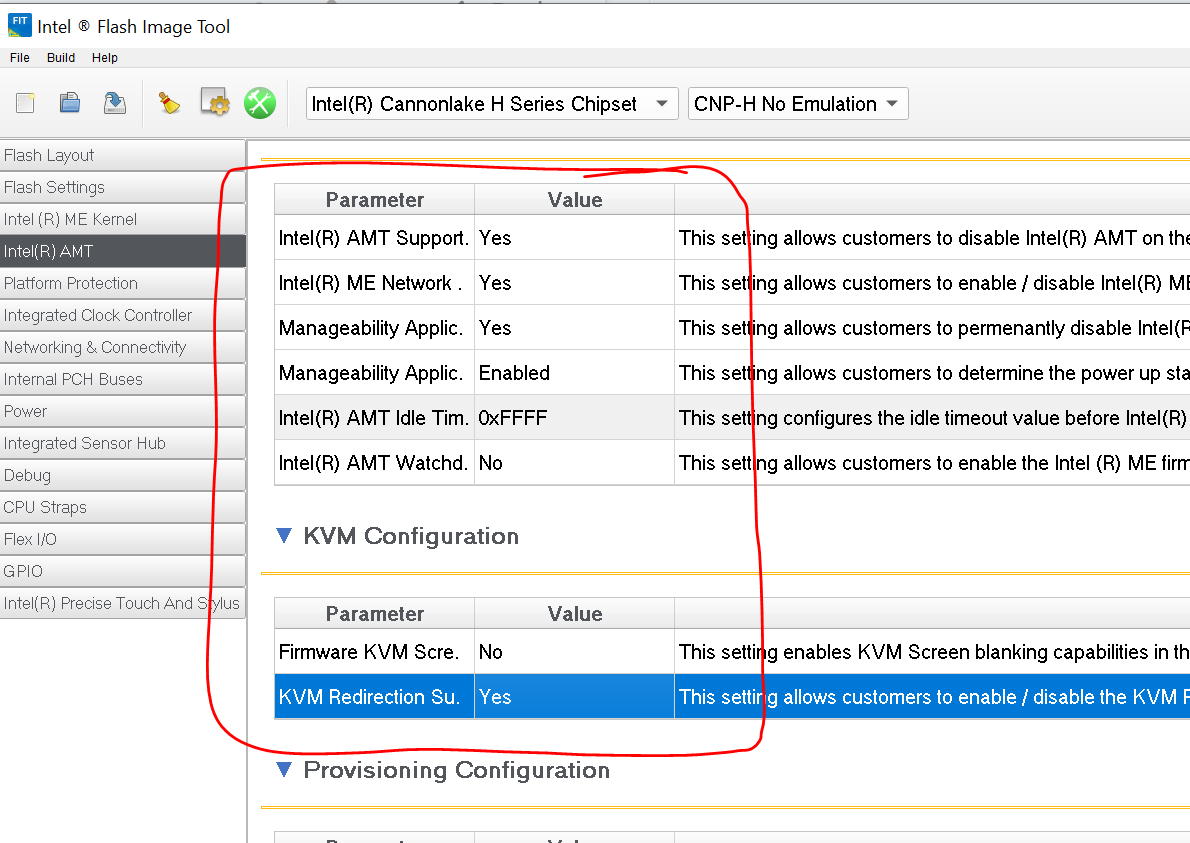
Now exactly follow the guide [Guide] Clean Dumped Intel Engine (CS)ME/(CS)TXE Regions with Data Initialization Section 4D - Important: Remeber that you work with a full SPI Dump, not a region.
I ignored the whole KEY SSL HASH Chapters because i dont work at the TXE Part on ME
Importand is
- Modify the Build Settings
- Modify AMT Settings
- Replace the ME Sub Partion.bin in the Decomp Folder with the correct Version from CSME 12 Repo (in my case 12.0.68.1606_COR_H_BA_PRD_RGN.bin)
now build the image. a file named outimage.bin with the same size as the original SPI Dump should be created.
Analyse the newly created dump with MEAnalyser and UEFITool_NE. The parameter “File System State” should now be “Configured”. Chipset, SKU, Release should be same as in the original dump. UEFITool_Ne shoudn’t show any errors. In my case a unknown version of the FD was marked. I compared the content of the old and the new one and they were exactly the same.
Now it comes to the dangerous part. Shutdown your host and set the Service Mode Jumper. You are now officaly allowed to overwrite the SPI (with all the risk that comes with it )
(3) Flash SPI
fptw64.exe -f outimage.bin
Now you have to wait. Maybe five minutes or so. Do never never never interupt this process. The tool will confirm the successful flash.
If something is wrong in the new binary so your host wont come up, this will be your last chance to access the OS.
fptw64.exe -greset
now wait. your host will go off and on and off and on. And you done everythin correct, you will be greeted with the Dell Logo. Press F12 to enter Boot Menu.
Don’t be disappointed because you don’t see any MBEX / AMT entries. Thats because the service mode jumper is still set.
Power Down Host, remove Jumper, and power on again. The Host will go on and off again multiple times. Press F12 again to get the Boot Menu. Now you should see the MBEX Menu entry. Go into MBEX set Password, Management Features and dont forget to activate and configure network.
Now. Youre done ! Congratulations
Your next steps should be download latest Dell Bios Package and install to get the recent ME Firmware. Use MeshCommander to connect to the ME Platform and active KVM SOL or what you need.
To be clear: This guide is without any warranty. I bricked a Dell 5060 Host two years ago by flashing a bad firmware. So, in the worst case, you maybe have to desolder the SPI and reprogramm it with your backup. See Bricked Dell Optiplex 5060 + CH341a + SOP16 > Alive again
Good luck and thank you @lfb6 and @plutomaniac for your provided information. Without that, the whole process wouldn’t be possible.