Thanks, I am aware of that and I think I will refrain from upgrading the FW for the moment. The issue I am having was hotplugging. I was able to solve that one by connecting the (external) drive in question to an internal SATA port (MSI motherboard) and moving an internal optical drive to the asmedia 1064 controller card. Now everything works as intended.
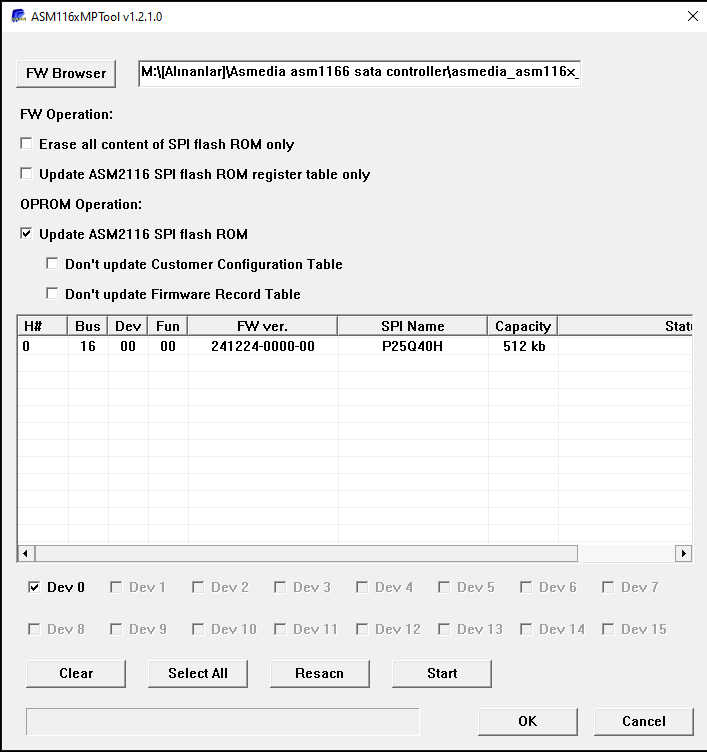
EDIT: seeing that others also have the SPI name as ‘unknown not supported’ in the MPTool, I took the plunge and tried the FW update anyway. It worked and the FW now shows as 241224-0000-00.

Hello,
What is the latest firmware for best use?
What is message signaling interrupts ?
I need hot plug enabled.
I have asm1166.
Thanks
it is hotplug
MSI is the modern IRQ (very simply)
Hi,
I have installed the station driver version. Current version picture attached.
My issue is pc boot time is egregious. This bios screen takes 2-3 minutes while it should be seconds.

This bios menu appears with asmedia controller like it was mentioned before.

I have connected 3 drives and only 2 are visible even though i have blocked the 3.3v cable by removing the psu side pin.
Edit: I have connected the drive that was not visible even in bios to an external usb dock and it showed but had weird partitioning i have cleaned it made gpt and single partition and it still didnt work. I have tried it on motherboard sata and it did work and then i tried it without 3.3 v mod and it worked again and right now even though it should be same it works under asm1166 card but bios booting takes longer than like 3 minutes it is too long
While asm1166 card was connected to pci slot but to sata cables werent connected to it boot times were normal
Thank you.
So is the issue a 3rd disk connected or specificly only when that disk connected… old SATA cables with accumlulated moister/greeny can also do that, besides a disk with problems.
EDIT: I see… maybe another card with a diferent controller, Marvel, JMicron or a newer with more up to date ASM controller.
After all… you’re dealing with an old “Aliexpress” ASM controller (1064) and a newer X670E chipset motherboard…, they cant please all 
Who knows, even a POS like this, can work better on that X670E

Hi,
I have restarted the pc so many times hdds are getting older.
When i remove all (3) sata cables from asm1166 controller pc boot time is normal.
I connected one and it takes long time to boot.
I connected 2 and it is stuck for 10 min while restarting.
Thank you.
I bought this from aliexpress thats correct 
I hate that current motherboards dont have enough sata ports it is a tiny amount of bandwidth, pennies in connector and chipset actually supports up to 8 sata ports but they still dont do it …
Some people have it easy with asm1166 and I have trouble I am not sure what to do I definately dont want to buy more. My m2 slot is also full so i can not even buy one.
It looks like it works after it takes a long time to boot i will test it with data and write here.
Also I updated bios is which didnt chane anything it still takes ages to turn on or restart…
Yeah, its really a point that i also care when searching for a MB and when we cant afford top models with 8+ ports, so i had also to add a spare Asus US3S6 from Intel 6/7 series timeline, old Marvel 9120 to my current Z490.
Update your motherboard bios.
Is is very old.
It is to seems this:
-https://www.msi.com/Motherboard/MPG-X670E-CARBON-WIFI/support#bios
7D70v1O2
I have updated to this beta bios already but it did not help.
Edit: I have updated to latest bios but boot times still terrible. I am not in USA and there are only old HBA and even they are are too expensive here
Edit2: After the latest bios update PC freezes without video output and I have to force shut down and restart it happened bunch of time made it unusable I have taken out the asm card waiting for a firmware update
Try enabling “Memory Context Restore” in the BIOS to enabled.
it starts faster
but still asm card is disconnected because i am sick of freezes. my old intel build started much faster than this new amd one
Freezes are caused by microsoft storahci driver, Install the asmedia Sata drivers and change AHCI Link Power management to HIPM…
https://www.reddit.com/r/ASRock/comments/10a0dkw/pc_hangs_on_postcode_46_after_reboots_x670e/
Use this SATA Storage controller driver. 3.3.5.0
I have not had to play w/ the AHCI settings using the most recent firmware. That is my experience.
on windows power management it was active and i am suppose to change it to hipm right but active should keep the drives operational all the time isnt it better also is there and bios settings to change or is it just windows power setting?
Yes you need to change it to HIPM, you could keep the drives operational by using turn off hard drive after x mins to disable, however the point of this change is that amd boards do not support Dipm…
Regards
I am trying to update ASM1166 firmware with AM116xMPTool. The PCI card is deteced, so is SPI (name is returned). However, I cannot select “Dev 0”, all “Dev X” are greyed out. If I click “Start” the Status column of the card detected changes to “No operations.” See screenshot for reference. Has anyone seen this before?
Note that I already updated this card once before just fine.

Answering myself here: the solution was switching to Q35 chipset in qemu/kvm/proxmox and passing the card as PCI-Express with all functions.
Hello everyone, joined because of this interesting thread. I bought a cwwk motherboard with an integrated ASM1164. Has anyone tried to update an integrated controller before? I read all the thread and saw experiences around separate controllers, not sure if a missed a case on upgrading the firmware of the internal one. Can somebody confirm if it was able to update the motherboard controller?
Regards,
Hallux