As requested by @cathome @Meatwar
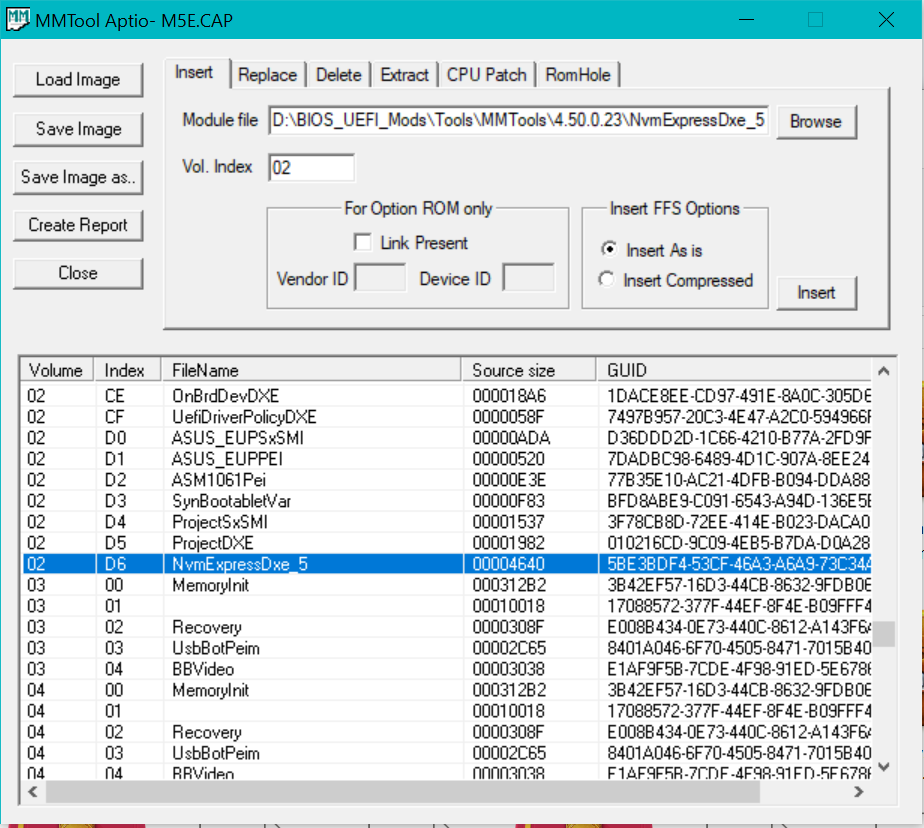
NVMe insert:
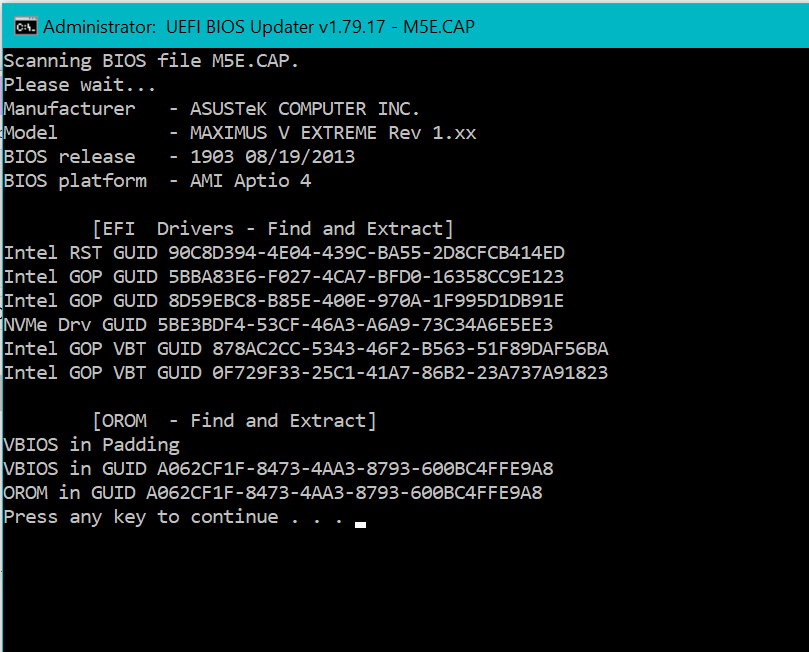
NVMe detect:
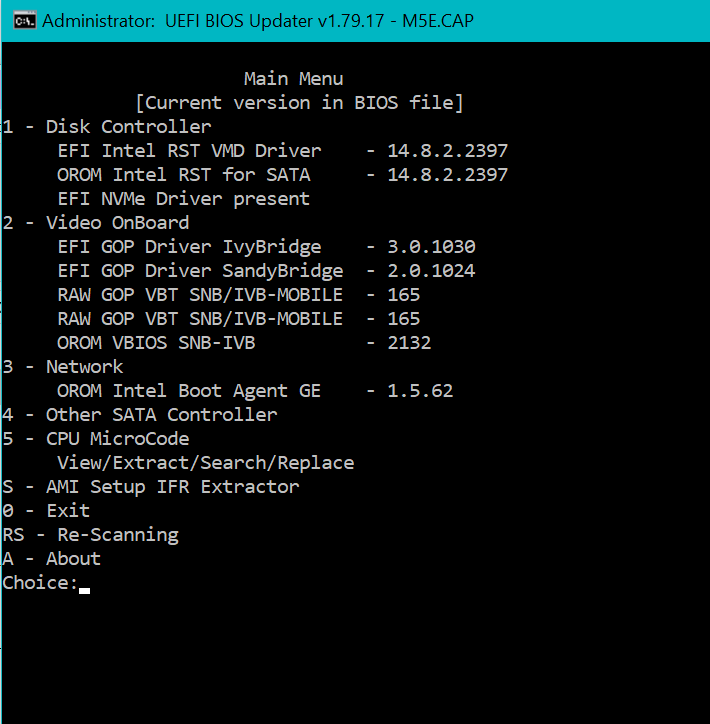
ROM EFI updates
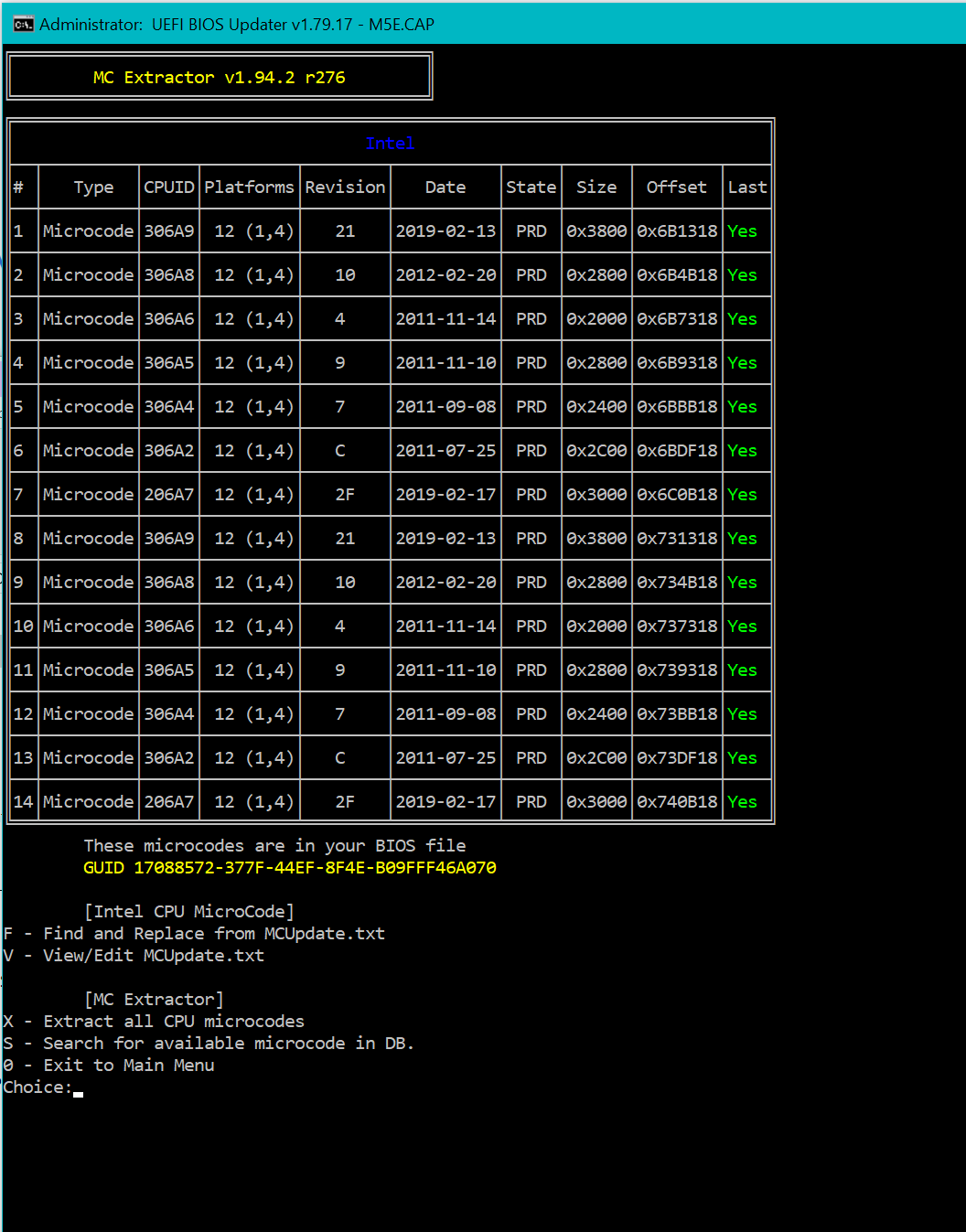
microcode updates
Cheers 
Hans
M5E.rar (4.1 MB)
Asus USB Bios Flashback method, on bottom “White” USB port, smallest size drive as possible.
As requested by @cathome @Meatwar
NVMe insert:
NVMe detect:
ROM EFI updates
microcode updates
Cheers
Hans
M5E.rar (4.1 MB)
Asus USB Bios Flashback method, on bottom “White” USB port, smallest size drive as possible.
Thank you Hans, much appreciated! 
is there anything that needs to be done with this modded bios? when I try to flash it, it gives me “security verification failed”
Yes, and expected as it’s a modified file…
Im very technologically illiterate when it comes to stuff like this so I was hoping that a premade file would work, I cant figure out how to do such modding myself which is why my initial comment was made
Sir… you didnt ask for guidance for doing the NVMe mod yourself, you just complained about an issue flashing a mod file and we are not “wizzards” to guess each user “technologically illiterate”.
Next time read forum guidance and make present your goal/request.
You want to do yourself the mod, the guide(s) are in main forum sections/top threads of Bios Modding
EDIT: You made a request that was deleted due to suspicious double post/content, since you had post here on this thread before. But it seems as if you want to learn it and do it yourself, the deleted post has no interest now, does it?
So do not be so “complicated” on the subject, learn and do it or do another request if you want it and post whatever you want…what is considered a double post/content will simply be deleted.
The mod file presented here by Hancor is well done and up to date, from a clean Asus file…so there’s no point for any user to redo the mod… but it’s always a user choice.
That’s all, over_n_out.
Hello, I have flashed bios of this version in my maximus v extreme. Booting with nvme is working good (except win 11) but i have other issues. First of all any modification of DDR settings in extreme tweaking menu is not working, even timings. After saving changes and reboot to windows it’s still at JEDEC settings with 1333MHz and basic timings - not changed by xmp. Manual setting also gives same results. In bios menu there is target ram frequency displayed as it is set in freq menu (2400). Memtest and windows shows default settings(1333 and basic timings), like there was default setting in bios. My DDR modules are GSkill TridentX 2400MHz 2x8GB. Other problem that I found is temperature of CPU in bios displays minus temperatures, not sure if auto speed of CPU fan is working properly. BIOS no 1 with orginal bios uploaded is working good at this points - XMP profile is loading properly, CPU temp is correct. Anyone found same problems? Anyone can help?
Yes, i remember seen that happen in some bioses mods…really can’t recall the main cause on this old boards…but yes, you’re not the 1rst one to report this issue, i do advise you to redo the mod following Fernando’s guide, i have a vague remembrance that this issue was not related to the NVMe mod itself but the other updated/mod modules in bios.
Thank you Hans for this work you have done! I have the M5E board, with 1903 running. I recently got a NVMe M.2 disk drive which I have installed in slot 4 (PCIe 3.0/2.0 x8_3) per the manual. Right now I am using it for “home” in Ubuntu 24, with the Ubuntu system on another SSD drive. I didn’t think there was any way to get it working in this computer as a boot drive. If I can, I would put the whole Ubuntu 24 on the NVMe drive, and use the SSD for another project. I’ve been reading through this thread, and following the links, and I have come to believe it might be possible to get the NVMe drive to boot on this M5E rog computer. I think I would want to use the method using the white USB port and pushing the flashback button. Does anyone have any advice for me before I try this?
@Pongo, User @belial has used this (he used to contact me about it), but this bios does have padding issues that causes XMP isn’t usable. I have made another bios similiar to this here.
Thanks @Koekieezz ! I am studying the link you left. I am not familiar with the resizeable bar? I don’t know if I use it or not. I am using XMP profile now. Does this other one leave it working? I have 32 GB of RAM in the system too. I like that it says boot NVMe! But do all drives need to be UEFI to boot then? I think my Windows 7 drive is legacy not UEFI. sorry for all the questions. I appreciate anything you can advise.
@Pongo Resizable bar is basically allows resizing a PCIe device mappable base memory/register space. On windows, for gpu resizable bar support, it started to be supported on Windows 10 (i never test it below windows 10). In this case, Resizable Bar on a gpu basically lets the cpu able to access the whole mappable memory for vram, instead of the ancient 256MB. Although performance may vary depending on the gpu, the driver, and the game itself.
You don’t have to use it if you not need it, i just leave it there for those who wish to use it.
Yes, user @belial (through DM) confirmed that XMP is working normally, CPU OC too.
I kinda confused what you mean’t here, but if you mean all your drives need to be converted to GPT Partition, the answer is no. Only your main boot drive that needs to be at GPT Partition
I kinda confused what you mean’t here, but if you mean all your drives need to be converted to GPT Partition, the answer is no. Only your main boot drive that needs to be at GPT Partition
I see what you mean… I am dual booting: Windows 7 pro and Ubuntu 24. I know Ubuntu is GPT partitions ok, but I think Windows 7 might be MBR. Will that mean Windows drive not boot? Ubuntu 24 is the main drive, but the Win 7 one has some legacy apps I still like to use. Thx for the help
Do you dualboot using clover or one drive for one os?
Well if you use Windows 7… maybe try Win 7 Uefi? I have never used windows 7 personally ever since 2018 on an HP 1000, an never ever had a chance to try W7 Uefi, so i can’t help you regarding to it (or just upgrade to w10/11).
I appreciate all of your help! You have answered so many of my questions. I’m glad to know that your BIOS mod can be what I need. I have it saved!
hello, I can confirm that version of @Koekieezz is working well, one that i didn’t tested fully yet was resizable bar. OC, boot nvme, xmp or other settings are working perfectly.
I’m still trying to figure out if Windows 7 needs to be UEFI in order to boot. IOW, can I leave the BIOS with CSM enabled and OS= other? If I do that will it prevent the NVMe drive from being able to boot (which is UEFI)?
Windows 7 usually do Legacy boot, though there is a uefi windows 7, i never used it. For nvme, i guess you can use ventoy for it? The native nvme boot means that the drive must GPT Partitioned and OS is UEFI Compatible. Although there is a Legacy NVMe boot option rom experimental rom that could work with csm… but you need to provide the ssd controller pci ven id and dev id.
Thx @Koekieezz for taking the trouble to answer me. I haven’t been very clear about what I’m trying to do. I want to use the NVMe drive which currently is being used as a “home” drive for Ubuntu 24 LTS. I’m pretty sure (with the modded Bios you did) it will boot up fine, (when I move the Ubuntu System disk to the NVMe drive) as it is already UEFI and GPT partitions. The problem I’m worried about is whether my Windows 7 Pro 64bit will continue to boot up once the new BIOS is in place. It is a MBR partition drive. I think it may still need CSM and “other” os. So my question is does that sound like it won’t work with the modded BIOS? Oh, the Windows ssd is just plugged into a SATA III port on the motherboard. No need to put Windows 7 on the NVMe drive… Just Ubuntu.
Meanwhile, I have backed up my BIOS 1 to the BIOS 2 chip so I can bring back my original BIOS if the modded BIOS does keep Windows 7 from booting anymore. (If I am understanding the BIOS backup chip properly)
You probably wonder why I must keep the Windows 7 system at all. It is because I have to be able to run Windows Media Center. I have an elaborate home media center that requires keeping Windows 7 on the main desktop (dual booting: Windows 7 and Ubuntu 24) and the home theatre PC which only runs Windows 7. On the main desktop, I spend all my time in Ubuntu, but need the Windows 7 system occasionally.
@Pongo Sorry for the long reply, yes, i think for W7 purposes it still needs CSM to be enabled unless you can get that OS running at UEFI (full UEFI with GPT partition), no matter what kind of drive that OS is installed. UEFI Seven might be interesting if you’re willing to learn how to boot W7 on uefi, but again, i didn’t have the experience doing that, so if you managed to boot off W7 with CSM disabled on your board and maybe along with Secure Boot keys installed and enabled, which indicate full uefi support, you can share your experience here