Hello Win-Raid community,
I want to share my successful attempt to enable Above 4G and ReBAR on the Gigabyte GA-Z97X-Gaming 7.
Background
-
Motherboard: Gigabyte GA-Z97X-Gaming 7 (rev 1.0), Aptio 4, BIOS F9b (2016)
-
CPU: Intel i7-4790K
-
GPU: AMD RX 9060 XT 16GB
-
RAM: 16GB (2×8GB DDR3-1866)
Base BIOS: This work is based on a community-modified F9b BIOS (originally shared on Win-Raid by another member). I further modified it by injecting the ReBarDxe.ffs, applying the HswAbove4G / BdwUSB3 patches, and replacing the DSDT with my own custom dynamic window logic.
Result:
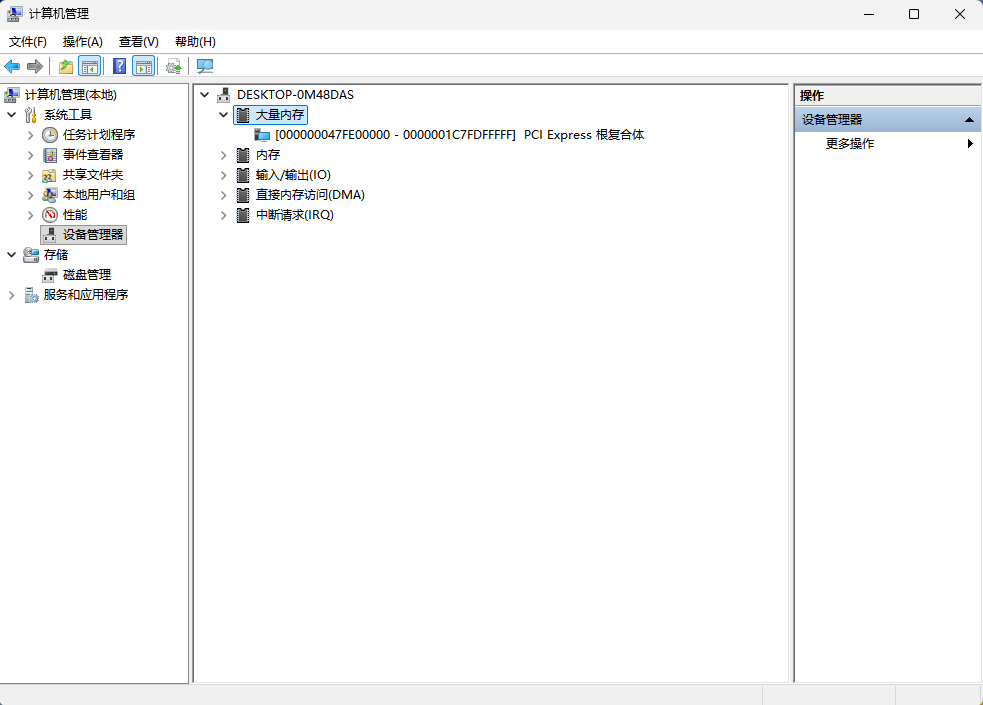
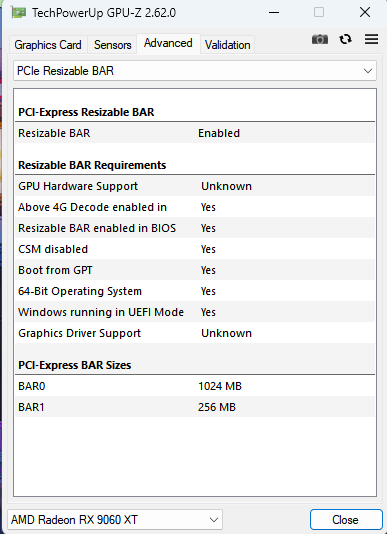
GPU-Z shows Above 4G Decode: Yes, BAR0: 1024 MB, Resizable BAR: Enabled. The system is stable and runs GTA5 perfectly.
Note: My Windows system language is Chinese. In the screenshots, “大型内存” (Large Memory) is the Device Manager resource type node, which can be found under View → Resources by type. The corresponding English term is “Large Memory”.
 The Core Method: Dynamic DSDT TUUD Window
Since the Z97 BIOS has no Above 4G option and the AmiBoardInfo module is missing, I extracted the ACPI tables using AIDA64 (this ensured all SSDTs were captured, solving the prior “9 unresolved external methods” error that occurred with acpidump-style dynamic extraction). I then joint-disassembled them with iasl 20160729-32 and modified the _CRS method in _SB.PCI0.
Key modified code:
If (Local1 >= 0x07D9)
{
    CreateQWordField (BUF0, \_SB.PCI0._Y1E._LEN, M2LN)
    CreateQWordField (BUF0, \_SB.PCI0._Y1E._MIN, M2MN)
    CreateQWordField (BUF0, \_SB.PCI0._Y1E._MAX, M2MX)

    If ((TUUD >= 0x1000))
    {
        M2MN = (TUUD << 0x14)        // Start right after physical RAM
        M2LN = 0x0000001800000000    // 96GB window
        M2MX = ((M2MN + M2LN) - One)

        If ((M2MX > 0x7FFFFFFFFF))   // 39-bit physical address clamp
        {
            M2MX = 0x7FFFFFFFFF
            M2LN = ((M2MX - M2MN) + One)
        }
    }
    Else
    {
        M2MN = 0x0000000100000000
        M2LN = Zero                   // Zero-risk fallback: window length = 0
        M2MX = M2MN
    }
}
Principle: Using TUUD (a 19-bit register written by MRC at PCI0 offset 0xA8), the PCIe window starts exactly after the physical RAM remap region, avoiding the 4GB conflict. When TUUD < 0x1000 (or TUUD is unassigned), the Else branch sets the window length to zero — Windows then sees “no valid 64-bit window” and simply skips allocation, so the system boots normally without any crash.
 Step-by-Step Procedure
-
Extract ACPI tables with AIDA64.
-
Joint disassemble with iasl 20160729-32 and fix all syntax errors to 0 Errors.
-
Modify
_CRSas above and compile. -
Inject into BIOS using OZMTool (
--dsdtinject). -
Flash via Q-Flash (BIOS settings: CSM Disabled, XHCI Hand-off Enabled).
-
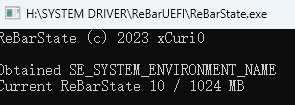
Run ReBarState.exe and set to
10(1GB).
 Failures & The Final Wall (16GB MMIO Hard Limit)
Attempt 1 (ReBarState = 32 → POST A9 deadlock → EFIFlash disaster & DualBIOS rescue):
-
After testing 1GB successfully, I set
ReBarState = 32(16GB BAR) out of curiosity. Result: System hung at POST code A9 (PCIe resource allocation deadlock), buzzer screamed then went silent. -
The Fatal Mistake: I attempted to recover the deadlocked BIOS by running
Efiflash_v0.99_mod.efi. Because the PCH SMI interface was already hung, the tool crashed mid-erase, physically erasing the main BIOS boot block. The main BIOS was bricked. (Note: EFIFlash itself is not the problem — the tool ran in an already-corrupted PCH state, and any flasher would have failed the same way.) -
Recovery (under Backup BIOS F8): The system automatically fell back to the Backup BIOS (F8). After booting into Windows from the backup BIOS, I installed the official Gigabyte App Center, which injected its low-level driver into the system. After a normal reboot, the DualBIOS auto-recovery was triggered, and it successfully overwrote the corrupted main BIOS chip with the intact F8 firmware from the backup chip. The main BIOS was fully restored.
-
Lesson: DO NOT attempt to flash a BIOS that is already in a POST deadlock. The PCH internal state is corrupted. Recovery must be done by booting from the Backup BIOS first.
Attempt 2 (ReBarState = 13 (8GB) / 11 (2GB)):
-
After recovering and re-flashing the TUUD mod, I tried 8GB and 2GB BARs. Both resulted in POST codes 96 / 69.
-
Recovery method: No EFIFlash was used this time. I simply removed the discrete GPU, booted via iGPU, changed
ReBarStateback to10, re-inserted the GPU, and the system booted fine. -
Conclusion: The Haswell platform’s MMIO High Window is hardcoded to 16GB. With 16GB RAM remapping taking ~12.5GB above 4GB, only ~3.5GB remains for all PCIe devices. A 2GB or 8GB BAR simply cannot fit.
 The Final Question / Request for Help
Is there any master here who can reverse-engineer the PciHostBridge.efi assembly code?
Currently, the Haswell platform’s MMIO High Window is hardcoded to 16GB. To enable 16GB BAR on Z97, we need to modify the PciHostBridge DXE driver to change the register assignment from 0x400000000 (16GB) to 0x800000000 (32GB) or 0x1000000000 (64GB).
All my modified files (BIOS, DSDT) and the GPU-Z success screenshot are attached below. This could push Haswell to its absolute limits!
 Attachments (Use at your own risk!)
Z97XGAMING7_F9b_TUUD_TEST.zip (9.5 MB)(Please unzip this compressed file!/Modified BIOS)
 WARNING: This is ONLY for the GA-Z97X-Gaming 7 (rev 1.0) with BIOS F9b and 16GB RAM. Do NOT flash this to other boards or 32GB RAM configurations, or you will get a POST deadlock!
isal2016_AND_DSDT_SSDT.zip (408.1 KB)(For research/reproduction)
-
acpi_dsdt.bin+ 6acpi_ssdt*.bin(Original ACPI tables extracted via AIDA64) -
Note: These are the untouched original tables. They are provided for joint disassembly reference. Do NOT flash these directly; they contain no modifications.
Warning to Everyone: If your BIOS is already stuck in a POST deadlock (A9/96/69), do NOT use any flashing tool (especially EFIFlash). It will erase the boot block. Only use Q-Flash after recovering via Backup BIOS and iGPU.
Edit by Fernando: Thread title shortened