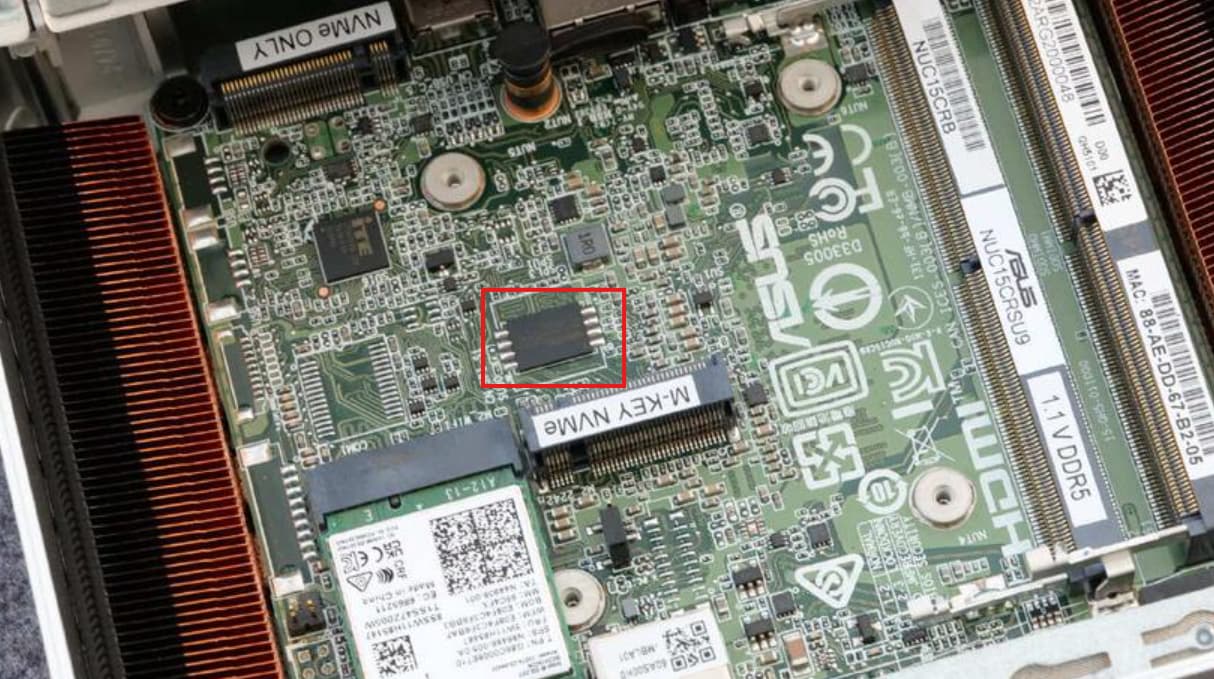
Hoping someone here knows AMI Aptio V internals better than I do. I have a board stuck in a permanent firmware-update loop that defeats every recovery path the vendor documents, and I’d like to avoid an external SPI programmer if there is any in-band route left.
The BIOS itself is not corrupted. It was never written to — the version string is unchanged, and BIOS Setup is fully functional. This is a stuck pending update request, not a bad flash.
Hardware
- ASUS NUC 15 Pro+ / NUC15CRSU9, regulatory model NUC15CRS, board ID
CRARL579 - Intel Core Ultra 9 285H (non-vPro SKU, so no AMT)
- BIOS
CRARL579.0017.2024.1226.0851— unchanged throughout - AMI Aptio V, Setup build
2.22.0059 (C) 2024 AMI - Secure Boot enabled
How it got here
The machine ran Linux (Proxmox VE 9 / Debian 13) with Secure Boot on, so ASUS’s own iFlashVLnx64 was unusable — it builds and loads a kernel module (amifldrv_mod) and kernel lockdown blocks it.
The binary even contains the string Error: Unable to generate driver automatically when Secure Boot is enabled.
So I submitted the BIOS as a UEFI capsule-on-disk via fwupd. That was the mistake.
The vendor .CAP is not an FMP capsule. I pulled the SSD afterwards and looked at the ESP offline. The payload begins:
9b 02 00 00 48 bf 00 00 5f 41 4d 49 50 46 41 54 63 41 4d 49 5f 42 49 4f 53 5f 47 55 41 52 44 5f
                        _  A  M  I  P  F  A  T  c  A  M  I  _  B  I  O  S  _  G  U  A  R  D  _
i.e. _AMIPFAT / AMI_BIOS_GUARD_FLASH_CONFIGURATION — an AMI BIOS Guard container. fwupd saw an ESRT entry, declared the device updatable, and wrapped that blob in a generic EFI_CAPSULE_HEADER:
| Field | Value |
|---|---|
| GUID | aa69d523-bffc-4f5e-9990-c9cfd450cc91 (ESRT System Firmware class) |
| HeaderSize | 4096 |
| Flags | 0x00050000 (PERSIST_ACROSS_RESET | INITIATE_RESET) |
| CapsuleImageSize | 38866944 |
The staged file was exactly the vendor image (38,862,848 bytes) + 4096 bytes of header;
sha256(staged[4096:]) == sha256(vendor).
Symptom
Every boot draws the Setup UI with this dialog over it:
Flashing...
Flash update failed
Flash image invalid or not found
System will reset in 5 seconds
- With a capsule file present: hangs there forever, no reset.
- With no capsule, or with both NVMe drives physically removed: appears ~1 s, then resets —
endless loop.
USB keyboard and mouse are completely dead on that path; the HID stack never comes up.
Everything I have already tried
Power Button Menu (hold power 3 s): F2/F4/F5/F10 — no keypress processed at all on that path.
BIOS Security Jumper removed (Configuration mode) — this does give a working Config Menu with a
working keyboard:
[F2]Setup — fully functional, all tabs navigable, settings intact (VT-d still enabled)[F5]Restore BIOS setup settings to build-time default → loop persists[1]Suppress menu, then boot → straight back to the hung Flashing screen[F4]BIOS Recovery → just reboots. Two different FAT32 sticks (58 GB, and a clean 7.6 GB
fully zeroed and non-quick formatted), with the vendorCRARL579.CAPat the volume root and
in\EFI\Intel\
Jumper in Lockdown (pins 2–3) — the TPS says “BIOS updates are not available except for automatic Recovery due to flash corruption”, so I hoped it would suppress the pending updater. Result: no video
at all, 7 s on / 3 s off power cycling. Evidently the lockdown flag is evaluated after the updater.
From inside Setup:
F9Optimal Defaults +F10Save & Exit → loop persistsRecoverytab →Select Image file/Update Image→ both just rebootAdvanced→EZ Flash— this is the one that convinced me the image isn’t the problem. It opened a working file browser, enumerated both the internal NVMe ESP and the USB stick, accepted my selection of the vendor.CAP, rebooted — and no flash occurred. That is the firmware’s own update UI failing with a file it packaged itself.- There is no capsule-update or firmware-update toggle anywhere in Setup (checked Advanced, Security, Boot, Power).
Hardware:
- Intel MEBX Reset Header (TPS §3.1.5, momentary short of pins 1–2) — ASUS documents this exact header for “when the system may have become unresponsive, such as after a failed BIOS update”.
Performed correctly. No effect — and BIOS settings survived it, so it clearly doesn’t touch the NVRAM variable store, only RTC/CMOS. - Removed the boot NVMe, then both NVMe drives — the loop still happens with no storage at all.
Offline ESP surgery (SSD in a USB enclosure): deleted the malformed capsule and \EFI\UpdateCapsule\, and replaced a zero-byte /CRARL579.cap that the firmware itself had created at the ESP root during one of its failed recovery attempts, substituting the pristine vendor recovery image (full SHA-256 verified on read-back). Result: the hang stopped — it now reaches the Config Menu with the jumper out — but with the jumper in it’s still an endless reset loop.
Where that leaves me
- BIOS 0017 intact, Setup fully usable via the security jumper, settings preserved
- No OS can boot, so
efivarfsis unreachable andOsIndicationscan’t be cleared from Linux - Nothing on disk helps — the request lives in the SPI variable store
- Every documented update and recovery entry point ends at the same failed apply
My questions
-
Is there any way to clear a pending capsule request /
OsIndicationson Aptio V without booting an OS? An undocumented Setup page, a key combination, a jumper state, an AMI service utility, an EFI tool that could somehow be launched in this state — I’m open to anything. -
Has anyone recovered an Aptio V board from a stuck pending-update state without an external SPI
programmer? On any platform, not just a NUC. -
Is there a known precedence between the pending-update handler and F4 BIOS Recovery on Aptio V?
Everything I see suggests the updater runs first and pre-empts recovery, which would explain why no recovery route can win. -
If it does come down to a programmer: does anyone know the flash chip package/location on NUC15CRS (board
CRARL579)? I haven’t been able to confirm whether it’s SOIC-8 and clip-
accessible or a leadless package needing soldering, and I’d rather know before ordering anything.
I can’t produce a BIOS dump since the machine won’t run anything — but I still have the original malformed capsule, a complete backup of the ESP, the full capsule header analysis, and photographs of every screen. Happy to provide whatever is useful.
Edit by Fernando: Thread title shortened and customized