I’m dealing with a bricked ASUS TUF Gaming F17 laptop and would really appreciate expert guidance. I’ve done extensive troubleshooting already but I’m stuck at the firmware level and need help before I proceed with a direct chip flash.
Model details:
What caused the issue:
Enabled Secure Boot and enrolled the Platform Key (PK) from within BIOS setup. On save/reboot, the laptop went completely unresponsive.
The chip is : XMC 25RH256CX1Q / P39551 0D 55 2336C
The core problem I need help with:
I downloaded the official BIOS file from ASUS support (FX707ZC4AS.312, version 312, SHA-256: 2C3C576E1F7FA1883CDF91A6AE0E42466A5A44A8FADA22EB42BBD9CE4D087523). File size is 38.9MB (38,928,384 bytes), but based on the chip capacity (256Mbit/32MB = 33,554,432 bytes), I need a clean 32MB image to write directly via CH341A
What I’m asking for:
-
Preferred option: Guidance on identifying and isolating the correct NVRAM/Variable Store volume within my own chip’s dump (once I extract it), so I can reset only that region while preserving my original DMI/serial data , since I believe the actual corruption is limited to Secure Boot/PK-related NVRAM variables, not the full firmware.
-
Alternative: If anyone has a clean, working full 32MB SPI dump (.bin) for this exact model (FX707ZC4 / FX707ZC4-HX062), I would be extremely grateful. I understand this needs to be from an identical board revision.
-
Any guidance on correctly extracting a flashable 32MB image from the official ASUS capsule file (FX707ZC4AS.312) using UEFITool, if that’s a safer path than a donor dump.
Edit by Fernando: Thread moved into the “BIOS Problems” Category and title customized
This is not such older system to lead to such SB keys behaviour, being an Asus W11 OS supported machine by default…very bizarre.
You can try to swap the NVRAM volume, with UEFI tool, from the Asus update file.
File should be extracted/decomposed with platomav/BIOSUtilities: Collection of various BIOS/UEFI-related utilities which aid in research and/or modding purposes.
This will not present a “regular” plain image with regions, like an SPI programmer dump reading.
For dumps need board ID, Quanta DANJLFMBAB0 ??? DA0NJLMBAD0 ???
Update 2: Got the script decoded via BGScriptTool - found source offsets, but there’s a complication + it’s DANJLFMBAB0 REV: B
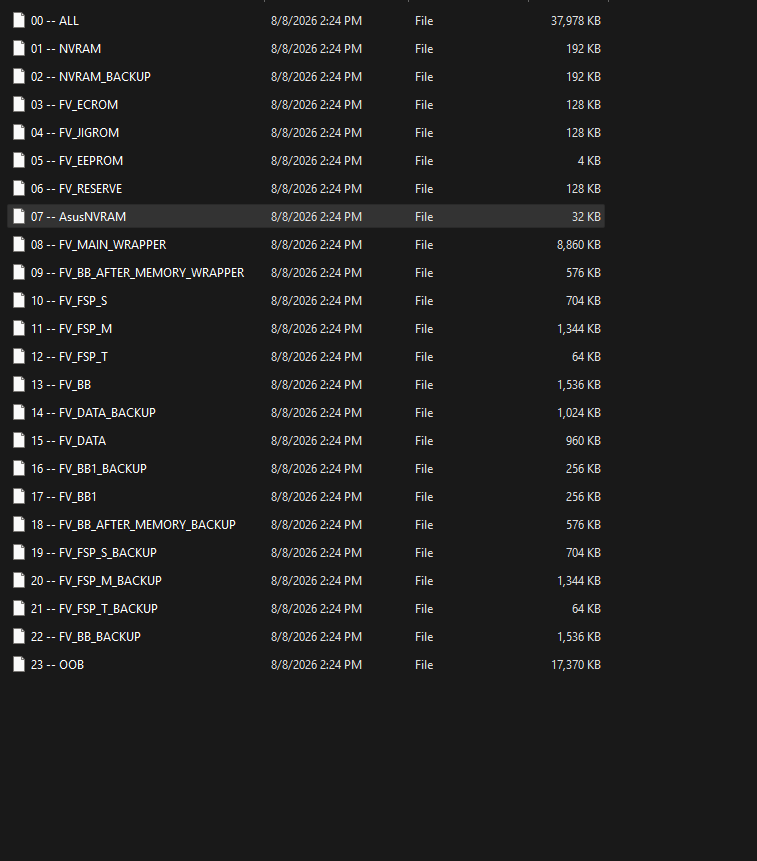
Got BGScriptTool set up and re-ran the extraction. Now have decoded BIOS Guard scripts for all 23 components with their source offsets:
-
NVRAM (Index 01): source offset 0x2F000, size 0x30000 (192KB)
-
NVRAM_BACKUP (Index 02): source offset 0x5F000, size 0x30000 (192KB)
-
AsusNVRAM (Index 07): source offset 0xC8000, size 0x8000 (32KB)
However, looking at the actual script logic, each component doesn’t write to a fixed flash address directly — it first reads a word from a location (offset 0x44 relative to a base), shifts it left by 0xC (multiply by 4096), and adds that to the base offset to compute the actual target address. This looks like AMI BIOS Guard’s block-redirection/wear-leveling mechanism, meaning the real physical destination on my chip may differ from the source offset in the capsule file depending on runtime state.
Given this, I don’t think I can safely just “splice bytes at offset X” into my own chip dump without understanding this redirection logic correctly, matching your earlier warning.
Is my read of this redirection logic correct, or am I overcomplicating it?
Given the AsusNVRAM component’s size (32KB) and role, does it still look like the right target for a Secure Boot/PK-related corruption, or should I focus on the standard NVRAM (Index 01) instead?
Is there a safer/simpler way to determine the actual runtime flash address for these components, given I’ll have my own chip’s raw dump to reference once desoldered?
Really appreciate the help so far , this has clarified a lot
I don’t have any dump for the DANJLFMBAB0, or other plain dumped source to examine the NVram volumes.
Look at BadCaps.
EDIT: Keys/Certificates from the OEM ASUS are in the bios for sure…and they came ENABLE in the factory ASUS Windows OS UEFI X64 installation…i really don’t know what you’ve done or what OS is installed/mode…i still have no issues performing clean W10/11 installations with default UEFI ScBoot in system of same age/generation…and for sure no broken/blank screens with a “death” motherboard/corruption.
But do you think this the right approach ? the main problem was to turn on secure bot + platform key
I am just trying to make sure that this part of the BIOS chip is what I should be working on
not like FV_BB (Boot Block) or AsusNVRAM
or a problem with AMI BIOS Guard (PFAT)
I have never faced this problem and i am just assuming this is the solution
I don’t know how bricked your bios is but I bricked my f15 by changing a wrong advance settings via command efi there is a recovery you can use to fix it and setup guide on Asus website https://www.asus.com/support/faq/1014276/
For me the working recovery key was ctrl home and it should bring you to a page you can select bios file from usb just put the latest bios on there from Asus website of your model plug it in to the wall and plug in the usb hopefully this works for you I assume f17 should be same or similar process to mine.