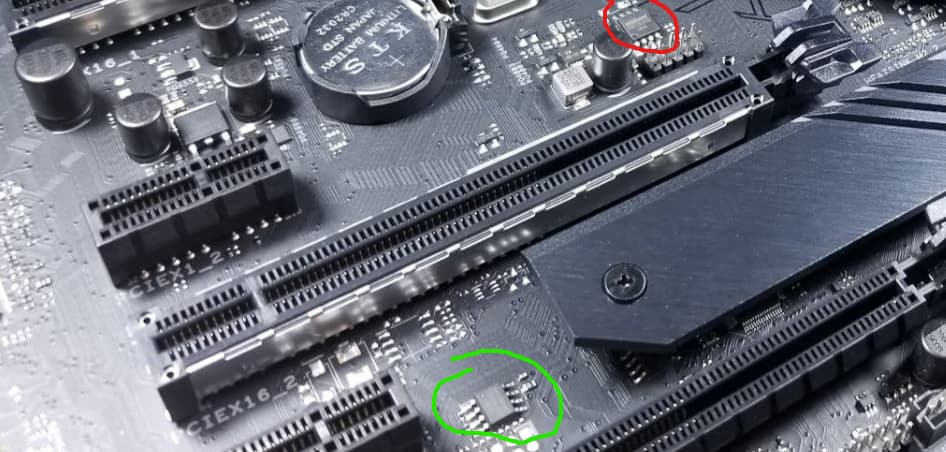
Hi, I appear to have possibly bricked my UEFI BIOS while attempting to mod it with NvStrapsReBar.
I followed the AFUWIN for Asus section of Fenando’s guide to flash the modded BIOS, which seemed to work fine until reboot. Prior to that I followed this guide to actually mod the BIOS, using the UEFITool method, but with NvStrapsReBar.ffs instead of ReBarDxe.ffs. I skipped the UEFIPatch and DSDT Patching, as to my understanding they’re for older systems than a Z390 chipset. I did unfortunately run NvStrapsReBar.exe before I successfully flashed the modded UEFI, as I wasn’t aware that a previous flash attempt had been rejected.
Now when I attempt to boot the system the power LED comes on and the fans spin, but I get no video output from my GPU. I’ve already tried pulling out the CMOS battery and shorting out the CMOS jumper with a screwdriver. After pulling the battery the system did behave a bit differently in that it rebooted once after I powered it up, but I haven’t been able to reproduce said behaviour again.
Unfortunately Asus Crashfree BIOS 3 doesn’t seem to want to kick in, either that or I can’t see it due to lack of video output from the GPU. Using the iGPU isn’t an option since I made the mistake of buying an i5-9600KF. I’m questioning whether something might also be wrong with the GPU now since I had to remove it to access the CMOS battery.
One thing I find a bit odd is that the system likes to power up roughly 5 to 10 seconds after I switch on the PSU instead of waiting for me to hit the power button. It also refuses to shut off until I’ve held down the power button for 5 seconds or so. Prior to pulling the CMOS battery I believe I saw the RGB running on the board, but now I only get the power LED. I have yet to look inside the case while the system is running because I have to haul it out of the low shelf it’s on to work on it, so I don’t know the status of the boot LEDs yet.
I’ll probably try swapping out the GTX 1660ti for my old GTX 660 later to see if that does anything; I was watching a video by JayzTwoCents where he had a bizarre issue where the BIOS rejected a very specific GPU after a BIOS update. So I’m wondering if maybe a different GPU might be able to illicit a video output.
Does anyone have any potential solutions or advice? Or is the only likely solution going to be one of those programmer devices?
The solution is to get an SPI programmer and recover the board to initial state of functionality.
The brick was a “Bad” REBAR mod done.
Asus CrashFree rarely kicks or has ever been useful at all.
Dont ask for any other solutions in the current state of it, because there aren’t none without a full re-programming, that’s all regarding your “death” system board, good luck.
Yeah, I had a feeling it was going to be a programmer I would need. I got around to swapping the GPU and checking the LEDs. The LED is an orange-amber, which according to the manual is “DRAM”. I’ll probably try taking 3 of the 4 RAM sticks out later, just as a last ditch effort before I order one of those SPI programmers from Amazon.
By the way could you link me to a guide, please? I see a handful of them pinned in the modding guides and I’m not sure which device I’d need. I’m assuming I need to get an ID off the physical chip?
Nothing to link, those are the guides for beginners.
Perform readings (after ICs correctly identified and voltage to use) and save each backup, as it contains mb original data, especially the main IC (RED), nothing to do now without a programmer.
EDIT:
Yes, those are the so-called “cheap” CH341a device kit.
And yes, it is imperative to identify it and search online for their respective datasheet.
And yes, it’s hard to clearly identify them a naked eye, a magnifier/phone camera zoom are enough.
Some YT videos are also helpful for beginners… and dont expect success at first tryouts because the clip on these kits is very sensitive to contact grip on the ic legs.
Operation should be done with the mb on a bench/outside the case as optional, no PSU standby power/CMOS battery.
I’m assuming this guide should work with this or this? Is it imperative that I identify the chips? I can’t read them at all and I can’t get any decent photos of them. To the naked eye it looks almost as if there’s no text on them because it’s so faded.
And yes, it is imperative to identify it and search online for their respective datasheet. And yes, it’s hard to clearly identify them a naked eye, a magnifier/phone camera zoom are enough.
So contrary to what I expected a magnifying glass combined with my prescription glasses worked out a lot better than my old digital camera and my mother’s iPhone. The chip you’ve highlighted in green appears to be “Winbond - 25X05CLNIG - 1923” and the red one should be “Winbond - 25Q128JVSQ - 1917”. A quick Google search turns up this and this. Is it safe for me to hook up the programmer without the voltage adapter?
Yes it should, as you can see by pdfs, the voltage range of each one.
Dump the 2, but we’ll be focusing on the assumption of only need to recover main bios IC, the larger one 128Mbit. Secondary, depending on mb model could EC/TPU/iROG
So once I’ve backed up both chips I’m assuming I should attempt to flash the stock Asus BIOS onto the “red” 25Q128JVSQ chip by the CMOS battery? Do I just flash the .CAP file with FlashROM or does it need modification? The guide doesn’t seem to address that, but I believe I did see some mention in other threads of outputting the body with UEFITool to “remove the header”. I’m also guessing we’ll need to splice the MAC, serial, etc. from the backup?
CAP files need to cut off (HEX editor) the header (0x800 or 0x1000), so in this one 0x1000, will see where…
This new file renamed to .bin and needs to be edited to take the system board original data, after that it can be used to program.
If programed as it came from Asus, the mb data will be blank with no SN, UUID, Mac, etc…
EDIT: Im not fan of Flashrom at all, rarely use it and only in some AMD platforms, try NeoProgramer, ASprogramer, Colibri or the app that came with the kit.
Each app has its own DB to correclty match the IC specs…some do not have it or updated.
And yes it can also be incorrect/faulty contact… there’s a lot of small details, dont rush it or you wont learn/understand these small details…
Do please read the previous linked guides, i cant lose my time writing in every new post/thread the repeated content to all users…over and over. I did warned you that its not a simple task for beginers…
Do you understand that this is task performed by many IT tech shops as part of their service…you cant expect to achieve in a remote forum with a few posts, their professional experience in these matters… true being said, even so you found me in a good “state of grace” as so many out there in other forums, etc…
FlashROM gives the following error: No EEPROM/flash device found.
Does this mean there’s no contact with the chip, or that it can’t find the programmer in the USB port?
Which guides should I be reading specifically? The one I linked earlier only goes over the bare basics of using Flashrom. I’ll try the other apps, but I don’t believe any came with my kit. I wouldn’t be surprised if the Flashrom binaries from Ubuntu’s repository are anciently old anyway. Still, I appreciate the help you’ve given so far. And you say they do this at IT tech shops, do most repair shops provide such a service or only specialists? I was under the impression it was more of a specialist’s job.
Alright, I got the smaller IC with both Flashrom and NeoProgrammer. The larger one couldn’t be read with Flashrom and required manual IC model number selection with NeoProgrammer. Are there any guides on splicing in the SN, UUID, MAC, etc. or should I upload the files here?
Edit:
Disregard, just saw your DM.
Ok system data lost… program the Asus CAP file (HEX cut)
Alright, system is back up and running, I appreciate the help. I’ll have to dig out the box for the motherboard in a few hours or so. Is there anything that can be done about the onboard audio not working in the meantime? Or is that not expected?
I’m also wondering, is it possible to reverse engineer the UUID, or is it hashed? I have a backup of a friend’s video game server where it stores players’ HWIDs in order to ban their hardware if necessary. The format is a number, then “:”, followed by a long string of hexadecimal. Should I bother DMing the HWIDs associated with myself? There’s about 10 of them, I presume for different devices. Assuming it is possible, I don’t mind trying to splice the IDs in myself if you don’t want to waste time iterating through them all.
Again, thank you. I would probably be out shopping for a new PC right now if it weren’t for you.
Usually not related to bios recover/re-program. The only linked audio issue could be tied up to the mb SN for codec licencing…if any.
System CSME FW engine could be re-initialized with fpt -greset and could be updated from original 12.0.81.1753 to latest one 12.0.97.2608.
UUID is product ID UNIQUE number, system UUID is generated, not the hw itself, in this case the mb.
I dont support games “hacks” to no user or system “camouflage” if i make myself clear enough…
The only thing left to help is trying to add the possible gathered orignal data from Asus.
EDIT: as i mentioned before… “from all labels on the box and mb pcb attached”
I should be able to DM a photo of the sticker on the motherboard’s box in a moment here. Do you need anything on the actual motherboard as well?
I dont support games “hacks” to no user or system “camouflage” if i make myself clear enough…
I was more trying to get the original UUID back, not evade a game ban by changing it or any HWID. I don’t believe I’ve ever even been HWID banned from a game before, I haven’t cheated in any for close to a decade now. My friend’s server stored the HWIDs of every player, I wasn’t banned or anything, if I wasn’t clear enough about that.
So since the UUID is generated, and not tied to the HWID, is there any issue I may experience besides software licensing if we generate a new one? Or is one already generated?
That’s system UUID (GUID), not “motherboard” UUID
Some Asus apps could work incorretcly due to the lack of it… some will use MB SN.
Alright, so I figured out the audio. I forgot that Realtek chipsets delete the device from the device manager when nothing is plugged into it, so I thought the chipset itself wasn’t being recognized when it was simply a matter of plugging in the 3.5mm jacks.
However some of the USB 3.1 ports aren’t working. Will that be fixed with the BIOS flash? It seems to specifically be the 3.1 ports that are on a built-in “hub”, the ones directly connected to the chipset seem to work fine. The USB 2.0 root hub also seems to still be functional. I’m not sure if maybe I scraped part of the PCB while trying to get the clip on or what. Or is this to be expected with the current state of the BIOS? I’ll try looking in the settings in a moment to see if something is disabled.
No it is not… and i have recover many boards, nothing to do with bios recover, the board is ok or has suffer some damage.