Hello. Thank you in advance for your helps.
I applied recovery to my Surface Pro 7+. After that I started having problems.
Problem 1- The Surface Pro 7+ doesn’t actually shut down. When I click Shut Down, the screen turns off, but the fans continue to run, and the light on USB Hub stays on until the battery is completely drained.
I tried Shift Shut Down, but it didn’t work.
I disabled the Fast Startup option in Control Panel, but it didn’t work.
I can only shut down by force shutdown (holding the power button for about 20 seconds).
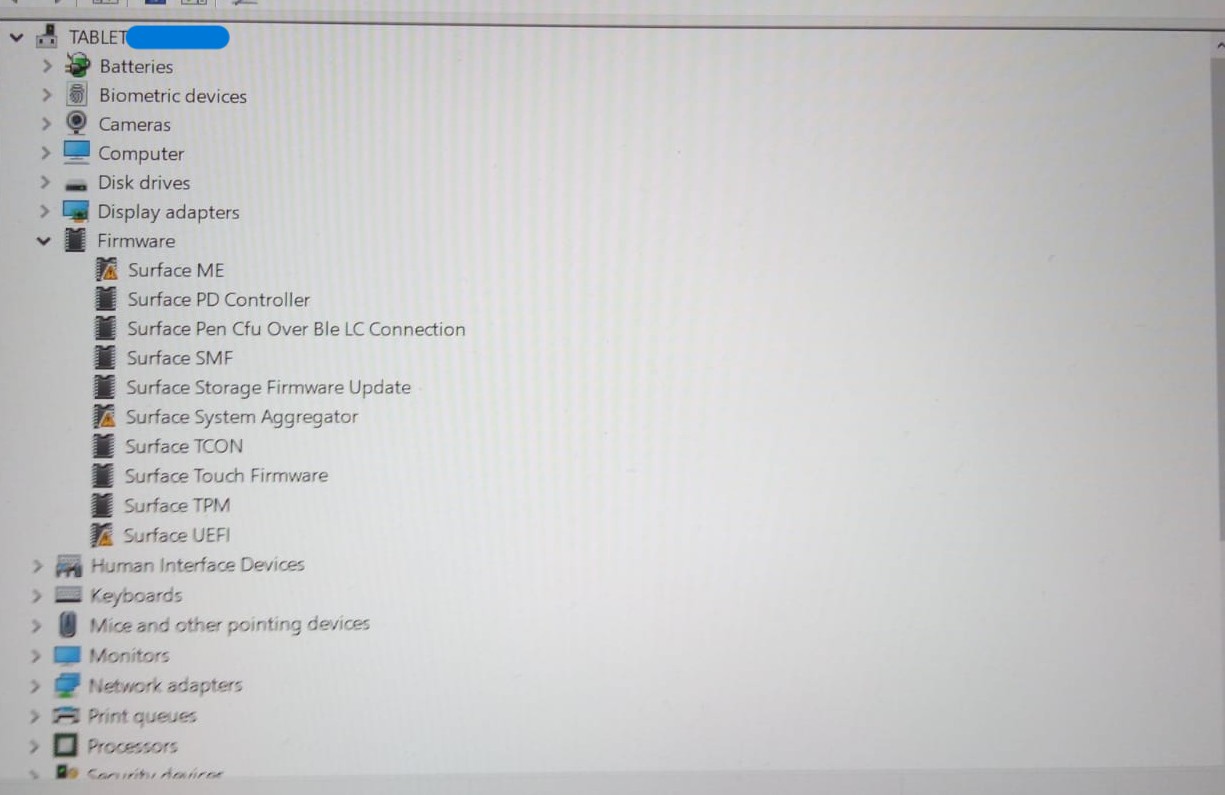
Problem 2- There are three firmwares with yellow triangles in Device Manager. Surface ME, Surface System Aggregator, and Surface UEFI. I believe the problems are related to these. All three have the error “This device cannot start. (Code 10)” in the properties tab.
I tried roll back driver, disable and uninstall device options but it did not solve the problem.
I noticed this: The current UEFI version appears to be 30.102.143. But my Pro7+ seems stuck at 18.200.143. I’m not very experienced in these subject. As far as I understand, the device can not update its firmware. Is there a method like a forced firmware update?
From my UEFI info:
System UEFI: 18.200.143
Nuvoton dTPM: 7.2.2.0
Tcon Firmware: 160.146.4.0
SMF Controller: 58.0.2.31
SAM Controller: 14.102.139
Intel Management Engine: 15.0.1879.1
PD Controller: 14.1.0
Touch Firmware: 5.0.141.139
Thank you for your helps.
Edit by Fernando: Thread title specified and customized