Hi, I have never done this, that’s why I ask for help.
I tried to modify it but I couldn’t finish the process, too complicated for me. I don’t have the knowledge to do this safely. Don’t even know what tool is right to update my BIOS.
The BIOS version is 2902 and has 4G Decoding option enabled.
I have a TPM 2.0 module working, and hope modding won’t cause issues and make it stop working.
This board is in the working list of xCuri0 GitHub, someone did it with 16GB BAR Size.
I have an I5-4690K at 4.4GHz with a RX6700XT and I can play modern AAA games like God of War / Red Dead Redemption 2 with stable 60 fps and would like to see if ReBar can improve performance.
I bought a CH341A and two extra 25Q64FVAIQ chips.
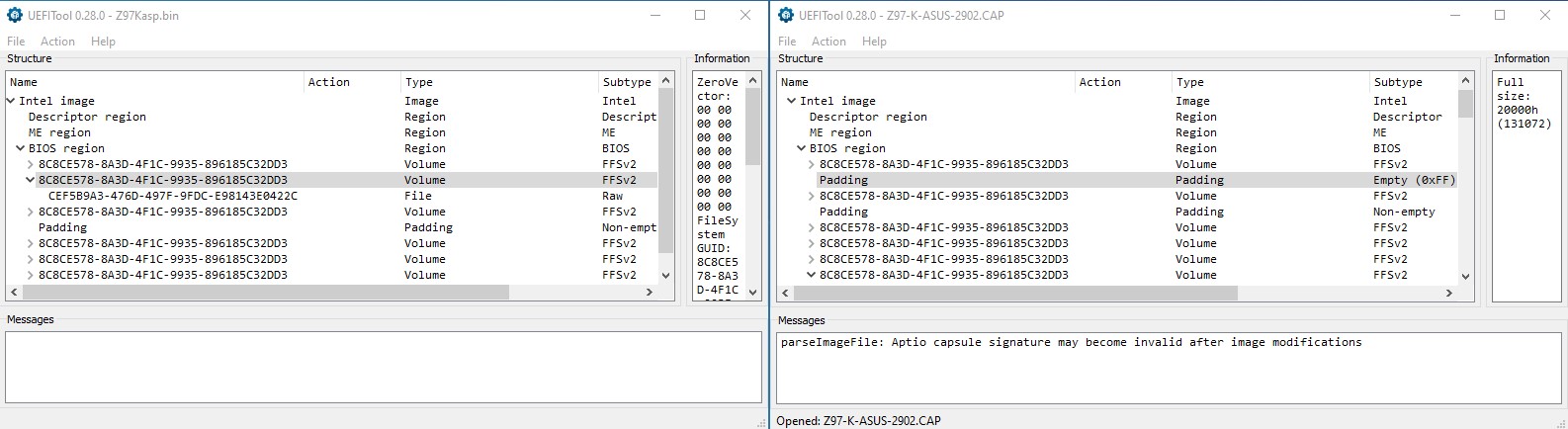
I noticed the bios backup made with the programmer, the bios region has a different line (a string) than the .cap (says Padding) bios from Asus website.
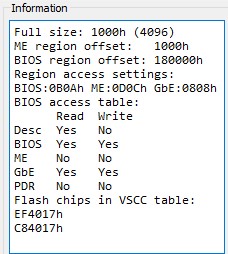
On Intel region, it has some read/write = No but Asus .cap everything is Yes.
So before trying anything modded I flashed my bios backup to one extra chip and PC doesn’t boot !!
Could these differences be the reason it doesn’t boot?
If I flash Asus .cap with the programmer will I lose Intel ME information? If so, can that be added?
And I suppose I have to add MAC, UUID and S/N to the Asus .cap file.
This forum doesn’t seem very active but I’m hoping someone with knowledge knows why this happens or saw something like this happen.
Really… well for a new user or someone that only visit its when needed, that could be right.
Or do you expect that all requests here are attended as you expect to?
This is a forum made of real human users with their own life outside sir…maybe you can ask those 'IA" out there to attend your request a bit faster…
Asus bios files are CAPsulated, not for direct use on SPIprogrammers, CAPSULe headr must be removed, now to find out this… take your time and search it on the “death” forum
It was just my perception, not a complaint or critique at all, and I understand everything you stated, just seems you took it in a wrong way.
It was not my intention/expectation of a fast answer or a one reply to “here is your mod”, just some guidance.
I’ve been reading this forum alot about different things, so I did take my time and I already know I have to remove the capsule and how to do it.
I guess I expressed myself wrong with “If I flash Asus .cap”.
I have to thank @68k-dude, he offered to help with the mod since the beginning, took me all the way, and was crucial for me to start to understand certain things about this topic.
But if I can’t get my own backed bios to boot I can’t proceed.
Anyway, if I ever get this working I’ll mention it in case it helps someone one day.
After reading alot and many experiments I finally did it !
I had to use the Asus website bios file.
No idea why extracting my bios with FPT or the CH341A programmer give me a different bios structure.
At first I just patched everything but it didn’t boot. I checked for the “Pad file issue’“ and apparently it didn’t happen but since it didn’t boot I figured it must be related anyway.
I followed the steps for the workaround and I had a problem trying to insert the NvramSmi with MMTool 4.50023 because it would cut the subsections of it.
I noticed this after inserting it and then opened the modified bios with UefiTool.
Since I couldn’t insert the modules with UefiTool due to corruption I found “MMTool Aptio 5.02.0024 Mod” that works for Aptio 4 and was able to insert NvramSmi with all it’s subsections.
MMTool 4.50023 must have some kind of bug or limitation.
These are the steps I took:
Add ReBarDxe.ffs to the PciBus with MMTool 5.02.0024 Mod
Run UEFIPatch, patch with patches.txt and BdwUSB3.txt
Open the .patched bios in UEFITool NE alpha 72 and extract “as is” the PciBus, PciHostBridge and NvramSmi.
Open the ReBar bios (from step 1) in MMTool 5.02.0024 Mod and replace the PciBus, PciHostBridge and NvramSmi with the extracted ffs files.
Save and flash
Note: Step 3 I think it should work also extracting modules with MMTool. Also, NvramSMI was not labeled, had to search the GUID.
Now for the hard truth and sad part, the performance is alot worse !!!
I have an I7-4790K with an RX6700XT, it’s a good hardware combo.
The GPU is working at PCI-E 3.0 x16 speed and ReBAR at 16384 MB.
I tried different values and it doesn’t matter, the moment I enable ReBAR performance goes down.
The built-in benchmark tool of Horizon Zero Dawn and Red Dead Redemption 2, show a loss in performance. Only Black Myth Wukong doesn’t seem to be affected most probably because the CPU is at 40% while GPU at 98%.
I can’t see an improvement and is probably losing fps also in: God of War, God of War Ragnarok, Marvel’s Spider-Man (Remastered, Miles Morales, 2). I own all these games.
After going through all this trouble to get ReBAR working and the system works better without it.
I’m wondering if I’m the only one that this has happened ?
Update: After removing the extra chip where I flashed the modded bios and putting back my original one, I was still having less performance than I had before doing any of this.
Then I noticed that in ‘Large Memory’ I still had ‘PCI Bus’ that was placed due to the modification and previously I had ‘PCI Express Root Complex’.
I removed the PCI Bus, got back the PCI Express Root Complex, Windows started to reconfigure all my devices and performance got back to what I used to have.
Conclusion: I lost performance due to the PCI Bus driver installed by the modification to enable ReBAR and I lost performance by having ReBAR enabled.
@Matrix thank you so much for providing an update and confirmation that it did indeed work for you. can you please share your file? It would save me a lot of time
Thanks to the resources in this fantastic forum combined with Gemini. I managed to get this sorted. I can now run a Tesla P40 in my Asus Z97-K Mobo + i7-4790. I will upload the bios in the offers section.
I made a backup somewhere, would have to look for it, but I’m glad you did it.
You also need to add the UUID, MAC and SerialNumber of the board to the modded bios, with FD44Editor.
I did benchmarks and posted my experience, so anyone willing to try ReBar would know what to expect, but since you did it, would be interesting if you do benchmarks with games, like I did, but you will probably lose performance too.
I can only see two reasons for this, one being the cpu is already at high load running those games and ReBar also needs cpu, and the other due to how ReBar is being utilized (PCI Bus, memory regions, whatever else).
My problem was slightly different. I wanted to run a Tesla P40 GPU for LLM inference. So I didnt really need rebar but the associated MIMO upgrades/address assignment capability which allowed for Bigger VRAMs to work with the Z97 Chipset. This upgrade basically fixed the Code 12 error in Device manager which was caused by bad memory address assignment logic in the BIOS.