Hello everyone, first time on win-raid, i hope you can help :
I’ve been trying for a long time to make Windows 7 work on UEFI (non CSM), so i built a custom iso with USB 3 and NVMe drivers (and UEFI files from Windows 10) but i’ve encountered a problem :
My iso only works on certain computers (mostly desktops), and i’ve a lot of issues to make it work on a lenovo laptop (Lenovo V14 G4 amn). It get past “System is loading files…” but completly freezes at “Starting Windows…”.
I think the problem here is the ACPI chip driver because Windows 7 doesen’t seem to want it bc of energy managment system (i can’t find one compatible with Windows 7). There’s probably another problem with the iGPU wich is not compatible with Windows 7 generic drivers.The CPU is an AMD Athlon Silver 7120U. I’ve already tried so many things to make it work but it doesen’t seem to work on modern AMD laptops.
I even tried UEFI PRO (https://www.reddit.com/r/windows7/comments/ukd3e5/uefipro_windows_7_uefi_iso_for_lazy_people/) but there’s almost the same issue.
I know that the version of AGESA on this particular cpu is a bit weird but i can’t find a solution.
I am currently trying to get windows 7 working on a lenovo v14 g4 amn as well, and i was able to get it booted to the desktop even however i cannot find any usb 3 drivers that’ll work at the moment and neither the power button internal keyboard or trackpad work in windows 7 (apart from holding down power button to force power off, of course, and the ps/2 internal keyboard sometimes seems to work for a fraction of a second inconsistently) which makes me unable to control it unless i fixed usb to plug in an external mouse. If i manage to fix it, i’ll update you but yeah heres how i got to the desktop:
First of all, i skipped the windows 7 installer fully by getting a windows 10 installer working and then swapping out sources\install.wim by windows 7 sp1 x64’s one, and installed windows 7 from there.
Then to get it actually booting, you need a patched acpi.sys from here as well as NVMe generic updates:
You swap out windows 7’s acpi.sys in Windows\System32\Drivers by this one, as well as optionally swapping out 2 other ones somewhere in driverstore and winsxs (you can find them by opening cmd going to the proper drive and doing dir/s acpi.sys, and driverstore one will need you to take permission if not in windows install environment). That will fix ACPI issues, however there is still nvme to fix.
Also note that if you do not swap out the 2 optional backups for acpi.sys, after windeploy runs you will no longer be able to boot unless you swap acpi.sys again in Windows\System32\drivers.
Now as for NVMe, you need to install 2 updates that add generic nvme support for windows 7:
KB2990941, which microsoft has removed from microsoft update catalog so you’ll need to find a mirror, and then:
KB3087873, which is apparently a bugfix and is still on microsoft update catalog.
Once you download the x64 versions of them as a .msu file, you can use dism as follows to add the updates:
dism /image:D:\ /add-package /packagepath:(path to the update .msu file)
where D:\ is the corresponding letter for your windows 7 drive.
Windows should now boot, however it wont display anything apart from “setup is updating registry settings” so just let it sit for a few minutes until it reboots. Once it does, if you only replaced acpi.sys in drivers folder you’ll need to replace it again, and you now need to fix graphics so it can actually display something:
I’ve tried UEFISEVEN, however it did not work but flashboot’s uefi loader did, so i recommend you download that
Keep in mind the boot animation will look somewhat funny with it, and it will break a dualboot with windows 10 if you have one so as a workaround i have a copy of the efi partition on a usb drive with flashboot’s uefi loader and a bcd that boots windows 7, and the normal bcd that boots windows 10 on my nvme drive.
You can get it here:
Download bootmgfw.flashboot.efi, and then go to your EFI partition, which will require mounting it through diskpart OR mountvol, then go to EFI\Microsoft\Boot and then replace the bootmgfw.efi thats there by flashboot’s one (youll need to rename bootmgfw.flashboot.efi to bootmgfw.efi)
After doing this, windows 7 should boot just fine and display, however you will not be able to control it:(
I was still able to create a user and get to the desktop through batch scripts, by editing registry:
HKEY_LOCAL_MACHINE\sys\setup (youll need to load the hive through file > load hive and then going to Windows\System32\config\SYSTEM and loading it as sys) and setting CmdLine to cmd /c \script.bat as well as the dwords to this following order (dont know the names, just the order lol): 1 1 3 2 1
Unload the hive.
Then create a batch script called script.bat in the root of the windows 7 drive and make it as follows:
net user /add user
net localgroup /add administrators user
(optional if your locale isnt english, in my case it was french so its administrateurs): net localgroup /add administrateurs user
Let it boot once, and once it reboots load the hive again, go to HKLM\sys\Setup again, set cmdline to be empty and set all the dwords to 0.
Booting windows should now get you to the desktop! Keep in mind every force power off triggers every volume to be dirty when i boot back into windows 10 (as well as it not booting once, just force power off and boot again) so to get around that annoying issue youll need a script to always shut it down properly.
I am still working on this, so if i do manage to fix usb or like the internal ps/2 keyboard to get some sort of input i will update you on it, and also please update ME on it if you manage to fix these yourself as i also need it lol.
I wrote this quickly at 3 am and its long so i may have missed some stuff, so ask questions if you’re confused!
I haven’t been on Win-Raid in a long time, but I did the same thing around three months ago and encountered the exact same keyboard/mouse problem.
I couldn’t find a fix either. I tried Snappy Driver Installer and downloaded every driver I could find, but nothing worked. I figured it was because Windows 7 doesn’t support I2C HID trackpads and keyboards. I even tried taking the .sys file from Windows 8 (since Windows 8 supports I2C HID), but that didn’t work either. However, i’ve encountered a really weird thing : when i plug an external usb keyboard to the laptop and unplug it, for some reason, the laptop keyboard starts working for a few seconds and then stop working again.
wait so did you manage to get USB to work or not? I can’t seem to get it to work and it’s driving me insane! Being able to get USB alone would be a game changer as i could actually control it with an external mouse and on screen keyboard would be fine for the meantime.
i mean i’ve tried inserting quite a lot of drivers into windows (its not windows pe) through dism /image:D:\ /add-driver /driver /recurse /forceunsigned but they all just dont work anyways
it says it successfully installed but yeah usb just refuses to work anyways when i boot back into 7..
looking forward to their answer to see if they used like a specific driver or iso or like whatever they did to get usb working
Hi, yes i managed to get USB working. To do that (at least that’s how i made it), you need to plug your usb drive in which you have Windows 7, then you have to install the gigabyte windows image tool. When you installed it open it, and use it to install the usb 3.0 drivers and thats it.
could you send a link to whatever that driver is? i’ve tried quite a lot of like generic windows 8 and amd drivers by injecting them through dism but they havent worked
also i doubt networking would just work for me to be able to remotely control it. Either way, it’d be pretty bad and annoying to setup and i dont really see how it’d help. I’d rather just get usb to work, its been quite annoying trying to get it working lol
Also to clarify; that internal keyboard is a “ps/2” keyboard explaining why it works sometimes, however the trackpad is I2C so yeah thatd be hard to make work lmao
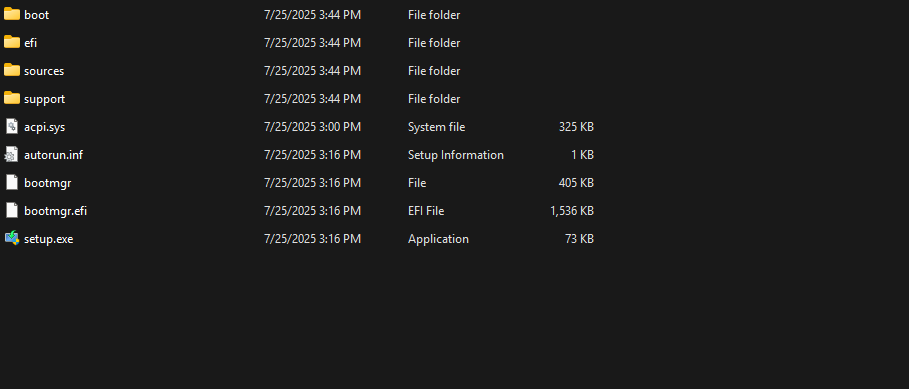
First, please let me know if you can download the files and if you have all of them (check the screenshot I sent to compare your files with the ones I have). After downloading, put them onto a USB key.
Then, boot from the USB key, open the Command Prompt in the setup, and copy the file acpi.sys from your USB key to C:\Windows\System32\drivers. You need to do this every time it reboots until the installation is complete.
So, when it reboots the first time to continue, go back into the setup, copy acpi.sys again, and do the same thing for the final reboot. Once Windows 7 is installed, you won’t need to do this anymore.
Tell me if you have any problems while installing it
Holy shit, it actually worked! Thank you so much!!
I was able to list the contents of my usb drive with no problem! Ironically though my external mouse got borrowed a couple days ago, but once i get that back or something else i should be able to control windows 7!
I may try extracting that install.wim to get that usb driver as a stand alone driver, but this is actually epic!
I’ll also probably try fixing internal keyboard (and maybe trackpad), and if i do figure it out i’ll update you on how i fixed it.
i might be able to help you make the trackpad work, here take these files and install the inf with this command: pnputil.exe /add-driver .\hidi2c.inf /install