[Request] Unlock HP Omen 17-CB000000

Hi, Thank you for watch this post.

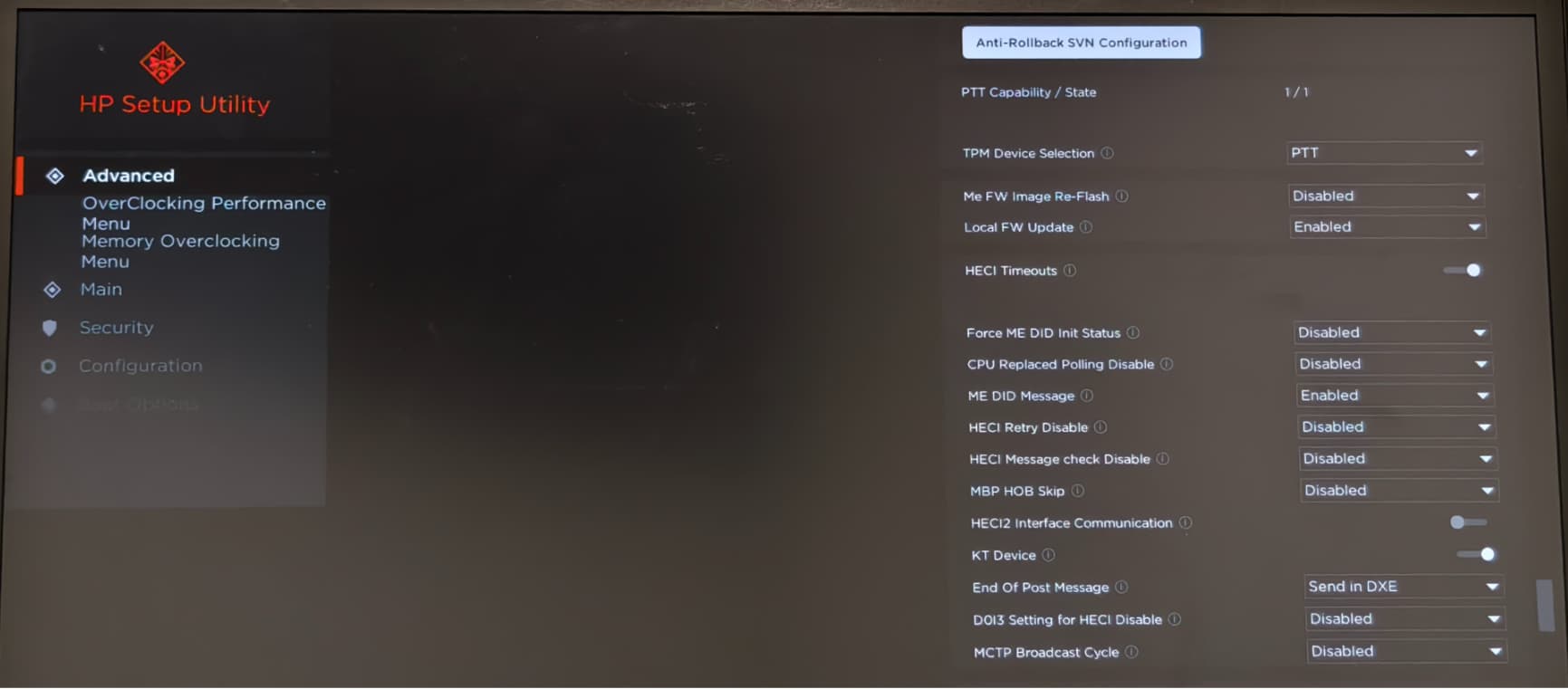
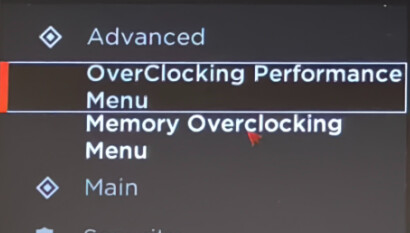
I’ve tried a lot, I can’t make Overclocking Performance Menu and Advanced shows together, and when i tried click Memory Overclocking Menu, the BIOS will just freeze.

So i’m thinking if this SREP config file have any problems that i’ve made ?

# All Menu List

# 4A 10 59 7B 0D C0 58 41 87 FF F0 4D 63 96 A9 15 11 27 ====> Main 0x2711
# 4A 10 59 7B 0D C0 58 41 87 FF F0 4D 63 96 A9 15 12 27 ====> Advanced 0x2712
# 4A 10 59 7B 0D C0 58 41 87 FF F0 4D 63 96 A9 15 13 27 ====> Chipset 0x2713
# 4A 10 59 7B 0D C0 58 41 87 FF F0 4D 63 96 A9 15 15 27 ====> Boot 0x2715
# 4A 10 59 7B 0D C0 58 41 87 FF F0 4D 63 96 A9 15 14 27 ====> Security 0x2714
# 4A 10 59 7B 0D C0 58 41 87 FF F0 4D 63 96 A9 15 16 27 ====> Save & Exit 0x2716
# 4A 10 59 7B 0D C0 58 41 87 FF F0 4D 63 96 A9 15 6A EA ====> Main 0xEA6A
# 4A 10 59 7B 0D C0 58 41 87 FF F0 4D 63 96 A9 15 6C EA ====> Configuration 0xEA6C
# 4A 10 59 7B 0D C0 58 41 87 FF F0 4D 63 96 A9 15 6D EA ====> Boot Options 0xEA6D
# 4A 10 59 7B 0D C0 58 41 87 FF F0 4D 63 96 A9 15 6B EA ====> Security 0xEA6B
# 4A 10 59 7B 0D C0 58 41 87 FF F0 4D 63 96 A9 15 6E EA ====> Exit 0xEA63
# 4A 10 59 7B 0D C0 58 41 87 FF F0 4D 63 96 A9 15 6F EA ====> UEFI HII Configuration 0xEA6F

# Accept Menu List

# 4A 10 59 7B 0D C0 58 41 87 FF F0 4D 63 96 A9 15 18 27 ====> Main 0x2718
# 4A 10 59 7B 0D C0 58 41 87 FF F0 4D 63 96 A9 15 19 27 ====> Security 0x2719
# 4A 10 59 7B 0D C0 58 41 87 FF F0 4D 63 96 A9 15 1A 27 ====> Configuration 0x271A
# 4A 10 59 7B 0D C0 58 41 87 FF F0 4D 63 96 A9 15 F2 29 ====> Boot Options 0x27F2
# 4A 10 59 7B 0D C0 58 41 87 FF F0 4D 63 96 A9 15 1B 27 ====> Exit 0x271B

# Blocked Menu List

# 4A 10 59 7B 0D C0 58 41 87 FF F0 4D 63 96 A9 15 10 27 ====> Setup 0x2710
# 4A 10 59 7B 0D C0 58 41 87 FF F0 4D 63 96 A9 15 11 27 ====> Main 0x2711
# 4A 10 59 7B 0D C0 58 41 87 FF F0 4D 63 96 A9 15 12 27 ====> Advanced 0x2712
# 4A 10 59 7B 0D C0 58 41 87 FF F0 4D 63 96 A9 15 13 27 ====> Chipset 0x2713
# 4A 10 59 7B 0D C0 58 41 87 FF F0 4D 63 96 A9 15 14 27 ====> Security 0x2714
# 4A 10 59 7B 0D C0 58 41 87 FF F0 4D 63 96 A9 15 15 27 ====> Boot 0x2715
# 4A 10 59 7B 0D C0 58 41 87 FF F0 4D 63 96 A9 15 16 27 ====> Save & Exit 0x2716
# 4A 10 59 7B 0D C0 58 41 87 FF F0 4D 63 96 A9 15 1C 27 ====> Debug 0x271C

Op Loaded
EsaFull

# Remove Setup from disabled region.
Op FastPatch
Pattern
4A10597B0DC0584187FFF04D6396A9151027
4A10597B0DC0584187FFF04D6396A9150000

# Remove Advanced from disabled region.
Op FastPatch
Pattern
4A10597B0DC0584187FFF04D6396A9151227
4A10597B0DC0584187FFF04D6396A9150000

# Replace Security to Advanced.
Op FastPatch
Pattern
4A10597B0DC0584187FFF04D6396A9151927
4A10597B0DC0584187FFF04D6396A9151227

# Replace Configuration to Overclocking Performance Menu.
Op FastPatch
Pattern
4A10597B0DC0584187FFF04D6396A9151A27
4A10597B0DC0584187FFF04D6396A9159927

# Replace Boot Options to Memory Overclocking Menu.
Op FastPatch
Pattern
4A10597B0DC0584187FFF04D6396A9151A27
4A10597B0DC0584187FFF04D6396A915A027

Op LoadFromFS
SuppressIFPatcher.efi
Op Exec

I’ve learned the disabled / enabled form from here, but the EsaFull is different for my device somehow.
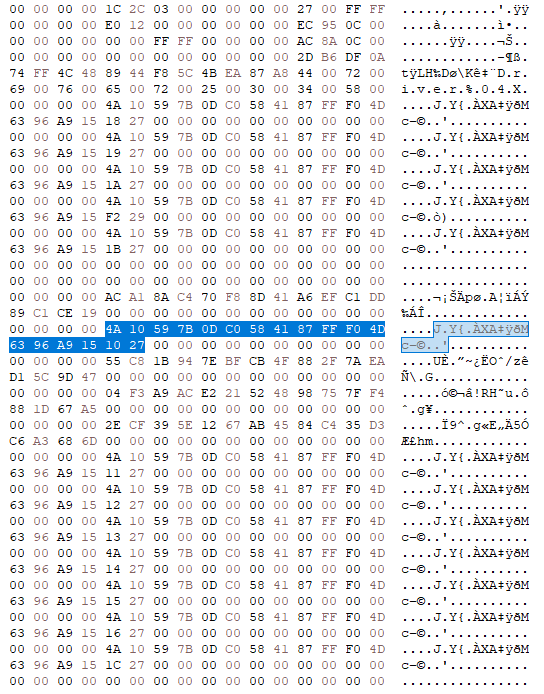

By using Setup form id, I’ve found the disabled region. But its different with the post i’ve linked before, Why ? And what is this in my case ?

Thank you for watching all of these.
BIOS.zip (9.4 MB)

EDIT:
By using the following codes to unlock the Setup from Disabled Region, BIOS will show a blank Setup page.

# Remove Setup from disabled region.
# Setup will be blank if it has been removed from disable region.
Op FastPatch
Pattern
4A10597B0DC0584187FFF04D6396A9151027
000000000000000000000000000000000000

I’m still trying to find where controls which menu should be visible, is it in the All Menu List ?

When i’m trying to replace Main(0x2718) to Advanced(0x2712) alone, there will be no any difference compare with original BIOS.
The actual Main Menu in the original BIOS seems like Main(0xEA6A) instead of Main(0x2718), And also other menus. I’ve also tried patch these, but still nothing changed. Why ?

EDIT:
Another attempt i’ve patched everything in All Menu List, the only thing i’ve saw in BIOS is the icon at the left of every menu option has gone.

Op Loaded
EsaFull

# Remove Setup from disabled region.
# Setup will be blank if it has been removed from disable region.
Op FastPatch
Pattern
4A10597B0DC0584187FFF04D6396A9151027
000000000000000000000000000000000000

# Remove Advanced from disabled region.
Op FastPatch
Pattern
4A10597B0DC0584187FFF04D6396A9151227
000000000000000000000000000000000000

# Replace Main in All Menu List 0xEA6A to Advanced 0x2712
Op FastPatch
Pattern
4A10597B0DC0584187FFF04D6396A9156AEA
4A10597B0DC0584187FFF04D6396A9151227

# Replace Main 0x2718 in Accept List to Advanced 0x2712
Op FastPatch
Pattern
4A10597B0DC0584187FFF04D6396A9151827
4A10597B0DC0584187FFF04D6396A9151227

Op FastPatch
Pattern
4A10597B0DC0584187FFF04D6396A9151127
4A10597B0DC0584187FFF04D6396A9151227

Op FastPatch
Pattern
4A10597B0DC0584187FFF04D6396A9151227

Op FastPatch
Pattern
4A10597B0DC0584187FFF04D6396A9151327
4A10597B0DC0584187FFF04D6396A9151227

Op FastPatch
Pattern
4A10597B0DC0584187FFF04D6396A9151527
4A10597B0DC0584187FFF04D6396A9151227

Op FastPatch
Pattern
4A10597B0DC0584187FFF04D6396A9151427
4A10597B0DC0584187FFF04D6396A9151227

Op FastPatch
Pattern
4A10597B0DC0584187FFF04D6396A9151627
4A10597B0DC0584187FFF04D6396A9151227

Op FastPatch
Pattern
4A10597B0DC0584187FFF04D6396A9156AEA
4A10597B0DC0584187FFF04D6396A9151227

Op FastPatch
Pattern
4A10597B0DC0584187FFF04D6396A9156CEA
4A10597B0DC0584187FFF04D6396A9151227

Op FastPatch
Pattern
4A10597B0DC0584187FFF04D6396A9156DEA
4A10597B0DC0584187FFF04D6396A9151227

Op FastPatch
Pattern
4A10597B0DC0584187FFF04D6396A9156BEA
4A10597B0DC0584187FFF04D6396A9151227

Op FastPatch
Pattern
4A10597B0DC0584187FFF04D6396A9156EEA
4A10597B0DC0584187FFF04D6396A9151227

Op FastPatch
Pattern
4A10597B0DC0584187FFF04D6396A9156FEA
4A10597B0DC0584187FFF04D6396A9151227

Op LoadFromFS
SuppressIFPatcher.efi
Op Exec
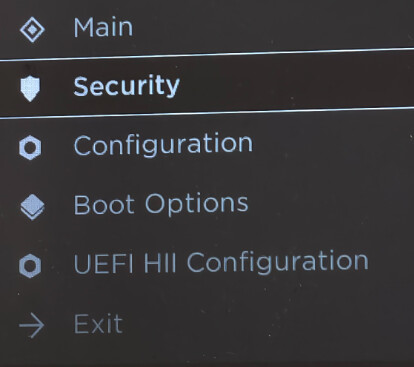
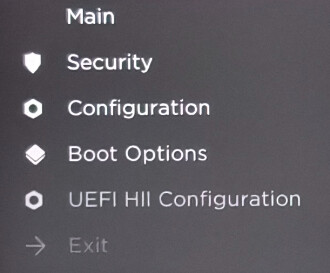
The UEFI HII Configuration only contains by All Menu List, But patch it still with no effect, I can’t understand this, Why ?

EDIT:
I‘ve found why the patch will fail. SREP patched the Form in the All Menu List instead of Block List, Which is why they’re still hidden.
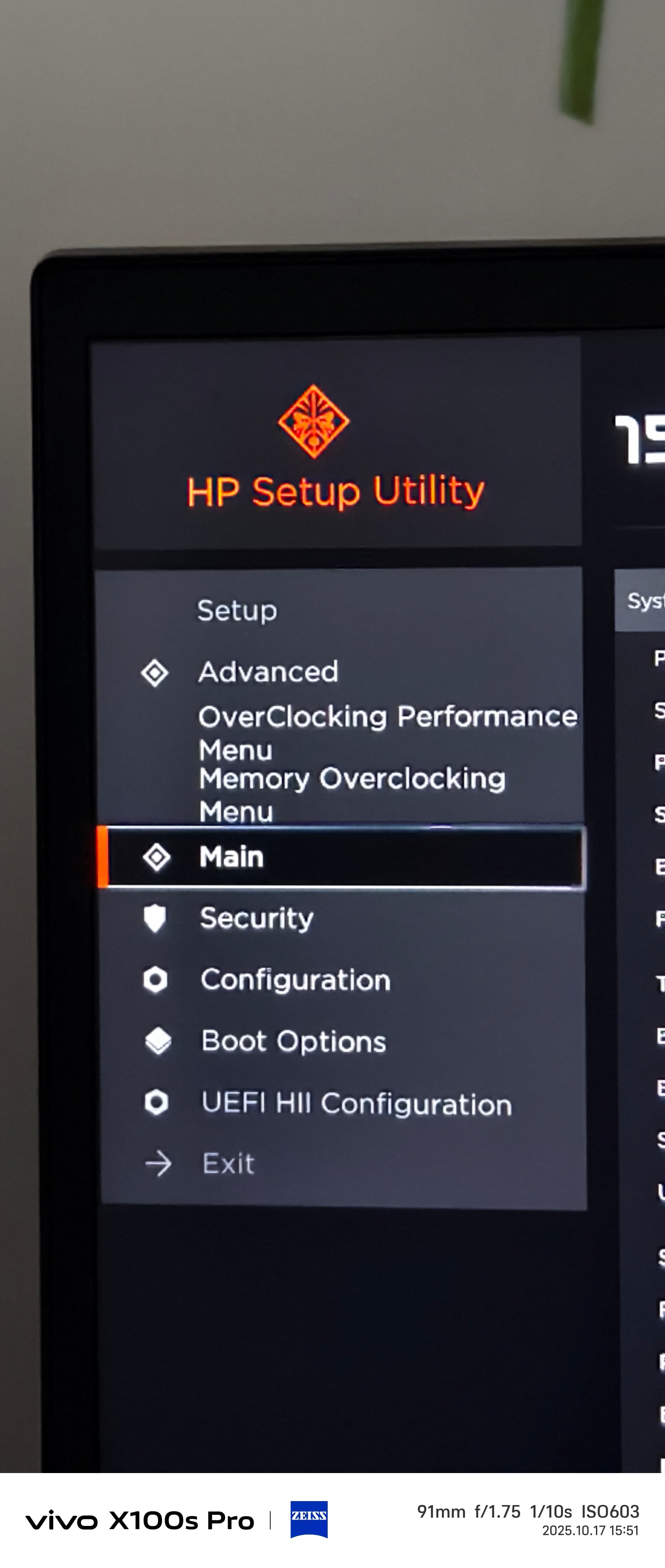
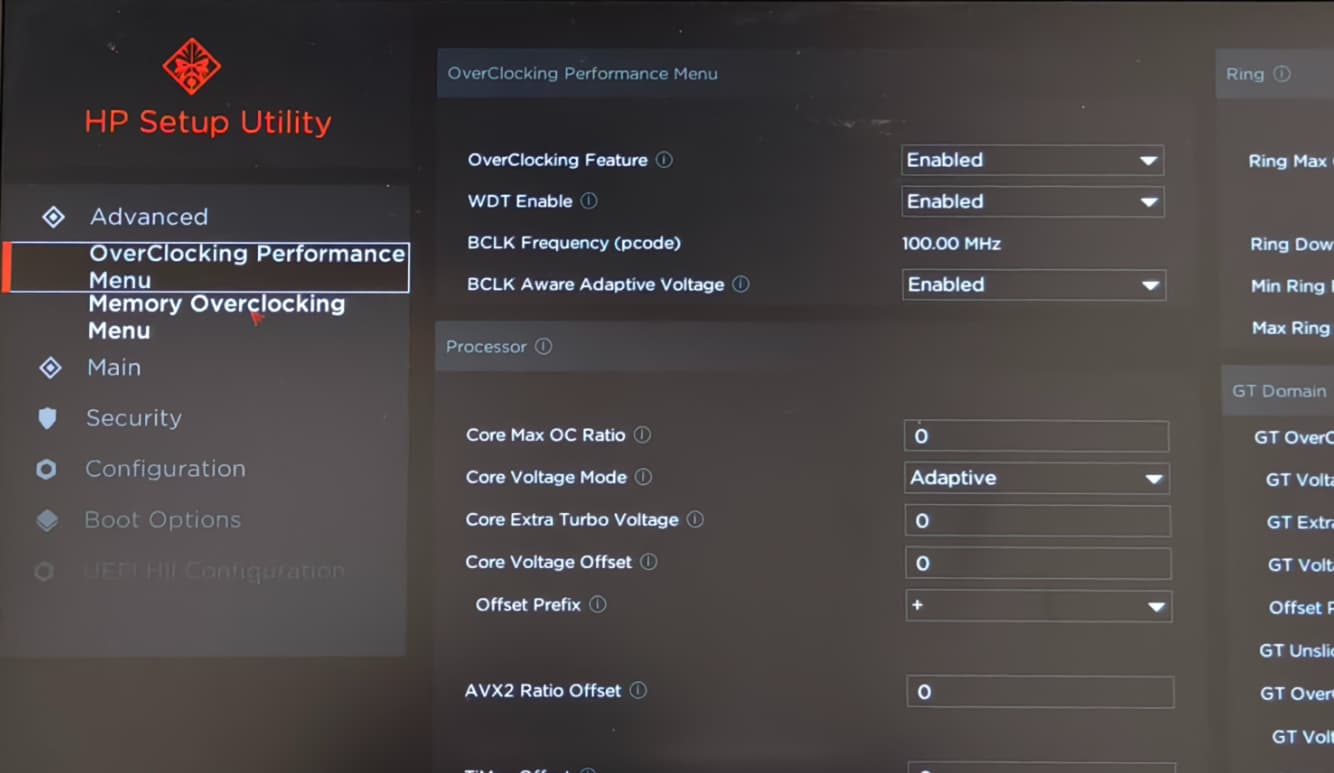
After solved this issue, I’ve successfully show Advanced, Overclocking Performance Menu, Memory Overclocking Menu. Which only Overclocking Performance Menu works fine, Advanced will work in UMAF but not my patch. When i click the other two menus, the BIOS will just freeze without any difference, Can someone help me solve this or explain why ? Thank you !
SuppressIFPatcher.efi can cause this. Have you tried without it?

Hi, Sorry for i just saw. The email sync was delayed.

I’ve tried 5 minites ago, and it will still freeze. I’ve also found that every menu has been expanded for no reason. This makes Advanced menu missing some options i rmb.

I was not at home now, But can quickly back.

Now at home.

# Op Loaded
# Setup

# Op FastPatch
# Pattern
# 0F0F16021702CB000000FFFF0057270A821206690E000005914A044B04CC000100A208101000010009070400000000
# 0F21B613020003000000FFFF00990001004A10597B0DC0584187FFF04D6396A9152902290229022902290229022902

# All Menu List

# 4A 10 59 7B 0D C0 58 41 87 FF F0 4D 63 96 A9 15 11 27 ====> Main 0x2711
# 4A 10 59 7B 0D C0 58 41 87 FF F0 4D 63 96 A9 15 12 27 ====> Advanced 0x2712
# 4A 10 59 7B 0D C0 58 41 87 FF F0 4D 63 96 A9 15 13 27 ====> Chipset 0x2713
# 4A 10 59 7B 0D C0 58 41 87 FF F0 4D 63 96 A9 15 15 27 ====> Boot 0x2715
# 4A 10 59 7B 0D C0 58 41 87 FF F0 4D 63 96 A9 15 14 27 ====> Security 0x2714
# 4A 10 59 7B 0D C0 58 41 87 FF F0 4D 63 96 A9 15 16 27 ====> Save & Exit 0x2716
# 4A 10 59 7B 0D C0 58 41 87 FF F0 4D 63 96 A9 15 6A EA ====> Main 0xEA6A
# 4A 10 59 7B 0D C0 58 41 87 FF F0 4D 63 96 A9 15 6C EA ====> Configuration 0xEA6C
# 4A 10 59 7B 0D C0 58 41 87 FF F0 4D 63 96 A9 15 6D EA ====> Boot Options 0xEA6D
# 4A 10 59 7B 0D C0 58 41 87 FF F0 4D 63 96 A9 15 6B EA ====> Security 0xEA6B
# 4A 10 59 7B 0D C0 58 41 87 FF F0 4D 63 96 A9 15 6E EA ====> Exit 0xEA63
# 4A 10 59 7B 0D C0 58 41 87 FF F0 4D 63 96 A9 15 6F EA ====> UEFI HII Configuration 0xEA6F

# Accept Menu List

# 4A 10 59 7B 0D C0 58 41 87 FF F0 4D 63 96 A9 15 18 27 ====> Main 0x2718
# 4A 10 59 7B 0D C0 58 41 87 FF F0 4D 63 96 A9 15 19 27 ====> Security 0x2719
# 4A 10 59 7B 0D C0 58 41 87 FF F0 4D 63 96 A9 15 1A 27 ====> Configuration 0x271A
# 4A 10 59 7B 0D C0 58 41 87 FF F0 4D 63 96 A9 15 F2 29 ====> Boot Options 0x27F2
# 4A 10 59 7B 0D C0 58 41 87 FF F0 4D 63 96 A9 15 1B 27 ====> Exit 0x271B

# Blocked Menu List

# 4A 10 59 7B 0D C0 58 41 87 FF F0 4D 63 96 A9 15 10 27 ====> Setup 0x2710
# 4A 10 59 7B 0D C0 58 41 87 FF F0 4D 63 96 A9 15 11 27 ====> Main 0x2711
# 4A 10 59 7B 0D C0 58 41 87 FF F0 4D 63 96 A9 15 12 27 ====> Advanced 0x2712
# 4A 10 59 7B 0D C0 58 41 87 FF F0 4D 63 96 A9 15 13 27 ====> Chipset 0x2713
# 4A 10 59 7B 0D C0 58 41 87 FF F0 4D 63 96 A9 15 14 27 ====> Security 0x2714
# 4A 10 59 7B 0D C0 58 41 87 FF F0 4D 63 96 A9 15 15 27 ====> Boot 0x2715
# 4A 10 59 7B 0D C0 58 41 87 FF F0 4D 63 96 A9 15 16 27 ====> Save & Exit 0x2716
# 4A 10 59 7B 0D C0 58 41 87 FF F0 4D 63 96 A9 15 1C 27 ====> Debug 0x271C

Op Loaded
EsaFull

# Remove Advanced 0x2710 from Deny List
Op FastPatch
Pattern
4A10597B0DC0584187FFF04D6396A915122700000000000000000000000000004A10597B0DC0584187FFF04D6396A9151327
00000000000000000000000000000000000000000000000000000000000000004A10597B0DC0584187FFF04D6396A9151327

# Replace Chipset 0x2713 in All Menu List with Memory Overclocking Menu 0x27A0
Op FastPatch
Pattern
4A10597B0DC0584187FFF04D6396A91513270000091000004A10597B0DC0584187FFF04D6396A9151527
4A10597B0DC0584187FFF04D6396A915A0270000091000004A10597B0DC0584187FFF04D6396A9151527

# Replace Main 0x2718 in Accept List to Advanced 0x2712
Op FastPatch
Pattern
4A10597B0DC0584187FFF04D6396A9151827
4A10597B0DC0584187FFF04D6396A9151227

# Replace Security 0x2719 in Accept List to Overclocking Performance Menu 0x2710
Op FastPatch
Pattern
4A10597B0DC0584187FFF04D6396A9151927
4A10597B0DC0584187FFF04D6396A9159927

# Replace Configuration 0x271A in Accept List to Memory Overclocking Menu 0x27A0
Op FastPatch
Pattern
4A10597B0DC0584187FFF04D6396A9151A27
4A10597B0DC0584187FFF04D6396A915A027

# Op LoadFromFS
# SuppressIFPatcher.efi
# Op Exec

This is my full SREP Config file, Currently, I’ve deleted the Setup unhide codes, Which now the Advanced and Overclocking Performance Menu shows but all expended.

The Memory Overclocking Menu will still lead to freeze even if i run without SuppressIFPatcher.efi.

I’ve think if it is because Memory Overclocking Menu is not in All List Menu, but as you can see, it still freeze.

EDIT:


I’ve checked, seems every option in Advanced menu has shown. But as you can see my mouse was put at Memory Overclocking Menu, and after click it freeze.

Idk then. Every time (three times, to be exact) I provided an Omen laptop user with an unlock script, they were ghosting me. So I got no results if srep works for this Aptio UI until this day. I bet the problem was in SuppressIFPatcher, but it didn’t turn out to be true. And I have no other idea to offer, which would worth your time.

Sad to hear that. The Memory Overclocking Menu actually works when you manually change the value in RU. Somehow it will cause BIOS freeze.

But if you have any other ideas, i can give a try, i’m free for a short of time, at least for days since im waiting for my new laptop.

And also, A digression, I’ve search and found the Insyde leaked source code, but the event callback system makes me hard to find where the SetupUtilityApp has been called, i’ve tried some points but it will not fire.
And i think Access Denied might also happen when BIOS launch the SCU by itself ? Or the bios just use protocol not gBS->StartImage to start the SCU, Which could be the way to solve the issue.

Shady one, but yes. I’ve just read you know how to use RU. I think you could open computer RAM contents using RU browser after srep finished working, and get to the location of Memory Ocing Menu. After that, compare the whole Form with the original copy. Shouldn’t be too difficult if you have multiple computers.
You can get the offset of Setup driver from srep’ log. And offset of the form from IFR or manual hex search.

This all needed in case if srep is buggy. Idk for sure if the issue is in updated srep or in the Omen bios.

Ah well, RU is not a option for me because i want make it unlock as what other options are.

But still thank you. I’ve tried RU years before and found that this laptop’s memory does not supports to overclock to a very high frequency and grants performance boost.

The most important stuff is HP has locked the PL4 in EC, which at max 180W pl4 does not enough while i’m playing games that will use 100 ~ 150W of graphic card.

If there are any option can decrease graphic card’s tdp or just patch the ec (i think it is impossible?), then it is awesome.

It may be HP BIOS, my current BIOS version is still in the 2022 version.

Speaking of which, your SREP 0.2.0 cannot run properly on my HP Laptop, whether it is QEMU or a physical machine, it ends without printing any logs, similar to program crashes.

Possible when you have sources and a programmer, but don’t wanna develop the idea further. I’m newbie in this.

I think you don’t know other functions but variable editor? Ok, forget about my suggestion.

Yep, there’s something went wrong with 0.2.0, tho the version is not much different from 0.1.9. I encountered the same problem a week ago on an Acer laptop. srep 0.2.0 couldn’t start from Uefi Shell command prompt, but started perfectly when placed to EFI folder and renamed to bootx64.efi. This is insane.

If you mean RU, yes, I only know that it can use to edit the variable values.

But anyway, thank you for your reply and help!

1 Like

If the EC is going to be patched (or the BIOS image for that matter), it is very possible that they’ll need to patch HP_BBUpdate to avoid getting the “BIOS corruption has been detected” screen to bypass signature checks.

There’s another thread that discussed this a while ago: https://winraid.level1techs.com/t/tips-hp-omen-series-laptop-bios-mod/96409

Though it is out of date by a fair bit, I used that thread to guide myself in patching my laptop’s HP_BBUpdate, which I talked about a little bit in the thread where I was facing issues getting hidden menus to show in the Setup Utility.