[Tool] Universal Intel WiFi & Bluetooth Drivers Updater

Universal Intel Wi-Fi and Bluetooth Drivers Updater

Project: github.com/FirstEverTech/Universal-Intel-WiFi-BT-Updater
Download: WiFi-BT-Updater-2026.06.0007-Win10-Win11.exe
Version: 2026.06.0007
Release Date: June 11, 2026

Universal Intel Wi-Fi and Bluetooth Drivers Updater is an advanced, security-focused tool that automatically detects
your Intel wireless hardware and installs the latest official Wi-Fi and Bluetooth drivers with enterprise-grade safety measures.

This project was built through a pragmatic collaboration between human expertise and AI-assisted tooling.

Why This Tool Exists
Intel distributes Wi-Fi and Bluetooth drivers as large CAB packages — but your system only needs the version that matches your specific adapter.
This tool automatically identifies your hardware, fetches the correct driver package from official sources, verifies its integrity, and installs it cleanly — nothing more, nothing less.

For a detailed technical breakdown and historical context, see:
Deploying Universal Intel Wi-Fi and BT Drivers Updater via MDM

Community & Project Maintenance
This project would not exist without the community support.

PowerShell Gallery: www.powershellgallery.com/packages/unive…ver-updater

Install in PowerShell (Admin):

PS> Install-Script -Name universal-intel-wifi-bt-driver-updater

Update in PowerShell (Admin):

PS> Update-Script -Name universal-intel-wifi-bt-driver-updater

Run in PowerShell (Admin):

PS> universal-intel-wifi-bt-driver-updater

The tool uses new databases:

Project implementation: Marcin Grygiel – tool logic, reverse engineering, testing, documentation
PowerShell code: Free versions of DeepSeek 70% / ChatGPT 10% / Claude 20%

2 Likes

In just one day (12 hours of focused work) I managed to push the Universal Intel Wi-Fi and Bluetooth Drivers Updater project three months forward by porting the engine from my other tool, Universal Intel Chipset Device Updater .

Changelog

All notable changes to the Universal Intel Wi-Fi and Bluetooth Drivers Updater project will be documented in this file. The format is based on Keep a Changelog, and this project adheres to Semantic Versioning.


[2026.03.0002] - 2026-03-16

Added

  • PowerShell Gallery Publishing: Script available via Install-Script universal-intel-wifi-bt-driver-updater
  • Multi-Database Support: -beta flag uses intel-wifi-driver-beta.md / intel-bt-driver-beta.md; -developer flag uses dev databases; default behavior unchanged (stable *-latest.md)
  • Dynamic Support Message: Credits screen loads support message from GitHub (data/intel-wifi-bt-message.txt) at runtime with inline color tag support; falls back to built-in static version if GitHub is unreachable
  • Help System Unified: -help and -? now show identical output via native Get-Help
  • Improved Console Exit: When launched from a PowerShell console (not SFX), screen is cleared after credits and a clean thank-you message is displayed before returning to the prompt

Changed

  • Architecture Rebuilt — BAT Launcher Retired: Universal-Intel-WiFi-BT-Updater.bat removed from the release; the script now auto-elevates natively; tool distributed exclusively as PS1 (for administrators) or SFX EXE (for end users)
  • Script Renamed: From Universal-Intel-WiFi-BT-Updater.ps1 to universal-intel-wifi-bt-driver-updater.ps1 to align with PSGallery naming convention
  • Path Handling: Replaced hardcoded C:\Windows\Temp and C:\ProgramData with $env:SystemRoot and $env:ProgramData for compatibility with non-standard Windows installations
  • Auto Mode Cleanup: Removed unnecessary wait at the end of -auto / -quiet runs — script exits immediately after completion

Technical Improvements

  • Boolean Flags: Refactored $DebugMode and $SkipSelfHashVerification from integer 0/1 flags to native PowerShell [bool] types
  • Dual Independent Detection: Wi-Fi (PCI bus, VEN_8086) and Bluetooth (USB bus, VID_8087) detected and installed independently
  • Bluetooth Device Fallback: BT detection attempts Bluetooth device class first, then falls back to full USB bus scan (VID_8087)
  • Version Comparison: Replaced string comparison with [version] cast for correct multi-part driver version handling
  • Code Cleanup: Removed redundant wrapper functions — logic inlined directly into core verification routines
  • Consistency: Replaced all cls alias occurrences with Clear-Host
  • Logging: All actions written to %ProgramData%\wifi_bt_update.log with timestamps and severity levels

Security

  • Maintained Integrity Checks: Self-hash SHA-256 verification and Intel Authenticode digital signature validation remain intact
  • Secure Temporary File Handling: Automatic cleanup of all temporary files after completion

[v24.0 (2025.11)] - 2025-11-xx — Legacy Release

Added

  • Initial Public Release of Universal Intel Wi-Fi and Bluetooth Drivers Updater
  • Automatic Hardware Detection: Scans for Intel Wi-Fi and Bluetooth adapters
  • Wi-Fi and Bluetooth Support: Wi-Fi 5 (AC) / Wi-Fi 6 (AX) / Wi-Fi 6E (AXE) / Wi-Fi 7 (BE) and Bluetooth
  • Dual-Script Architecture: BAT launcher (Universal-Intel-WiFi-BT-Updater.bat) for UAC elevation + PowerShell script for core functionality
  • SHA-256 Hash Verification: Every downloaded CAB package validated before installation
  • System Restore Point Creation: Automatic restore point before any driver changes
  • Digital Signature Validation: Verification of Intel Authenticode certificates

Security

  • Multi-layer Verification: SHA-256 hash checks + Intel digital signature validation
  • Administrator Rights Required: Mandatory elevation via BAT launcher for system-level operations
  • Dual-Source Download: Primary and backup download sources for reliability

Release Notes Format

Version Naming Convention

  • YYYY.MM.REVISION format (e.g., 2026.03.0002)
  • Date component reflects release year and month
  • Revision number increments with each update

Categories Used

  • Added: New features and capabilities
  • Changed: Modifications to existing functionality
  • Fixed: Bug fixes and issue resolutions
  • Security: Security-related improvements and fixes
  • Deprecated: Features marked for future removal (if applicable)
  • Removed: Features removed in this version (if applicable)

Caution:

v2026.03.0002 users: If you encounter a hash verification error, please download v2026.03.0003 manually. This was caused by an incorrect filename in the auto-update URL — fixed in v2026.03.0003.

Changelog​

All notable changes to the Universal Intel Wi-Fi and Bluetooth Drivers Updater project will be documented in this file. The format is based on Keep a Changelog, and this project adheres to Semantic Versioning.


[2026.03.0003] - 2026-03-21​

Release Notes: Release v2026.03.0003 - Release Notes · FirstEverTech/Universal-Intel-WiFi-BT-Updater · GitHub
Direct Download: WiFi-BT-Updater-2026.03.0003-Win10-Win11.exe

Added​

  • Microsoft WHCP Digital Signature Verification: All downloaded CAB driver packages are now verified against the Microsoft Windows Hardware Compatibility Publisher certificate before installation — after SHA-256 hash check and before expand.exe extraction; installation is aborted on any failure; security architecture is now fully symmetric with Universal Intel Chipset Device Updater
  • Legacy Device Support: Database files (intel-bt-driver-latest.md, intel-wifi-driver-latest.md) now support optional per-device Latest Version and Release Date columns; a dedicated ## Legacy Devices section tracks EOL devices with their last available driver version; script displays [LEGACY] indicator and installs the correct last-available CAB automatically — no script update required when Intel discontinues a device
  • First Legacy Entry: Intel AX200 Bluetooth (PID 0029) — dropped by Intel in 24.10.0.4 (11/10/2025); Wi-Fi for AX200 remains fully supported
  • Per-DEV Wi-Fi Download Blocks: intel-wifi-drivers-download.txt rebuilt to support per-device CAB blocks, mirroring the existing BT parser structure; global header ensures full backward compatibility with v2026.03.0002
  • Auto-Launch After Update Download: After downloading a newer version, the updater now prompts to exit and launch the new version automatically (Start-Process + exit 100) — consistent with Universal Intel Chipset Device Updater behavior
  • Expanded Wi-Fi Hardware Coverage: Added 5 previously missing adapter DEV IDs — AX203 (2030), AX101 (1010), Wireless-AC 9260 (9260), Wireless-AC 9461 (9461), Wireless-AC 9462 (31DC)
  • .ICONURI in PSScriptInfo: PowerShell Gallery listing now displays the project icon

Fixed​

  • pnputil Exit Code Handling: Both pnputil /add-driver and pnputil /update-device calls now correctly handle all real-world exit codes — 259 (driver already staged), 1 (device already on best driver, relevant for force reinstall), 3010 (success, reboot required); force reinstall now works correctly in all scenarios
  • Auto-Update Filename: Download URL corrected from WiFiBT-Updater-* to WiFi-BT-Updater-* to match actual release filenames; v2026.03.0002 users who encounter a hash error during auto-update should download v2026.03.0003 manually
  • $isSFX Detection Pattern: Pattern corrected to match actual script filename universal-intel-wifi-bt-driver-updater*

Security​

  • WHCP Digital Signature Verification: See Added section above

Update: 11/06/2026

Project: github.com/FirstEverTech/Universal-Intel-WiFi-BT-Updater
Download: WiFi-BT-Updater-2026.06.0007-Win10-Win11.exe
Version: 2026.06.0007

:new_button: Highlights

I have aligned the self-update mechanism with the Universal Intel Chipset Device Updater:

  • When the updater is installed from the PowerShell Gallery (Install-Script) it will now update itself in-place using Update-Script .
  • If the user accepts the update, the existing PSGallery installation gets upgraded automatically - no manual download required.

Additionally, I fixed an issue with dual driver updates (Wi-Fi + Bluetooth):

  • Previously, the Wi-Fi driver was installed first, which often disconnects the network for 1-3 seconds. The subsequent Bluetooth CAB download would then fail.
  • In v2026.06.0007 the order is swapped: Bluetooth first (does not affect network), Wi-Fi second (may disconnect, but no further downloads are needed).

Both changes are fully backward compatible.

Regards,
Marcin

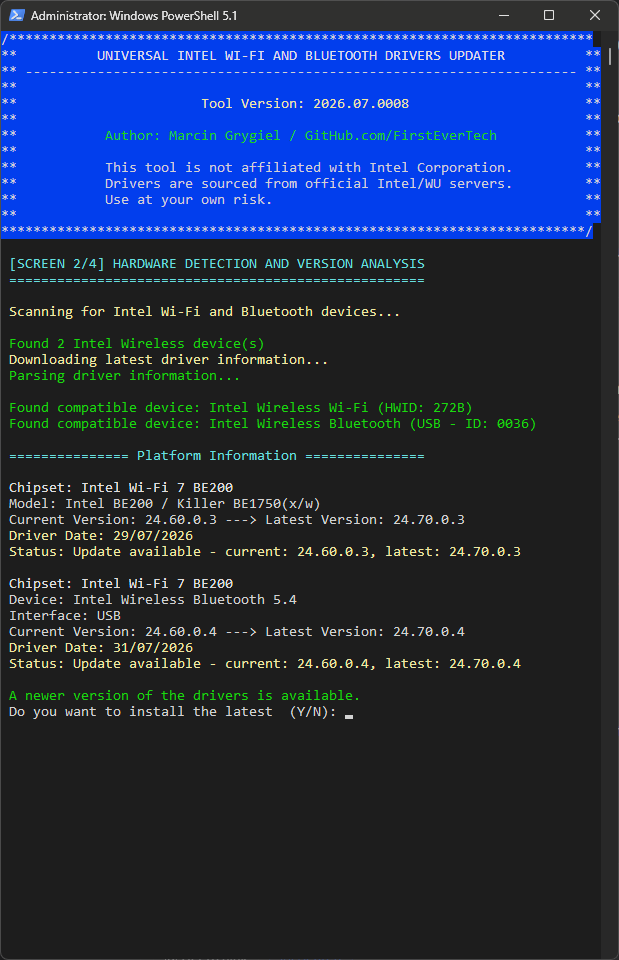
Update: 14/08/2026

I’ve just added new Intel Wireless Wi-Fi and Intel Wireless Bluetooth drivers to the updater database:

Screenshot2026-08-14093512.png

The Universal Intel Wi‑Fi & Bluetooth Drivers Updater code itself remains unchanged.