ASUS implies that many of its LGA 1151 socket motherboards feature a TPM 2.0 module and support its activation, having issued the following statement:
“A wide range of ASUS motherboards are ready for the latest Windows 11. Users can enable Windows 11 support on their motherboards by following one of the two methods below:”
So, is this true? Or is ASUS being untruthful?
Let’s take a look:
There are some explanations at this link.
And they also wrote a statement like this: “The following motherboards are compatible with Windows 11 under current testing. The upgrability is subject to the support from operation system or 3rd party drivers availability.”
As seen in the image, there is a list of ASUS LGA 1151 socket motherboards that support Windows 11.
I investigated this matter and made the following observations based on my own experience:
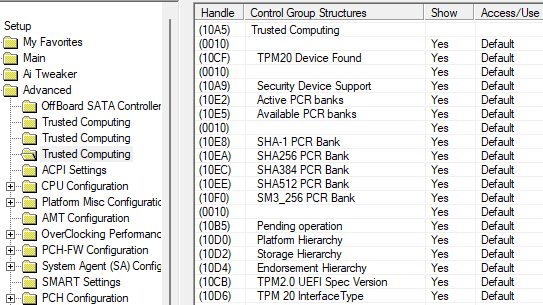
1- Although many ASUS LGA 1151 motherboards actually contain a TPM 2.0 module, the “PCH-FW” option or line required to access it is missing from the BIOS; consequently, PTT cannot be enabled.
In short, this menu has been set to “hidden.”
So, how is an average user supposed to enable it?
Suggestion: ASUS should release new BIOS files that make the hidden line I mentioned visible.
2- For instance, although the “ASUS Z170-P D3” appears on the list of supported motherboards mentioned above, I discovered—despite all my efforts to modify the BIOS files—that this motherboard does not actually have a TPM 2.0 module at all.
Doesn’t that mean ASUS has misled us?
This list of points could actually be expanded further.
In the meantime, I was curious, so I submitted a request to ASUS regarding the “ASUS Z170-P D3” motherboard—either asking a question or requesting a new BIOS file.
Let’s see what happens.
@ismailTPC_Hastanesi
Thank you very much for your interesting contribution.
Since your thread has not much to do with the “BIOS Modding/Flashing Tools” Category, I have moved is into the better matching “Windows 11” Category.
Please shorten your chosen thread title for being visible even by devices with a small display.
My proposal: “[Win11] TPM 2.0 Support of ASUS LGA 1151 MBs”
Thanks for the suggestion.
People like me can already enable this hidden menu.
But the real question is: what is an average user supposed to do?
As I actually wrote above:
“So, how is an average user supposed to enable it?”
Isn’t Asus aware of this?
Why don’t they release a new BIOS update for LGA 1151 socket motherboards?
One of the motherboards they claim supports Windows 11 is the “ASUS Z170-P D3”.
I have this motherboard right now, and interestingly, even after making the “PCH-FW” line visible, it turned out there was no TPM module.
Could this be because the ASUS Z170-P D3 supports DDR3 RAM?
I found this very interesting, because the “ASUS Z170-P D3” is included in the list above.
For now, this is the specific ASUS LGA 1151 motherboard where I’ve confirmed the absence of a TPM 2.0 module.
Who knows how many other motherboards are like this?
The images below reveal everything.
That’s a really old statement from Asus and their never finished most of those upgrade bioses to include PPT. So that’s why there are no other options after unlocked PCH-FW.
I may be wrong but i have a slightly recall of seeing a couple of ASUS Intel 100 Series with PPT bios code already visible or to unlock…or a user mod/non-public on a certain Asus model, can’t really remember.
Could the interesting aspect of this matter be that the ASUS Z170-P D3 supports DDR3 RAM?
Most 1151 motherboards support DDR4 RAM.
When I examined the BIOS of the ASUS Z170-P D3 motherboard, I noticed—for the first time—that there was absolutely no TPM 2.0 module; it simply wasn’t there to begin with.
Weren’t these features standard on socket 1151 motherboards?
Or am I mistaken or making a mistake somewhere?
If the 1151 motherboards on the list support Windows 11, why is the PCH-FW tab missing—or hidden in a secret menu—when accessing the BIOS on certain ASUS 1151 motherboards?
This might be off-topic, but I frequently test ASUS socket 1151 motherboards that come my way and try to enable Xeon processor support on them.
Naturally, I first examine the official BIOS files, observing the locations of the modules and the changes made firsthand.
This gives me the opportunity to analyze 100-series motherboards as well as the 200 and 300-series socket 1151 boards.
I observe how Intel ME modules have evolved over time; specifically, how new blocking modules were added via updates following user efforts to disable the HAP-BIT flag through reverse engineering.
Enabling Xeon support is quite difficult on B360-series motherboards because they switched to the ME v12.x.xx series.
It is clear that the Asus H170M-E D3 is not a motherboard sold at retail. As you noted, the “ME” designation implies an enterprise-grade component, suggesting it was part of a pre-built system sold in bulk.
I find systems like this—often sold to government agencies via public tenders—to be particularly problematic.
Why is that?
Because no manager in a government agency or corporation wants a gaming-oriented system that might distract an employee from their work.
If that were the case, the employee might spend all day gaming; consequently, tender specifications often mandate specific, non-standard motherboard features to prevent this.
For instance, I recently got my hands on an MSI 1151 motherboard. It had clearly been used in a government agency; despite being an MSI board, it lacked many standard BIOS modules and wouldn’t even accept the official BIOS update file from MSI’s website.
This indicates that MSI had prepared a custom BIOS version specifically to meet those requirements.
The curious part is that even when I enable Secure Boot, I cannot see the TPM 2.0 module—which is physically present on the board—in either the BIOS or the Device Manager.
No no…this board was bought new by 84,89€ on 23/07/2017, on my country retail shop online, as a gift to my son for his (past) new build at the time. I wanted to keep his Kingston 16Gb DDR3 CL9 kit.
So, to clarify the situation:
Wouldn’t the enterprise-grade motherboard used in your country also be available for retail sale?
Does this motherboard have a TPM 2.0 module? Is it visible in the BIOS? Or is it enabled?
It’s not really an “enterprise-grade”…besides using the H170…this is where the CSME SKU has big differences, didn’t even saw this board as “enterprise-grade” on Asus list, this board was listed as consumer retail at the time…this is basically a H170M-PLUS model, we may say.
You can see a lot of new boards, these days…with Intel H series, sold new as consumer models.
I tested several ASUS LGA 1151 socket motherboards that support DDR3 RAM.
Result:
When checking via the BIOS and the desktop, the TPM 2.0 module was still not visible.
I managed to make the TPM 2.0 module visible by modifying the BIOS files of some of the motherboards I tested.
If anyone owns the motherboards listed below, they can test them and check for themselves whether the TPM module is active.
This Wednesday evening i can confirm what’s available on the board features, there’s no 14pin external TPM2.0 module on the header, we never bought one for it.
@MeatWar I’m really looking forward to Wednesday. Let’s see if the motherboard you have is the same.
I received a reply today to the request I submitted to ASUS three days ago.
The fact that Asus responded means they are fulfilling their responsibility toward the customer.
Thanks, Asus.
Guess what their reply was?
Here is the response I received:
Dear Valued ASUS Customer,
Thank you for contacting ASUS.
Following our review, we have identified that your device does not have TPM 2.0 support. Therefore, it is unfortunately not possible for us to provide a BIOS version that would enable TPM 2.0 functionality for your motherboard.
Additionally, as indicated on your device’s driver support page, official drivers are only provided up to Windows 10. For this reason, we do not recommend installing the Windows 11 operating system on this device.
We understand that this information may not be the answer you were hoping for. However, given the current hardware limitations and available driver support, there are no alternative solutions we can offer regarding this request.
Expected from ASUS…they have a position in the Global market that can afford to ignore users, they have set their own Product Life expectation to deserve such attention, they are a “Money” machine company with good products…and thats it.
EDIT: Just checked today on my son’s wife PC, no way…as you already noticed, this (Asus H170M-E D3) SKU has AMT enable, Secure Boot…but no PPT. Seems you’re right, that only DDR4 boards will have chance.
@MeatWar I’m sorry to hear that, and unfortunately, you’ve confirmed that I was right all along.
Given the arguments and claims I’ve put forward from the very beginning, to put it briefly: we can say ASUS has misled or deceived us.
In that case, far from merely questioning the accuracy of the information on this page, it is blatantly obvious that the data is designed to deceive and mislead the user.
Search engines index and process this information, effectively presenting incorrect data to users—largely because there is a prevailing assumption that ASUS wouldn’t provide false or erroneous information.
What do AI systems actually do?
When you ask them a question, they present the information provided by the company as if it were the absolute truth.
This implies that AI systems lack the capability to synthesize, analyze, and cross-reference information to definitively produce accurate facts. Of course, that doesn’t mean they are useless.
But ultimately, they rely on a pitiful database and can propagate misinformation.
Let me give you an example:
I asked Google’s “Gemini” AI a question.
Look at the answers it gave me.
These didn’t help me. Isn’t there an easier BIOS update program?
Unfortunately, Asus’s official EZ Flash utility or software like Asus AI Suite / EZ Update (used within Windows) will strictly refuse to flash modified BIOS files.
These official programs verify the file, flag it as “not original/safe,” and abort the process.
Since running a Xeon v6 processor on a Z270 motherboard is not an officially supported configuration, there is no “one-click” easy utility provided by manufacturers for this purpose.
The latest and relatively easiest desktop-based method you can try—without purchasing an external CH341A programmer or using complex command-line instructions—is the “AfuWin” (AMI Firmware Update) method.
This method offers a clickable interface (program window) instead of requiring you to type command-line arguments.
It is used to force-flash American Megatrends (AMI)-based Asus BIOSes from within Windows.
Download the Necessary Tools: Download the AFUWINx64 (AMI Firmware Update Utility for Windows) program from the internet.
Prepare Your BIOS File: Rename the Xeon-compatible modified BIOS file—whether prepared earlier with CoffeeTime or found online—to mod.rom.
Run the Program as Administrator: Right-click on Afuwinx64.exe and select “Run as administrator.”
Select the File: Once the program opens, click the “Open” button and select the mod.rom file you prepared.
Disable Protections (Important): Navigate to the “Setup” or “Options” tab in the program. Check the boxes for “Do Not Check NVRAM,” “Program All Blocks,” and any available options to bypass “Capsule” or “Secure Boot” checks.
These settings instruct the program to bypass Asus’s security restrictions. Flash: Return to the main screen and press the “Flash” button. The program will begin the flashing process, indicated by green blocks. Once the process is complete, restart your computer and install your Xeon processor.
What if this method also results in an error?
If the AfuWin program returns an error such as “Size Mismatch,” “Security Verification Failed,” or “Write Protected,” it means Asus has completely locked (at the hardware level) the ability to flash the BIOS from the desktop on this motherboard.
In this scenario, no desktop software in the world can bypass that lock.
Forcing the process further could damage the motherboard’s chip and cause your computer to stop booting entirely (bricking it).
Technically, the only definitive and risk-free solution is to acquire a CH341A USB programmer clip—which can be found online very cheaply—or to remove the motherboard and take it to a computer repair shop capable of flashing the BIOS directly to the chip.
Repair technicians can flash this modified file directly onto the chip using an external device in about five minutes.
If you encounter any error screens or warning codes in AfuWin, please share the text or a screenshot with me so we can determine whether the issue can be resolved via the desktop method.
You stated: “[Tool] New ‘UEFI BIOS MOD Tool’ (multi-language) - BIOS Modding/Flashing Tools - Win-Raid Forum” and “In this case, no desktop program in the world can bypass that lock.”
However, at this link: [Tool] New “UEFI BIOS MOD Tool” (multi-language)
It says that this has been proven possible. What do you think?
You are right; my statement that “no desktop program can bypass that lock” was incorrect and incomplete. I apologize for providing misleading information.
The “All BIOS MOD Update Tool” software you shared—created by the Turkish developer ismailTPC_Hastanesi on the Win-Raid forum—uses a very creative method to bypass Asus’s official security barrier (EZ Flash protection) from the desktop without requiring external hardware.
The program’s operating logic solves the issue—where standard tools like AfuWin or FPT (which I had mentioned) would simply hit the lock and throw an error—by using a clever workaround.
This is a copy of my back-and-forth correspondence with Google’s “Google Gemini” AI. There are actually more details, but I think this suffices.
At first, it wrote: “In this case, no desktop program in the world can bypass that lock.”
But later, when I sent the link to the content I had posted on Win-Raid, it immediately replied: "You are right; my statement that ‘no desktop program can bypass that lock’’ was incorrect and incomplete; I apologize for providing misleading information."
The fact that it responded this way demonstrates that it relies on a flawed database—and most importantly, isn’t that surprising?
I advised everyone whenever possible, not to trust AI engines, especially on delicate matters…by now surely all of us, understands that AI collects human knowledge and opinions, by human we can say all the correct actions and failed actions, so no, AI can’t replace the “know how” and/or verify it for you…all we get are PoV and directions to follow and analyze ourselves, it’s the human side that gets their hands “dirty”, period.
All this thread information will be collected by engines…
“by now surely all of us, understands that AI collects human knowledge and opinions, by human we can say all the correct actions and failed actions”
Yes, exactly.
There is no attempt at analysis, synthesis, or blending; it simply presents raw data.
And a user with no prior knowledge accepts this as accurate information.
What, then, should we say about those unfortunate groups who are glued to their mobile phones—or about apps like TikTok that allow people to broadcast content naively, without any regard for personal life or privacy?
Of course, TikTok and similar apps don’t force people to do this. But are ignorant people aware of the consequences? After all, it paves the way for others who are also prone to ignorance to follow suit.
“it’s the human side that gets their hands “dirty”, period.”
We are on the same page here.
The human factor poses a danger that shouldn’t be underestimated.
By “dangerous,” I don’t necessarily mean it in a negative sense.
But it is the height of foolishness to accept all data provided by a being prone to error as absolute truth—or to take information spread by a well-known company or a famous person and, without a second thought, declare, “They would never lie.”