this bios v6 for huananzhi f8 v6 works on V5.0 ? mine have nuvoton nc 5567D mine is F8 V5.0
As far as I know then yes, all previous 5567 based Huananzhi boards works with their corresponding V6 BIOS (F8, T8, TF).
But as always, make sure you have an external programmer on hand in case it does not work for you.
@nik160
Did the V6 BIOS work on your 5532 board? I found a Github discussion that clearly states it has been tested and works not only on 5567, but also on 5532.
@faridx1
I was looking at some other stuff on another forum. From what I can gather, it seems that your board also runs the less common 5567 SuperIO. Which would explain why my modded BIOS didn’t boot. I think that you have several options here, where the first one is of particular interest:
- Try the latest Huananzhi V6 BIOS, you can probably start with F8
- Try the latest Machinist RS9 BIOS. Here is a direct link to the BIOS, tends to be a bit hidden on their homepage
1 Like
yes it has nuvoton nct5567d-b
you mean the first bios with IIO 0 x4x4 ; auto ; auto which didnt work ? cause i have not tested the second one with g629a ME and IIO 0 yet
the repair shop has not called me yet ! gave them the second bios
should i test these two bios as is or do i need to use them with your B1 bios ?
I think the easiest way forward is:
- Give the repair shop the BIOS you had before, so that you know that it works
- Then once you have it working, you can try the BIOSes I listed above. The V6 being of primary interest
- My modded BIOS will not work on your motherboard, since it is for another SuperIO chip (5532, not 5567)
On a sidenote, I am now looking at buying the cheapest possible motherboard that will run the new V6 BIOS, so that I can develop and test myself. So if you could verify that it works, then I will probably go for a second hand QD4 board.
1 Like
The computer wouldn’t boot with BIOS v6. I loaded cx99de77 ( VK.com | VK ), and it booted up fine. The audio works, and the top NVMe drive works.
Thank you all for the help.
I just recieved the motherboard
They damaged some pcie lane which was under the bios chip i guess
It wasn’t displaying video
Now its repaired im just a bit scared to try the programmer myself
Which bios you think is more likely to work so that i won’t need to use the programmer ?
I think V6 from huananzhi x99 f8 has tpm right and is the one you recommend
Recently I did indeed buy a second hand Huananzhi QD4 with a 5567 SuperIO. I have been working on a new BIOS the last week, and finally got my breakthrough yesterday (using Machinist MR9S BIOS as starting point). I will send you a PM with a link. In short:
- The “D2_Mxx_B3_261015” BIOS is what you should start testing with. Although my QD4 has a Q87 chipset, it can overclock core and ring bus on my 1660V3 from within the BIOS (no need at all for software solutions like Intel XTU). As far as I know, this is a world first
- If you have a 26xxV3 CPU and want TBU (Turbo Boost Unlock), then the “D2_Mxx_B4_261015” provides just that. Undervolting offset is set in the BIOS, not by rebuilding the BIOS with another .ffs driver and then reflash
@Tris I will send you the same link via PM. Would be great if you could test on your TF V6 board 
1 Like
thanks to @ForeignerInBeijing i now have TPM 2 on Qiyida X99-QD4 (G629A) with ASUS TPM-M R2.0 module
i wish you the best @ForeignerInBeijing
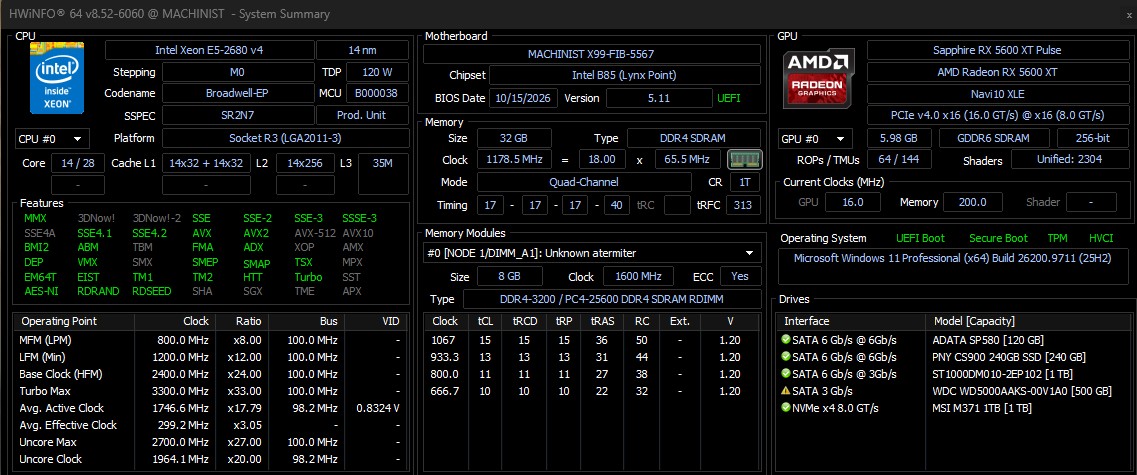
1 Like