I have no experience at all with 8 DIMM boards, and the 4xDDR3+4xDDR4 boards like TF-Q are even more special. Assuming that you have an external programmer like CH341A and a backup, this is what I would do in your situation:
First try flashing the stock Huananzhi BD4 BIOS and test. Note: Both BD4 and TF-Q use 8x series chipset and 9.1.x ME. Hence it is very likely enough to just flash the BIOS region (fptw64.exe -f X9BD4006.bin -BIOS)
If the stock BD4 works, you can go ahead and try my modded BD4 BIOS. If you want TBU, flash the B2 BIOS. In all other scenarios, flash the B1 BIOS
If the BD4 BIOS does not not work, then you can try the JGINYUE X99-8D4/2.5G based BIOS (will absolutely require an external programmer).
Good luck, and please post back in the other thread if you have success with the BD4 BIOS!
I think I need to start on a high level here: What is your overall goal?
As you can see in this thread, there is very little hope to get TPM 2.0 functionality (only TPM 1.2) with an official BIOS.
In your particular situation, I would actually start in a very different end:
Are there any known working TPM 2.0 branded (ASUS, MSI, Gigabyte, ASRock) X79 boards? If so, I would start by trying to crossflash such a BIOS. The bad news is that you have an ASUS boards. Quite often ASUS adds special chips for “product differentiation”, which makes crossflashing that much harder.
I believe that so far there is no board from these brands mentioned with functional TPM 2.0. There is a topic about an ASRock Z97 board that the company provided a BIOS adding support for TPM 2.0. I know they are different sockets, however, this made me positive. There is also a report from a user who requested a Gigabyte BIOS, leaving TPM 2.0 functional, so I hope that soon there will be a more concrete update on this
Ok. Quite often in life, you need to push for the change that you want. So I will simply give you some homework here, since you are the one with the actual hardware in hand:
Download UEFITool 0.28.0
Extract all modules that has either “Tcg” or “TPM” in their name, from the Angxun BIOS (use “as is” and save as .ffs)
Replace the corresponding modules in your ASUS BIOS
Flash your new BIOS and test. It is very unlikely to show correct data in the BIOS, but if you are very, very lucky, it might work in Windows
Do you think you could do this? (I can try, but I have less experience with it.) As for the risk, don’t worry. I have a recorder in case of any error. I think there’s a high probability of it working.
If it does not work and you are indeed serious about getting TPM 2.0 working, then I have already given you instructions for what to try next. In other words: I will not swap/add modules for you. It is not that difficult to do, but it is very time consuming
Basically I have 3 items that you can test
ASUS X79 (DESC, GBe ME), merged with an extra-padded Angxun X79-V5.7 BIOS region
Stock Jginyue X79M PLUS V2.7. Although it only supports TPM 1.2, the whole point here is to see if your board can boot with a more standard Chinese X79 BIOS (link to info)(link to BIOS)
If you really need TPM 2.0 and want to re-use CPU and RAM, then buying one of the Angxun X79 boards could be an option.
Another budget oriented solution would be to buy an X99 board that supports DDR3 RAM, paired with one of the select few 26xx V3 or V4 CPUs that support DDR3. But you are probably better off just selling what you have as a kit (mobo, CPU, RAM) in that case
You probably could make money with either approach, since top notch X79 boards like the ASUS Deluxe are still quite expensive
I tested the BIOS merged with Angxun, and it returns error 9A. I changed all the “TCG” and “DXE” modules, and it returned the same error. I added the following DXE modules: “tpm20acpi” and “tpm20platformdxe” and replaced “amitcgplatformdxe.” The motherboard worked perfectly, but still didn’t recognize TPM 2.0.
Any Suggestion?
Note: I would really like to keep the platform because I have an i7 4960x and 32GB 1866MHz RAM, and the features the Deluxe offers are great.
There is one thing I really don’t understand here:
The Angxun BIOS region already contains “tpm20acpi” and “tpm20platformdxe”
So in exactly what BIOS did you add these modules, and where did you take them from?
Using my original list, is my understanding of what you have tested correct?
Gives error code 9A
Not tested
Not tested
Believe me, I am all for using things for as long as possible. The 4960x was amazing for its time. But if TPM2 is absolutely needed, then buying an Angxun board is probably your best best here.
I removed them from Angxun and added them to the Asus BIOS, using the UEFI tool. With these three modules, it started. I was thinking about testing one module at a time until I saw which one gave error 9a, but I don’t know if that’s the best way. As for the BIOS, I’ve only tested the first one for now, not the other two. However, the version merged with Angxun and the one where I added the DXE and TCG modules, as you requested, both show error 9a in the debug.
Ok. However, running a quick check with UEFIExtract tells me that there are more differences than just what you have listed. Module swapping is not so easy, you need to match it with the NVRAM as well. And the ME regions are two major revisions apart (6.x vs 8.x), that will probably cause a lot of issues on its own.
Anyhow, I am very sure that practically speaking you have only a few options here:
Find a BIOS from a Chinese X79 chipset board with TPM1.2 support, and swap the BIOS region with the Angxun BIOS listed here (basically item 2+3 on my list)
Find a BIOS from a Chinese X79 chipset board with TPM2.0 support, and try crossflashing that (by far best chance of working on your X79 chipset ASUS board). See this post for some examples
Buy a Chinese X79 board with TPM2 support, and just use it
Personally I held on to my Ivy Bridge PC for a long time (same gen as your 4960x). Once overclocked, performance was not a big problem. But it became too frustrating with new games being compiled with AVX2 instructions required, so I upgraded in the end.
Hello! Sure, you need to get an external programmer and follow what I did in the second post. Secure boot is enabled by default in my modded BIOS. If you are willing to do hardware modifications, you can as demonstrated even get a TPM 2.0 module working.
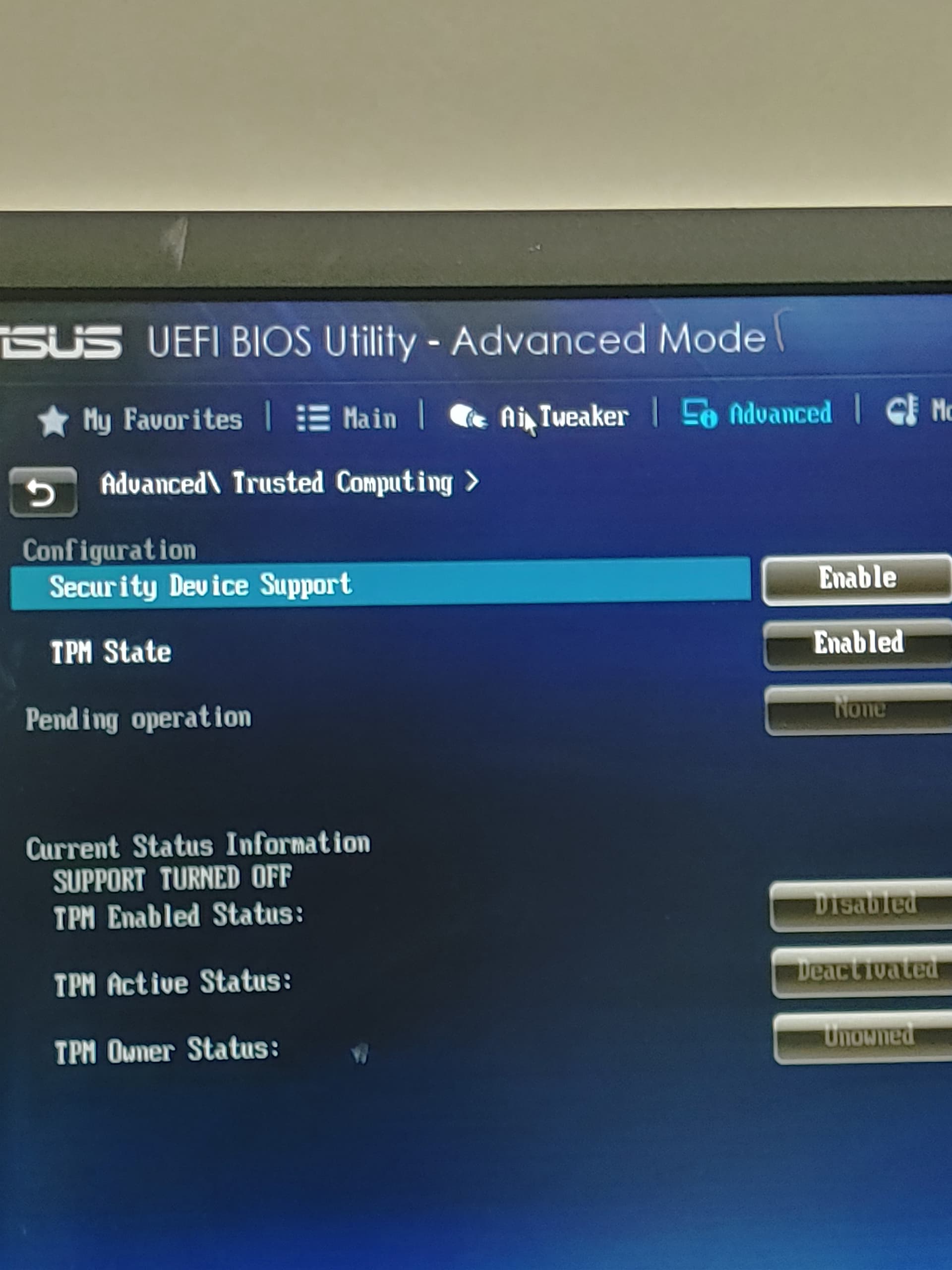
Hello, thank you for notifying me about the Angxun VG5 BIOS. I tried several modifications to the BIOS modules; in a certain combination, the menu appears in the BIOS as in the photo, but Windows still doesn’t recognize it. Also, please take a look at the Asus Z87 Sabertooth, as it was the only similar motherboard that received the TPM L 2.0 update. Perhaps using these two as a basis, you can give me some suggestions.
I already gave you my recommendation in this post (forget module swapping). It hasn’t changed. Now I have even provided you a link to an actual X79 chipset based BIOS to test. So why don’t you try that?
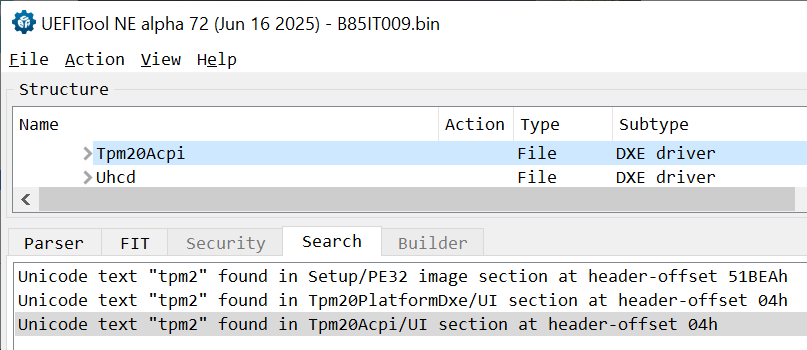
Glad to see you are doing some research, and the Z87 Sabertooth info might be useful for some people. As a side-note (things I have ran across recently while researching new X99 BIOSes): The latest BIOS for both Huananzhi B85-ITX and B85 PLUS seemingly also have TPM2.0 support.
News update: Virtual TPM / vTPM 2.0 coming shortly to X99?!?!
For now treat this as a rumor, but I will follow closely to see where this will go. If later proven true, this would be a very welcome feature. Porting vTPM 2.0 to other platforms than X99 might also be possible. I have not seen any videos from this person before, but he seems to have a fairly large YT following of almost 9k.
TPM 2.0 for X79 is real yay. Will now install Windows 11 to check if games that require TPM will work or nah. The BIOS for Angxun X99-VG5 works on my motherboard just fine without having to transplant the BIOS region (prolly due to same ME version). There’s one glitch (on Windows only, not Linux), however; the PC will restart itself after I shut it down. (all Angxun BIOSes I tried share the same issue, maybe they’re not fully compatible with my motherboard somehow. I can just wait a bit and unplug the power cord anyway, so no big deal.)
Congratulations! I have two comments/suggestions here:
Although they are of the same version, it will most likely work better if you keep your original ME. So try just transplanting the VG5 BIOS region into what you have originally. If you really want to check for differences in ME, then you can use open both in Intel FITC, save each XML file, and then run diff/comparison with for instance Beyond Compare.
You have a very old version of TPM 2.0, and therefore attestation might not be possible in Win11. Luckily, PremaMod has the official Infineon updates available. In your particular case (FIPS, or ending in .2), you can go from 5.0.1089.2 to 5.62.3126.2.
Just as you said, attestation is not ready by default due to the old firmware. I updated the firmware and everything is working now. As for the first suggestion, I’m not sure if the original ME is of any difference since I used that with X79 V5.7 BIOS Region but still got the auto-restart issue in Windows. Fun fact: the original BIOS of my motherboard is actually the BIOS of Alienware Aurora-R4. Everything works except for the PS/2 ports
So I guess it’s safe to say that TPM2.0 works all the way back to Sandy Bridge systems, given that JLPC1 header is present and the BIOS has TPM2 support. I’ve checked the latest BIOS for H61/B75 motherboards from Angxun and they all have TPM2 support.