One question on your BIOSes, do you think the ECC errors are showing up in Hwinfo with them? I remember i found different behaviour between bioses on that matter, using same setup some would just have performance regressions, other would show errors in hwinfo while other would just show error in the app (linpack) but having higher score wich suggest ECC disabled.
Longer answer: Interesting video, and yes, sometimes slightly slower transfer speed but tighter timings (especially refresh rate) gives the best result. What I have found is that my y-cruncher live USB will show ECC errors. So I have not seen an urgent need for WHEA reporting. But I might add it in the future.
What do you mean show ecc errors? There is a way to collect them outside WHEA ? I am tryng to explore my current build behaviour under a Huananzhi tf8 bios, another “half dead” board with 2678v3 cpu, TBU enabled and bios GHX99_0014 on the boot screen, internal info says X99_15 from 10/28/2019, by lowering CL to 8 on the 32gb samsung DDR3LRDIMMs i got errors showing in WHEA if i don’t cool them with a fan after approx 3hrs of tm5 - shown as memory controller errors.
I still have not flashed your bios on this same build but will soon
Hi, I have Jingsha x99e max motherboard.Which mb BIOS can I use? Are there any instructions how can modify bios myself? The stock BIOS is really awesome, but it seems to be incompatible with TPM 2.0 modules.
There’s no way to know ahead for sure if one BIOS is gonna work - you need to experiment yourself. I would really recommend getting a CH341A to recover in case of a bad flash.
Back to your question about BIOS modification, you can start with Huananzhi X99-BD4 BIOS - the best one so far according to FIB’s research. You can either:
Use Intel FPT to flash ONLY the BIOS Region
fptw64 -f new_firmware.bin -bios
Most Jingsha boards I’ve seen block FPT flashing by default; in such case enter BIOS, go to IntelRCSetup → PCH Configuration → Security Configuration, and set BIOS Lock to “Disabled”.
Replace the BIOS region in your stock BIOS with BD4’s one using UEFITool 0.28 and flash by CH341A.
In either case if your board fails to POST, use CH341A for recovery.
100% agree with Tris here. But before you begin, can you make a full backup of the original BIOS and upload it somewhere? The Jingsha X99E MAX has caught my attention for the following reason: It is to the best of knowledge the only current MATX motherboard that has 8 RAM slots. Which means that you can buy eight 4G sticks for 32G RAM (DDR3 or DDR4). And this is probably the most affordable way with current crazy RAM prices.
I happen to have it here (DDR3 version). Unfortunately, the BIOS has no support for TPM2.0 and ReBAR (which is weird since TPM2.0 had already been implemented in Jingsha X99-D8 BIOS dated 2019)
I used Intel FITC (Flash Image Tool) and ran a quick check on the Jingsha X99E Max (save .XML file and compare). The ME (Management Engine) is configured exactly like the Huananzhi X99-8M. Reading a bit further on e5450, the Huananzhi TF BIOS seems compatible. But that does not solve the lack of TPM support.
So yes, test with the BD4 BIOS region only as a first step and see where that goes.
hi, i have a huananzhi x99 f8 NCT5567D-B revision any news on the test of the bios supporting tpm2.0 for those board i am waiting for the delivery of my programmer
Hello and welcome! So far I have not received a lot of feedback. In addition, I found out through that feedback that there is a working BIOS with TPM 2.0 available on Brazilian forums. So I guess people simply found that one and started using it. I would probably do the same thing in their position.
But I would be happy working together with you if you want to. As shown in this post, with great testing support from tiburcillo we manged to get fully working BIOS with TPM 2.0 and CPU overclocking on the Machinist PR9.
While doing other things, today I noticed this new and large sub-repository on Koshaks Github. I translated some of the text in the Word document, and TPM2.0 and Secure Boot seems to be the major new feature. Hence, I think this is the solution to the problem, and therefore I will simply re-direct you there instead of trying further myself (too hard without hardware in hand). But please feel free to give your feedback in this thread, it can help a lot of other people.
My environment
Huananzhi X99-F8 (NCT5532D)
Xeon E5-2680V4
Micron 16GB DDR4-2133 RIMM x 4
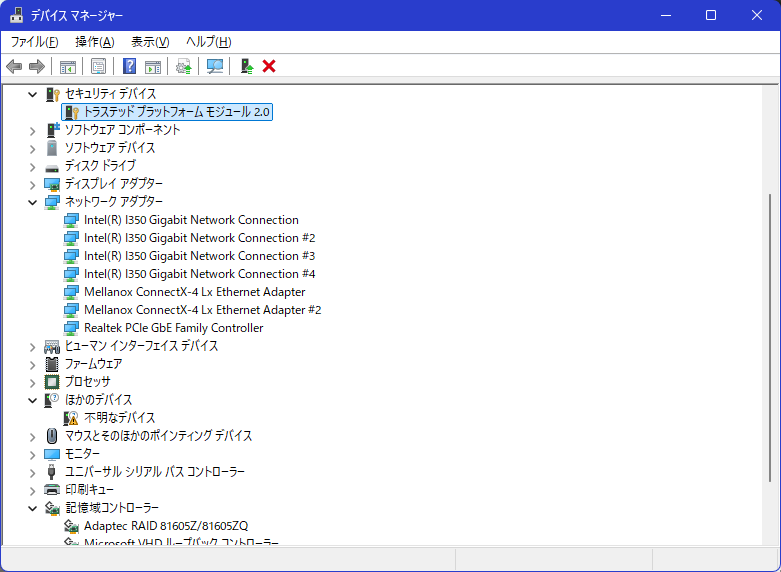
I applied the modified BIOS for the CD4 from the linked source, and connected the TPM using a custom-made Gigabyte 12-pin LPC conversion cable. I confirmed that the TPM is recognised correctly. I have not yet tested Secure Boot.
Thank you for reporting your success, this should be useful for other people as well!
The credit goes to “yadrik” on the OC forum, clearly he figured out how to do this correctly. A quick check shows me that the NVRAM variables were changed from the default CD4 BIOS. Might study these changes further.