Z170XGaming7.zip (5.6 MB)
I provide the latest beta BIOS (22r) for the Gigabyte Z170X Gaming 7 motherboard. Enjoy!
As it is, from Gigabyte Tech Support.
Z170XGaming7.zip (5.6 MB)
I provide the latest beta BIOS (22r) for the Gigabyte Z170X Gaming 7 motherboard. Enjoy!
As it is, from Gigabyte Tech Support.
@themorb Thank you for sharing/uploading the Beta BIOS.
For others that may want to try this BIOS, Gigabyte have attempted to fix an issue with (2TB) SATA SSD drive detection on this motherboard, in particular Samsung 9xx series.
As with any Beta BIOS you try it at your own risk.
Is F22r the latest available (beta) BIOS? What is the maximum size of M2-SSD supported by this motherboard?
Thanks,
What is the maximum capacity of an M2 SSD that can be used on the GA-Z170X Gaming 7?
With all models, size, new technology and new storage chipset controllers available on the market…it’s a bit sketchy to elaborate a conclusive answer don’t you think?
Off course that the official PDF’s from the motherboard support page are not a great help these days…specially on Beta bios releases, that often the OEM doesn’t share info on changes made, so an inquiry to Gigabyte itself should be the best action to take.
And being an old product…waiting for a report from the forum user community maybe painful or non-existing at this time if no one is using this motherboard anymore.
Thanks for your swift reply. I contacted Gigabyte, and their response was something like, ‘According to the compatibility list, the maximum supported capacity is 512 GB.’ No help at all. So, I am hoping some users can report whether they have successfully used 1TB, 2TB, or higher with this motherboard.
Expected answer from Gigabyte… unless some users with newer and bigger storage models had any compatibility issues and Gigabyte internal notes have a release note on this…only then it would be helpful, good luck.
Gigabyte GA-Z170X-Gaming 7
Samsung 960 Pro NVMe PCIe M.2 512GB
WD Black SN850X M.2 2TB
and
The following list was used on only one motherboard.
Seagate Barracuda 4TB
WD WD2002FYPS-01U1B0 2TB
Nvme Samsung SSD 980 1TB
Samsung 850 Evo 500GB
WD WD2002FYPS-01U1B0 2TB
I recently bought a Samsung 990 Pro (4TB). So far, it has been working flawlessly.
Good evening,
I flashed the beta BIOS version f22t. System startup times seem to be longer with that version, so I want to go back to BIOS version f22m (the latest available on the Gigabyte website).
I set the BIOS switch to “Single BIOS mode” and I used efiflash to downgrade to version f22m. The system works perfectly; however, I also want to downgrade the backup BIOS to f22m.
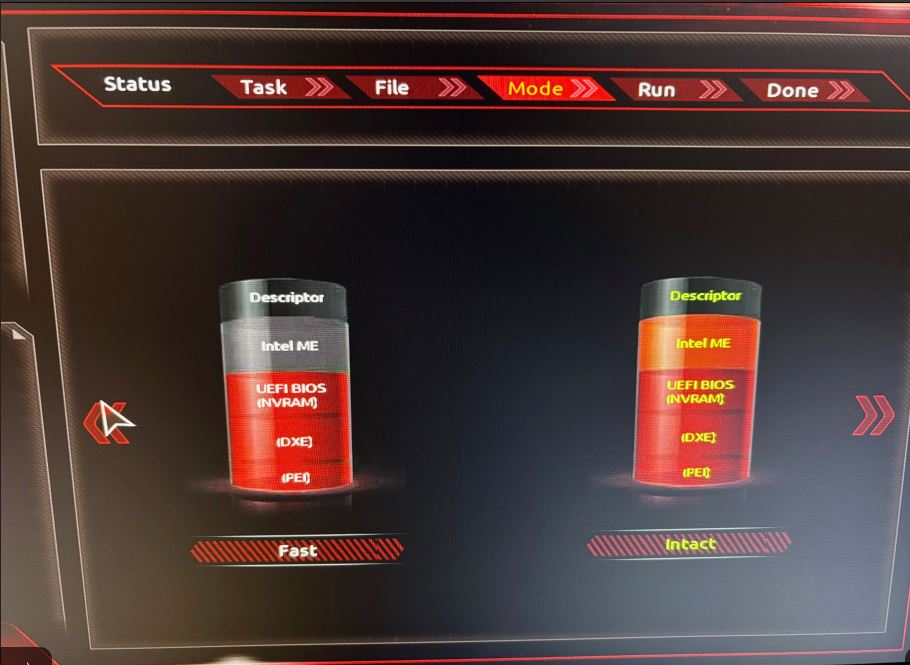
When using Q-Flash (in „Dual BIOS mode“), I encounter the following screen:
Which one should I choose, Fast or Intact?
What is the difference between those two options?
During previous BIOS updates/downgrades, I have never been asked to choose between these two options.
Thanks,
GA-Z170X Gaming 6
Updating the BIOS using Q-Flash - YouTube
and do not remove USB disk until a full reboot in to OS.