Mobo froze and shutdown itself during the bios update around %30, now bios is bricked. I think the USB stick died in the worst possible time. Bios chip is Winbond 25Q256JWEQ. I would appreciate any suggestions to get this thing working again. I would rather not desolder it since it has other components next to it that might get damaged.
I was planning to buy this
Amazon.com&qid=1637252650&sr=8-18
and an 1.8v adapter, but seems like the 25Q256 is not supported. I have a SPI TPM header right next to the bios chip, but I assume that is not usable for my purposes? Any suggestions on what to get on preferably amazon-US?
I have read this page
win-raid.com/t4287f16-GUIDE-The-Beginners-Guide-to-Using-a-CH-A-SPI-Programmer-Flasher-With-Pictures-10.html
, but mine doesn’t have the JSPI1 header.
Can’t post links properly due to account age.
TPM header is for TPM, not useful here. SPI chip is a little borader, men might work with clip. Buy as written, dump the firmware and post a link to it. Looks like neoprgrammer possibly does know the chip? (https://www.overclock.net/threads/agesa-…1733304/page-34)
Thank you for the link.
This is the SPI TPM? header I mentioned.
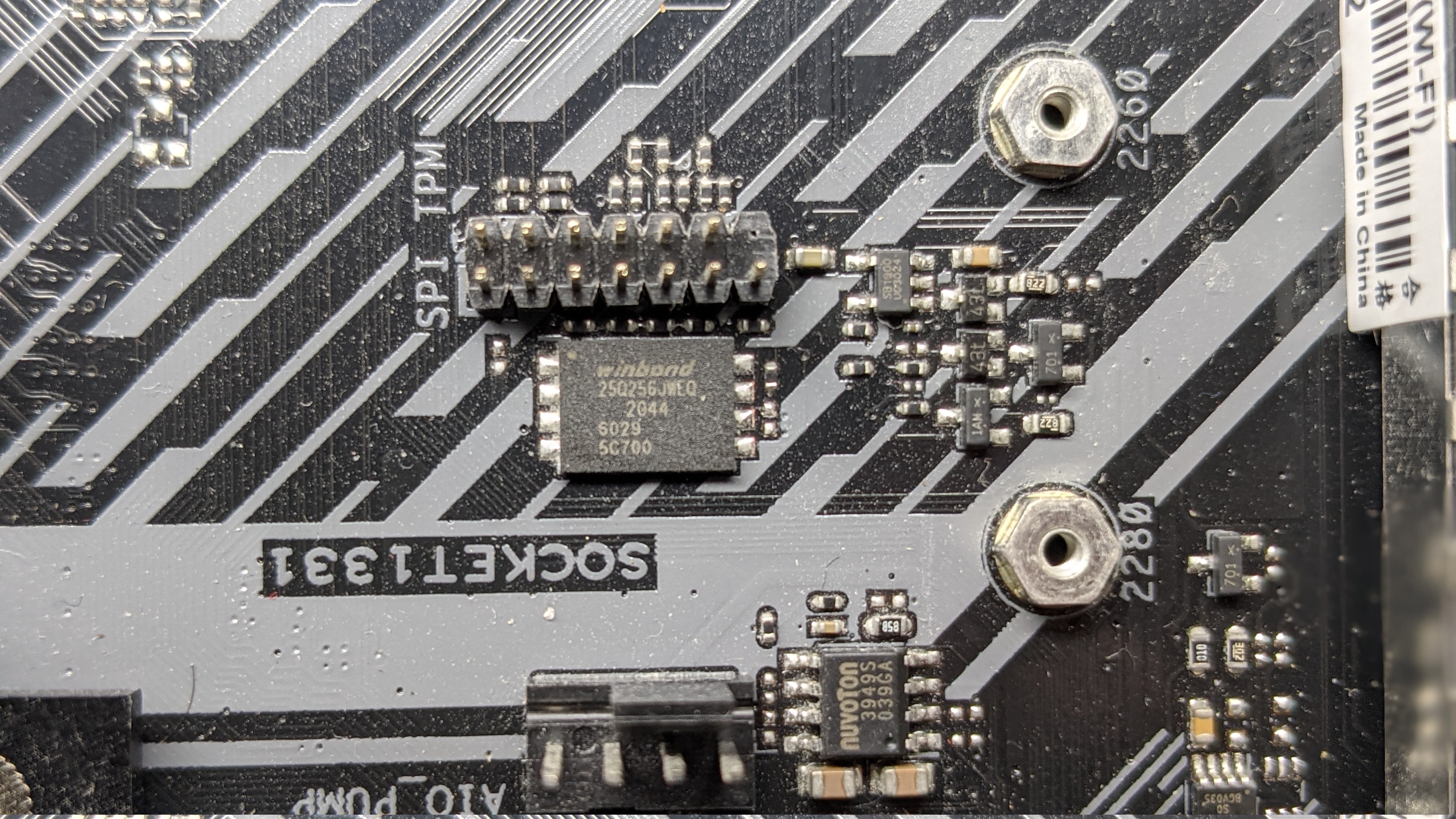
His motherboard has a similar header but I am not sure I can use mine like he did, is that possible?
And I am sorry, I don’t understand what you mean by “buy as written”.
Does that mean something like this will work?
amazon.com/Organizer-EEPROM-CH341A-Adapter-Programmer/dp/B07V2M5MVH/ref=sr_1_3?keywords=ch341a+1.8v&qid=1637262080&sr=8-3
This is a WSON8 surface soldered, the regular clip (SOIC8) on the SPI programmer will not work (The CH341 still does its job), some new needle pin pressure contacts clips r around the web, other than that de-soldering only.
Or search info on the 14pin Asus header.
biosisborked hi, where you able to programm the bios chip with this eepromm programer?, I am on the some situation and I would like to know if it worked for you before buying it. thanks
I ended up using the warranty, I had a friend who had the same motherboard so I just used his warranty. From the research I have done, de-soldering is the way to go or you have to trial and error with the various other clips. I didn’t have the required equipment to de-solder a modern mobo without damaging it and didn’t want to order 50 clips and waste hours, so I had to wait for 2 weeks for ASUS to fix it. I am sorry I am not much of a help.
I want to say that, though there’s guide online regarding connect the programmer to the nearby SPI TMP header, but I tried both ch341 and RT809F programmers, triple checked the wires, the programmer can not read the chip.
I ended up desolder the chip using hot air gun, programmed it with RT809F, solder back and the board is back to life.
Thanks to ASRock, this “legendary” board doesn’t have dual bios, doesn’t have bios self healing feature,and the BIOS chip is a special 25Q256JWEQ 256Mb large chip your usual programmer software will not support, that use a special 1.8V which your normal ch341 programmer will not support without the 1.8v adapter, and it has a special WSON8 package which is again your normal ch341 package doesn’t have support for this. And plus, ASRock put it into a position near the PCIE hook which is a bit of challenge to desolder and soldering back without damaging the nearby components or plastic. And ASRock is known for its very confusing chaning bios revisions that often stop supporting old cpus when upgrading the bios, very hard to understand bios revision histories change logs.
So much for ASRock, I will not buy it again.
Hello everyone. I bought a new x570 PLUS WiFi and a new Ryzen 7 5800XT. It was a shock for me to figure that the bios on the motherboard was version 1405, and the CPU compatibility guide states it’s compatible, but after version 4403. Great, I bought a brick. Since I live in Argentina, there’s no chance of buying a “bootkit”. I could’ve used a friend’s computer with an old CPU that worked with the decrepit bios revision I had, but no dice.
I thought it was my DDR4 ram, which is old (G.Skill Ripjaws V, mixed 2x8 2666MHz CL19, and 2x4 2133MHz CL15) because the dreaded yellow DRAM led was on.
I de-soldered the 25Q256JW chip, placed it on my T76 using an adapter for SOIC (used kapton tape to not short the underside pad that’s ground). Took a good dump for reference, as this is critical in these circumstances.
The bios comes in a CAP as everyone knows (UEFI capsules). I followed a tutorial on how to get a bin dump out of said CAP file, but for some reason, I extracted something wrong out of it, because I soldered the chip with this binary, but nothing happened. In fact, I de-soldered the flash chip again, and tried to boot the machine, and it still showed the DRAM yellow led. So that indicator is completely bogus. DRAM errors could be more broad than expected.
So I ended up flashing a bios from here. I was in such rush to get this working that I didn’t see that it wasn’t for this motherboard, but rather the PRO version.
The machine misbehaved a lot, for instance, if I rebooted from the OS, the VGA card wouldn’t display anything. I have two old RX580s and I thought this setup had something to do. In fact, the BIOS told me that the VGA card didn’t support UEFI so it switched CSM so the card works (this was completely bogus, as my previous setup was UEFI-only, but Intel, and worked fine).
I tried endless ways to get back to the “PLUS” bios, by tricking either the BIOS (EZ Flash on the UEFI setup), or the AI Suite EZ Flash, or even running AFUDOS (never worked, complained about failure to allocate memory), AFUEFIX64 or AFUWINX64 (both hang the machine hard), or even the older AFUWINX64 with /GAN support (didn’t find the driver/chip).
In the end, I didn’t want to de-solder the chip again, so I tested the SPI_TPM header with a multimeter. I figured that ALL the pins of the flash chip are connected there. It was a matter of creating a cable that connects to my T76. I did that, by following this connection scheme (sorry, I didn’t even lay down a schematic, this was a dirty hack):

The motherboard uses 3v3 for this, so I assume you should also use 3v3? I have no idea what power the Xgpro programmer used. With the power of the machine removed, the T76 can read/write the flash just fine.
In any case, I took my time to figure out how to extract the proper binary out of the UEFI capsule. Using UEFITool (even with the latest releases that don’t let you modify the binaries) I was able to do so. The trick is actually paying attention. After opening the X570 PLUS cap file (I’ve used the TUF-GAMING-X570-PLUS-WIFI-ASUS-5021.CAP), you have to right click “AMI Aptio capsule” and select extract body.
The extracted image can be flashed directly to the Flash chip. However, by doing so, the original MAC address of the GbE, the system UUID and the serial number won’t be respected.
I know there’s a tool for this (FD44Editor), but that tool won’t work with this image. I ended up extracting these values out of the original dump into this new image.
It’s pretty easy, using HxD, you can look for the section where those values are stored. In this case, just look for “BSA_” on the new image binary file.
As it’s clearly visible, after the “BSA_” string, there are a lot of 0xFF bytes. This means these values are empty.
Now, it’s trivial to open up the dump of the original BIOS, and look for the exact same thing.
As you can see, this one has information. The FD44 tool would read up these values fine (but not write them back okay, it screws up the entire binary).
So it’s just a matter of selecting the entire block from the original dump, copying it (Ctrl+C): (sorry can’t add more than one image, per forum rules, but you’ll select something like this, until a few 0xFF show up, just in case)
08 10 00 19 42 53 41 5F F8 0F 00 00 02 07 00 80 09 10 00 02 00 32 30 30 31 39 33 35 37 33 38 31 30 39 34 35 00 01 08 00 80 09 10 00 01 00 4D 32 36 90 85 FD EB 91 C0 7A D4 5D 69 42 55 99 FF FF FF FF FF FF FF FF FF FF FF FF FF FF FF FF FF FF
Selecting the same area on the new image, and “copy inserting” (Ctrl+V) it there.
Save the new image, flash it, et voila!
I ended up going for the “beta” BIOS 5044, and those reboot hiccups don’t occur.
So in short, you don’t need to pay anyone for a good dump of a bios, you can create your own one. The SPI_TPM header is enough to flash the chip. And even if FD44 doesn’t work, you can easily recover those values from your own dump (or steal mine  ).
).
Excellent! My motherboard was stuck in a loop after updating to 5022; the green boot light would turn on and then return to the beginning repeatedly.
Could you give more details on how you generated the .bin file? I used UEFI Tool as you said, the file is the exact size, but after burning it, it got stuck on the DRAM LED (it doesn’t blink, it stays on continuously).
I tried version 4808 and the same thing happened.
I tested another processor, memory, and video card, without success.
Do you have any videos of how you edited the hex file? I bought the motherboard used, and the backup didn’t have the MAC address or any information. =/
I saw that it could be the header or region, but I have no idea what to do. I haven’t found any other dumps of it on the internet. I have a 5950x processor (the repair shop also tested an older one with the letter G, and it didn’t work). I’m lost.
Hello, I’d suggest doing just this for now:
After opening the X570 PLUS cap file (I’ve used the TUF-GAMING-X570-PLUS-WIFI-ASUS-5021.CAP), you have to right click “AMI Aptio capsule” and select extract body.
The extracted image can be flashed directly to the Flash chip. However, by doing so, the original MAC address of the GbE, the system UUID and the serial number won’t be respected.
Validate the flash is properly flashed.
Clear CMOS (don’t forget to put the jumper back to the normal position).
I did this, it didn’t solve the problem.
I performed the flashing using the T48, verified, but the DRAM light is still on.
I flashed the beta version, but it’s back in a loop.
I heard about BIOS region settings, I’ll research that.
I don’t know what to do….
So, even if you downloaded a very old bios, say the one that starts supported your cpu, and flash it, it wont work? Could check that the bios flash is correctly done (maybe elaborate the steps you did from start)?
Hello!
I recently purchased this motherboard. It was advertised as “partially functional,” but the fact is, it won’t boot at all.
In fact, the CPU LED stays lit in red. After dozens of attempts, including swapping out the processor and RAM, I only saw a white light once, and it lasted just a few seconds.
I managed to dump the BIOS using your diagram (and thank you for that!), and flash it using a flash tool provided by Asus, but the motherboard still behaves the same way. I imagine the previous owner had already tried this solution, which explains why there was no visible difference before and after the operation.
Because of this, I’d like to ask you: Would it be possible to send me your BIOS dump?
Thank you for your response.
Hi, this BIOS file should normally work for you
Mobo froze and shutdown itself during the bios update around %30, now bios is bricked. I think the USB stick died in the worst possible time. Bios chip is Winbond 25Q256JWEQ. I would appreciate any suggestions to get this thing working again. I would rather not desolder it since it has other components next to it that might get damaged.
Get a SPI programmer, read corrupted content of the IC, transfer possible still valid data from dump to new Asus CAP file, remove 0x0800 or 0x1000 header and use it for programming.
Look in the forum for same mb recover or similar Asus AMD400/500 boards, there’s also guides using cheap SPI programmers like CH341A device.
Thanks for the file!
I flashed the motherboard with the binary, but the result is still the same. The CPU LED stays red.
This might be due to my hardware or my procedure. The connection between the CH341a and the header was unstable.
I’ll take the time soon to do this properly, and I’ll keep you posted.
What exact Ryzen CPU model is installed in your machine?
Also, always follow this sequence when programming chips, erase → write → verify
I’m using a Ryzen 2400G. That shouldn’t be a problem, since it’s older than the motherboard. I also tried using a Ryzen 4000, but without success.