[Problem] Crazy Secure-boot on Gigabyte Z390 Master

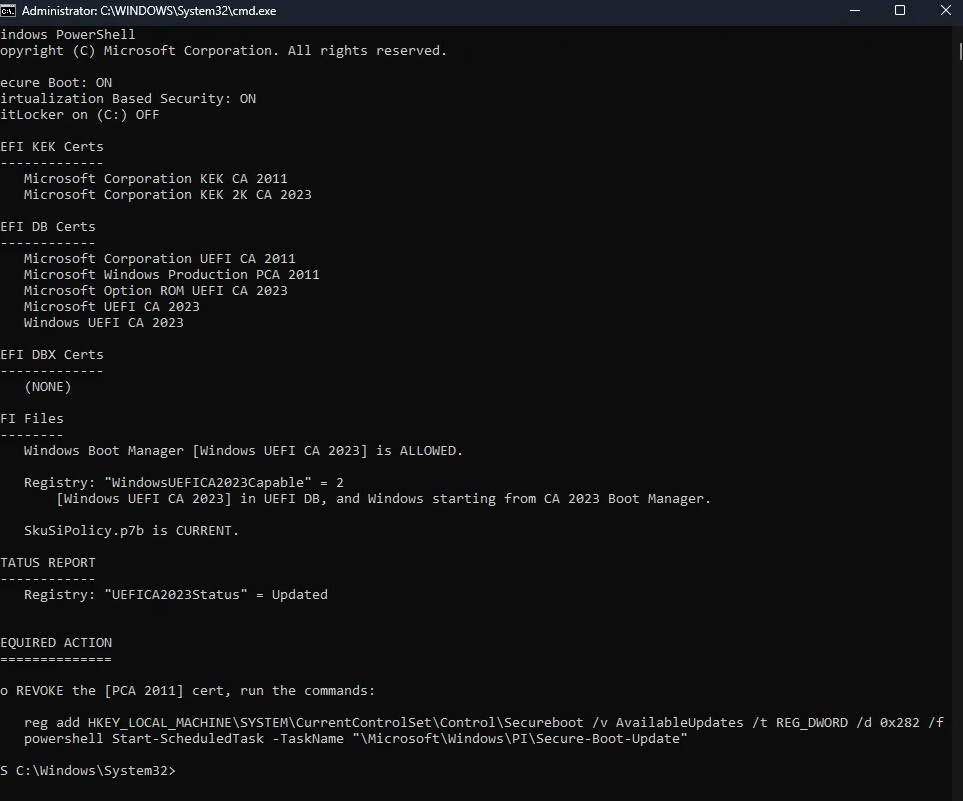
What I’ve had to do is picture showing device guard, and then when I click the remove UEFI as a said above it don’t seem right,

Then the secure boot USB issue I have given a guide, but it’s once we revoke the 2011 certs, there is then a conflict, an the windows install usb / Iso will give invalid signature.

P.s a live chat, I can try that in a hr, need walk me dog

Gigabyte is in a different time zone in New Taipei City, Taiwan.
Keep this in mind when contacting them via live chat.

P.S./ I’ve been using Gigabyte motherboards for a long time—they are simply indestructible and the component quality is top-notch, though the software leaves something to be desired.

1 Like

I have also been using gigabyte motherboards for some time, there support maybe tricky, but do get there in the end. But in the last 2-3 year’s gigabyte has been letting down there customers and cutting costs from the sign of some of the new gigabyte display cards.

I tried live chat, for UK and it says use esupport, they maybe closed but don’t say a time :frowning:

I still have a GA-X58A-UD3r running windows 11, with a RTX 2070, for 1 of my kids, I bricked the Marvell SATA controller on it back in 2018. I was never able to recover it, flashed a incomplete bios to the SATA.

Here is the live chat schedule; please keep the time zone in mind.
I’ve contacted them without any issues in the past.

Service is available Monday through Friday from 10:00–11:45 and 13:00–18:00 (GMT+8), excluding holidays.

Time offset of 8 hours relative to the prime meridian.

I contacted Taiwan.

1 Like

So its just to Taiwan, I was hoping there was a UK department.

I’m GMT+0

So i tried last night, for me with Gigabyte chat, yet had no luck all busy,

It could be related to custom mode, when I re-flashed my bios I went in to secure boot, set it custom then put it back to user, clicked yes on the pop up, saved and exited, and when doing that it dose not load as many certs in to the bios, it miss’s the UEFI DBX, its empty. when windows loads and updates the key it then fills them.

It gigabytes bad coding that is the problem, I tried enrolling the USB to secure boot the pc went a bit strange.

I have tried many combos and well soon as I revoke the PCA 2011 Keys problems start.

So It works out the issue is the media creation tool. even thought windows 11 has revoked PCA 2011 Keys, the media creation tool is still creating a install USB/ISO using PCA2011 keys, hench why I get invalid signature. The media creation too should be using the 2023 keys.

The Fix is using the scrpit above with the media mounted or plugged in being USB or ISO, then run.

Update-UEFI.bat -Bootmedia

I have always used a ready-made ISO distribution from the Microsoft website or an original MSDN image.
I do not use the Media Creation Tool.
Everything works excellent.
Thanks/

Also noticed, it seem the best way to setup secureboot, is set it to custom mode then switch right back to user, then yes to the popup. With user mode, it’s reset is restoring all but the UEFI DBX, that is empty, windows will then get the keys. Also windows seems to act better with secure boot. Custom mode it restores all the keys.

Using custom, notice the vendor keys will change to modified, I’ve not worked out how to restore the vendor key to valid again its a bit random, apart from reflashing the bios.

Now I’m in user mode I go in custom and the keys are updated and still valid, I exit but don’t save after checking. To stay in usermode.

@Zaver is that it all work after you update the iso?

Everything is working for me, and updates are downloading from the Winsows Update Center.
Secure Boot is disabled.

I have a Gigabyte H310M S2H (Rev. 1.x) motherboard.
This motherboard shares the same chipset as the ones you have:
Intel® H370 Express Chipset.
https://www.gigabyte.com/Motherboard/H310M-S2H-rev-1x/sp

Based on what you’ve described, I’ve reached the following conclusion:
To add Xeon support to this motherboard, I’ve experimented with every module and ME configuration imaginable within the BIOS.
I performed most of these modifications using the FIT tool,
as I am aware of certain issues associated with CoffeeTime.
In my most recent attempt, I successfully got an i3-6098P running on this board.
However, as you noted, the motherboard emits 5 beeps upon startup, shuts down, restarts, skips the BIOS screen (displaying a black screen), and then proceeds to the Windows desktop.
Yet, Xeon processors never work; the motherboard powers on for just a second before shutting down.

In this specific attempt, I did not remove any Secure Boot modules; I left them exactly as they were.

My assessment is as follows:
This suggests a link or relationship between the Intel ME region and the Secure Boot modules.
ME 12 is newer, and its operational mechanics are not yet fully understood.
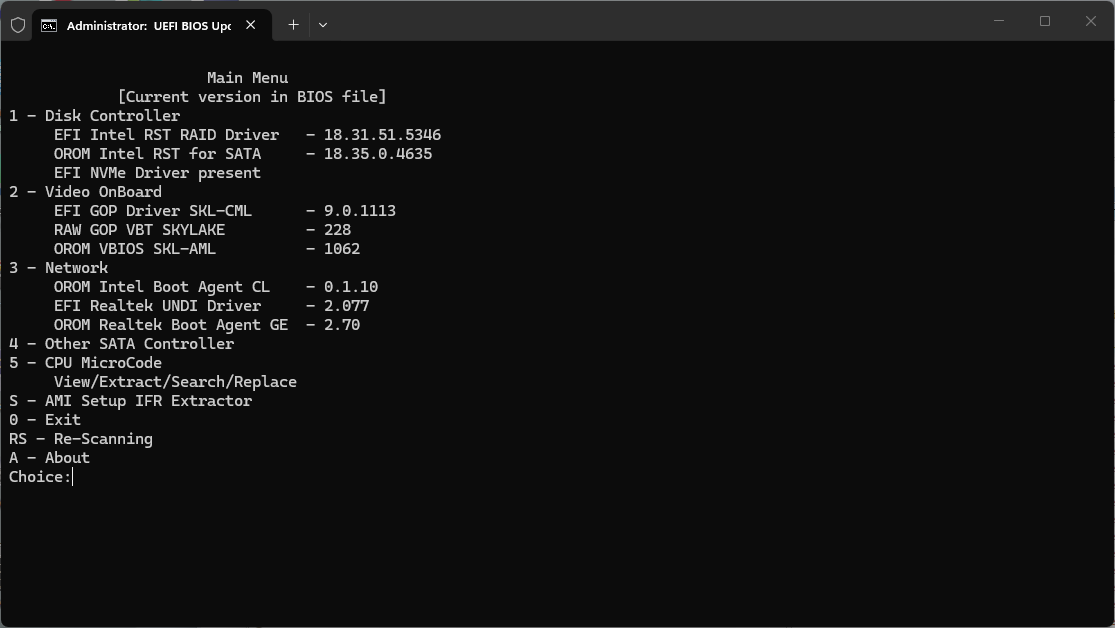
Furthermore, entries such as $FPT, $PSVN, $UEP, $IVBP, $MFS, $UTOK, $HVMP, $RSTR, and $FLOG—which were located in the initial lines in ME 11—are embedded in the final bytes of the main ME module here. Regarding ME 12: Even if I disable or completely delete the HAP-Bit in the Data partition modules—while the initial Boot partition modules retain full authority and the final entry ($FPT+PSVN+UEP+IVBP+MFS+UTOK+HVMP+RSTR+FLOG) remains—the motherboard functions without any issues.
In short, disabling the HAP-Bit in ME 12 is meaningless, unlike in ME 11; or, I am absolutely certain it continues to run in the background even if disabled.
By the way, I have a ready-made application (a Python script) for disabling ME 12.
If requested, I could share it here for the first time.

What strikes me as interesting here is that the initial Boot partition modules in ME 12 seem to hold full authority, appearing to manage or verify the checksums of all Main BIOS modules.
Furthermore, if I update the Main BIOS video output VBIOS module (GUID_C5A4306E) to version 1062, the system treats the VBIOS module as missing or deleted during the BIOS file integrity check.

From this, I gather that ME 12 also controls or verifies the VBIOS video output.

Consequently, upon startup, the motherboard emits five beeps and boots in Legacy mode rather than UEFI, skipping the BIOS screen and booting directly into the Windows desktop.
Additionally, 5 beeps usually indicate a processor failure or that the processor is not being recognized.

I have tried various methods to overcome this but haven’t succeeded so far.

I also suspect that the operation of the BIOS Secure Boot modules is subject to ME 12’s checksum verification; therefore, I believe the issue you are experiencing stems from an incompatibility between ME 12 and the BIOS Secure Boot modules on certain Gigabyte motherboards.

The solution here might be to downgrade or upgrade the ME 12 version, or to modify the BIOS Secure Boot modules accordingly. These are the things that come to mind for now.
Your thoughts on this matter are also valuable to me.

We was getting our beeps due to a secure boot error with device guard, when removing the UEFI CA

The intel ME on my Z390 is 12.1.

When I’ve looked at updating the vga of the bios, its better to not update it.

1 Like

That’s right—the beeps occurred after removing the UEFI CA keys.
Everything works excellent and overclocks well for me with these settings:

TPM also works.

Only release processors 6-9Th were tested, I don’t have a Xeon.

Secure Boot works great with the factory keys, but I don’t use it.

1 Like

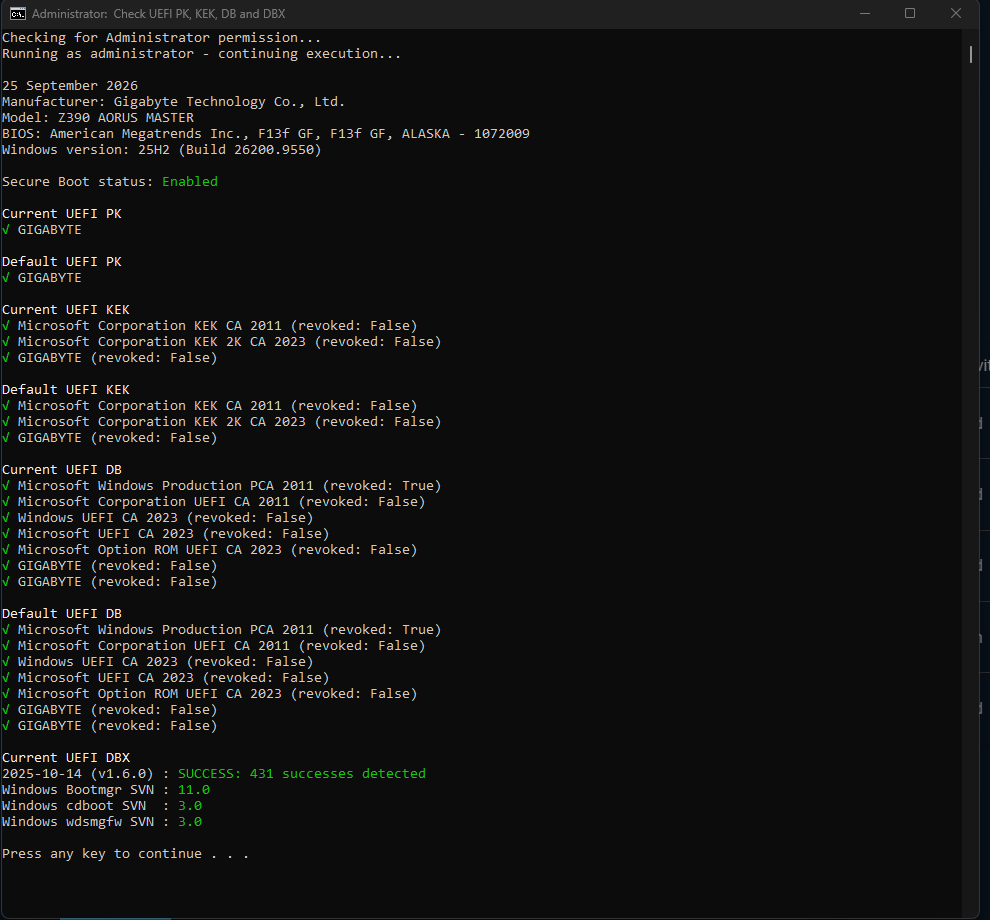
I did this reflashed the bios, enabled secure boot, set to custom then set right back to user, then Yes to the pop up, save exit, boot to windows, I then run Update-UEFI.bat -revoke, I then rebooted, I then pluged in my windows install USB or mount the iso, in windows, I then run the commands Update-UEFI.bat -BootMedia.

Now I have all the lastest certs, PCA 2011 Keys removed and my install usb all works.

Doing this way my pc seems a lot happier, And my secure boot vendor keys are valid in bios settings.

As I mentioned earlier, the “IVBP” module in the ME 12 region is linked to the Secure Boot modules—specifically the PK, KEK, DB, and DBX modules. Upon startup, the motherboard checks these modules (located in both the ME 12 region and the Main BIOS) and generates a checksum.
What is the IVBP in ME 12? What does it do?
IVBP stands for Independent Validation Boot Partition. It contains the validation data used to ensure integrity during Secure Boot processes.

Based on all this, I conclude that current 2023 CA certificates (found in Gigabyte and other motherboards) should not simply be added to the Main BIOS at random; they must be fully compatible with the ME 12 firmware.

To put it more clearly:
If you are preparing a BIOS for an LGA 1151 motherboard with a 300-series chipset (like the Z370), the 2023 CA certificates must be added to the Main BIOS in a way that aligns with the ME 12 firmware.

@trebleta, the manual approach you took feels to me like you are essentially forcing the ME 12 firmware to accept the certificates temporarily.

In this scenario, it seems more logical to extract the modules from another motherboard—one that already has the latest BIOS and where the ME 12 firmware and 2023 CA certificates are compatible—and apply them to your own motherboard.

@Zaver, your motherboard uses the Z370 Express Chipset.
My motherboard uses the H370 Express Chipset.
There isn’t a huge difference between them, but I’m going to give this a try.

The bios I have, has all keys updated, and running me 12.1.

@ Zaver is dose not have all keys in bios ans is running me 11.

Yet both get the same issue with device guard, when removing the UEFI CA else everything is working.

Doing the above, when it resets it not defaulting the UEFI DBX that is still empty then filled by windows that windows seems happier, with custom it’s reseting all back and all works, but the vendor keys can chance to modified, not that it matters.

Also read online last night, that there could even be a glitch with secure boot in custom mode.

P.s the only thing my bios is missing is 1 forbidden keys and revoking the pca 2011keys, and update svn bootloaders, by default. I had gigabyte update it all

Could you send me the full DUMP file of the motherboard you are currently using?
As far as I know, you have a custom BIOS from Gigabyte.
I want to examine the PK, KEK, DB, and DBX modules and compare them with the motherboard I have.

This is a copy of the bios that gigabyte has given me.

Its version F13f GF Dated 18-7-26, I am waiting on a update to this version. as the bios its self has problems.

I can share a Full Bios DUMP if required, only difference will be that the above secureboot has been done.

By default my keys are like above post 7.

this if i do custom then back to user, i get

then once i run the Update-UEFI.Bat - Revoke or run the command online via google I get the last part of post 7.

The Keys you want to look at are the PK that should be the same, as yours, the KEK and DB will be different and the DBX can be empty.

P.S . I can export my keys too, then they would just be amended to the secureboot keys that are there.

and our device guard error is when we remove the UEFI DB Certts for the MS UEFI CA. would of said maybe its the 2023 key that are the issue, but @Zaver has also and dose not have them keys.

Another picture of it updated.

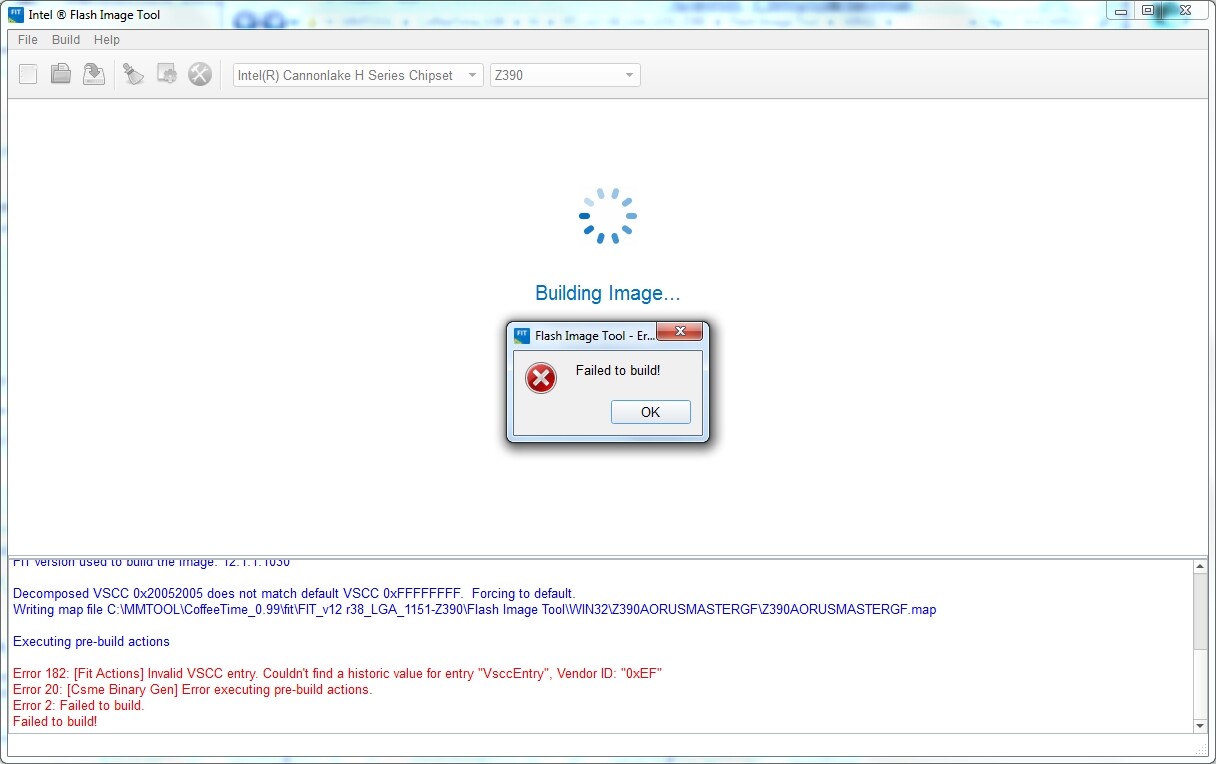
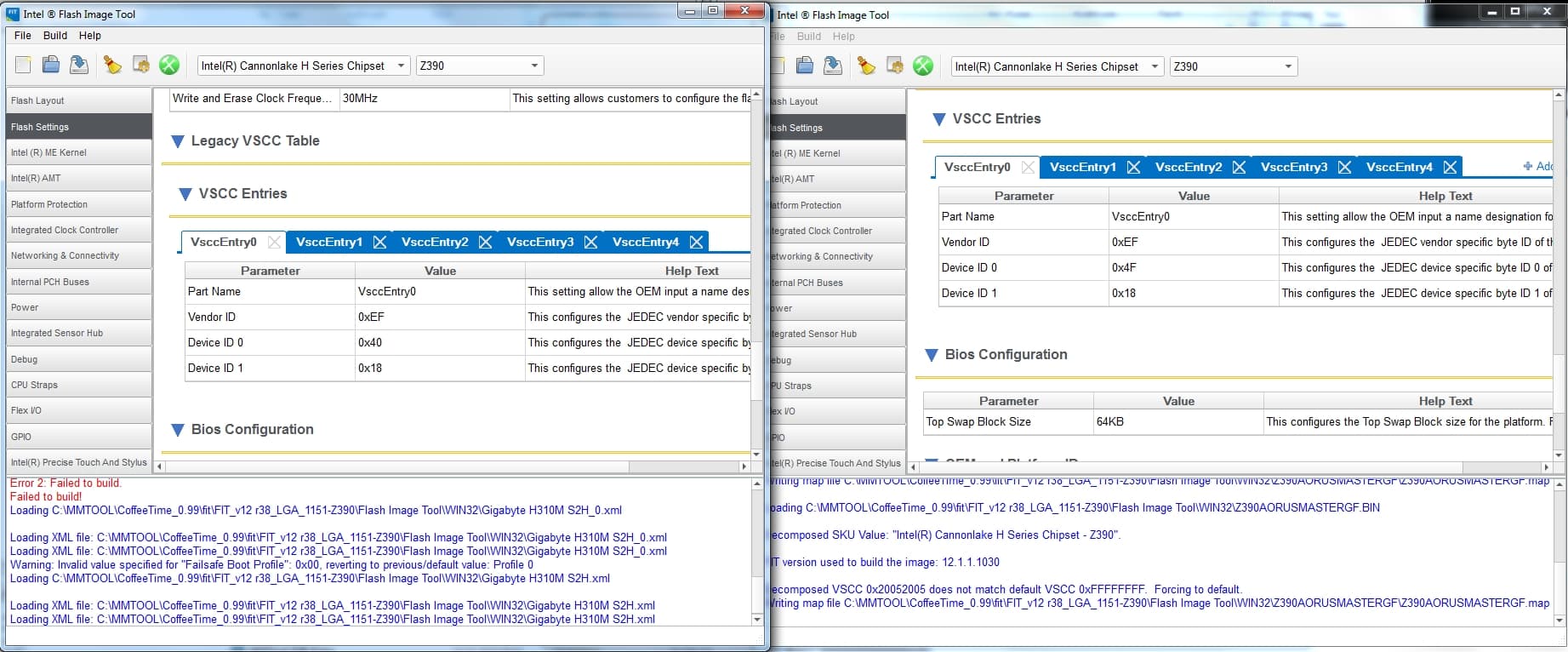
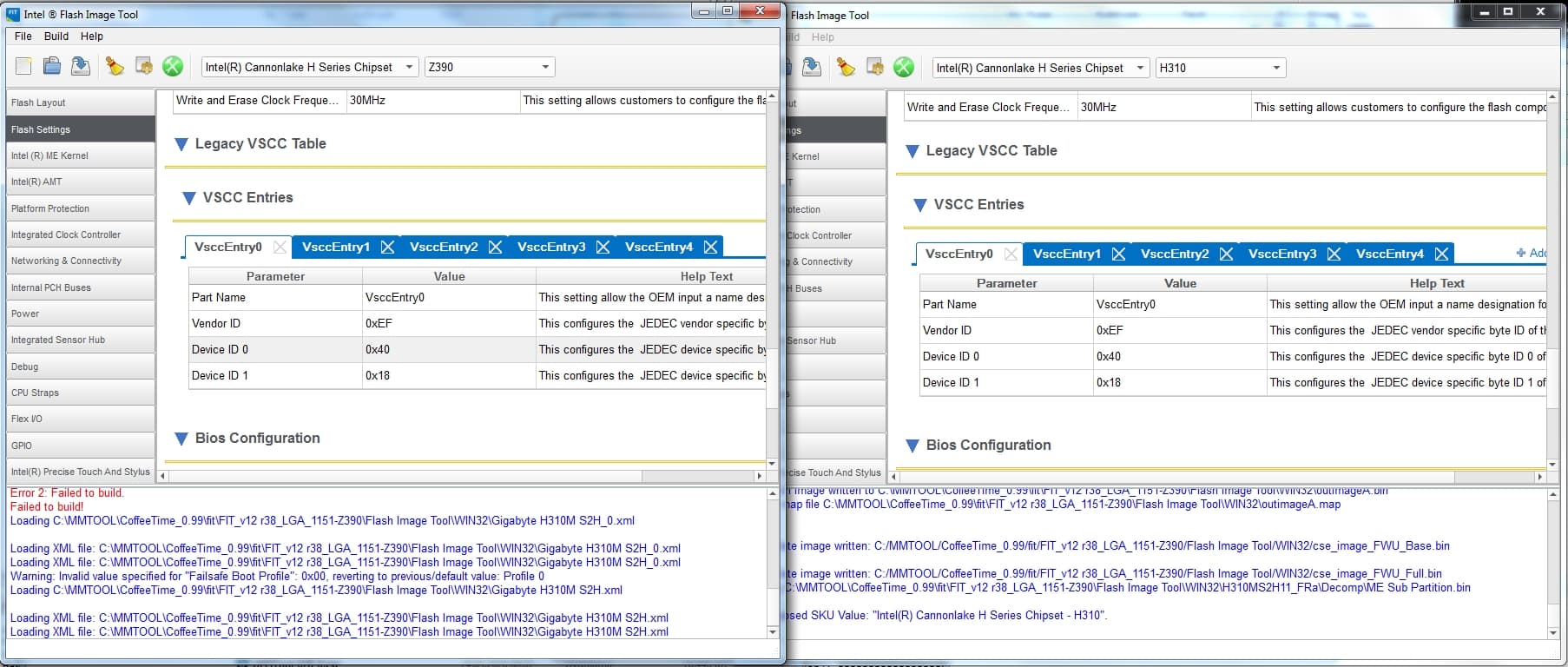
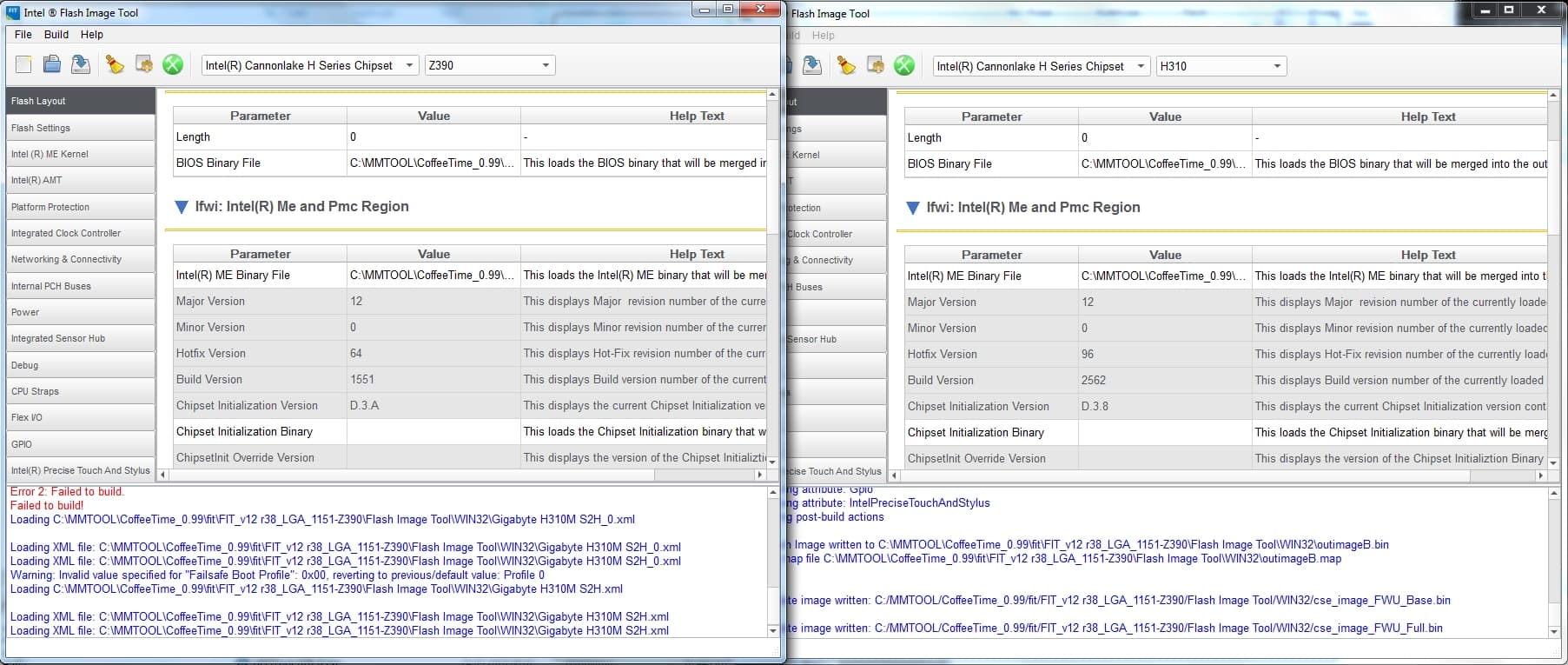
That Z390AORUSMASTERGF.F13f file of yours is throwing an error in FIT.

I encountered the same error on my own motherboard and fixed it.
It seems like an issue specific to Gigabyte.
The cause of the error is that all the entries in the VSCC tables are incorrect.
There are four tables here; I corrected each one, and thanks to the proper table configuration, the build process completed without issues.


Additionally, the “DB” and “DBX” modules from my motherboard differ from yours; those two modules have been changed.
I also downgraded the ME version and rebuilt it using ME_12.0.96.2562.

Finally, the VBIOS and all other modules have been updated as well.

Could you try this file I’ve prepared now?
[Z390AORUSMASTERGF.rar|attachment](The file was deleted because it was deemed unnecessary on the user side.) (6.6 MB)

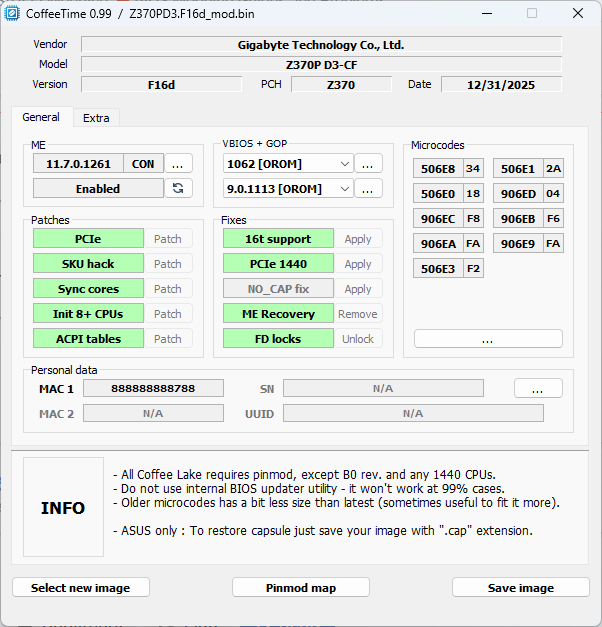
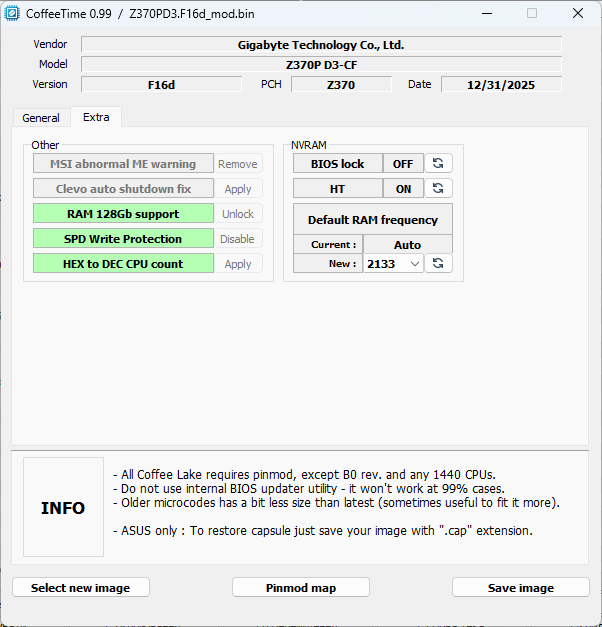
This is the BIOS I use:

Z370PD3.F16d_mod.bin.zip (6.8 MB)

This works excellent on the Z370PD3 and Z270PD3.

These boards are clones.

On the Z270, the chips need to be replaced with 128Mbit ones.

1 Like