I had flashed a modified bios (inserted DXE module) with flash programmer tool from CSME and then the machine had no display.
Tried to reflash orig bios with CH341a but after flashing it, the machine not even starts up anymore.
Link not valid. REBAR on laptop… cant remember seeing a success report …
What did you flashed with fpt, a bios region or full image spi? Same for the programming, a full dump or Dell files?
This is usually not a complete fw image with all regions expanded, they must be composed/edited with old dump, did you check this integrity before programming?
This is an example of a full fw expanded regions image from a G5 5590…
Multiple ICs motherboards may have different contents, one could be main bios the other ME FW, EC etc…
This was an operation to be done before any attempts of flashing mods, the rule is identifying all IC’s, their content and save them as a backup…then we know each one content and what data is to program into each one…
If you flashed this…(1 – 1 System BIOS with BIOS Guard v1.27.0.bin) then it will never boot, thats why you got the result…
the FW, etc backups i have on the hard disk unaccessable, as i was really sure getting the write protection solved was the only thing needed and flashing the modified bin file with the DXE module will work 100%. Do i need to find some files from other G5 15 5590 to get what is needed ?
Well…that’s not the notebook with the original files and the respective hard disk, right?
These files were to be stored outside…not with a single system accessible… so irresponsible actions, sleep time for me now, good luck.
No, its usable for swap in a corrupted dump to fix, besides, the files do not contain Service Tag, WinKey Lic or Serial Number, only reference to model, looking like a cleaned/blanked.
A valid dump was to be made with fptw64 -d spifull.bin
Things that can be easily verified by you, in your linked web dump you just found, if it’s working or not your task to try, by now since the main IC was overwritten with wrong firmware image, seems you got nothing to lose as you need to recover the system, what’s been lost, since no full backup was made, it’s all Dell motherboard/system original data, Mac, UUID, SN, ST, WinLic…etc… unless there’s valid info on 2nd IC, not always present.
To check what… i don’t have such system to report you anything, as i said “REBAR on laptop… can’t remember seeing a success report”
Be glad that you have now a recovered laptop… and it’s booting with a flashed mod bios region with ReBar on it… the rest is to follow the ReBar developer notes… that was intend primarily for desktop motherboards…
That’s all, good luck and all the best.
i am not using the inserted_biosreg.bin, the last time i flashed it with FPTw -bios -f -inserted_biosreg.bin the machine had no display after a reboot. i havent used the Rebar.exe tool till this point.
Thats why i asked, maybe you see instantly that it could not work with the inserted DXE modul in the bios file for what ever reason.
Thank you for this hint. I saw those colored marks before.
“Protected” does this always lead to the Bios Guard ?
(my flash with the inserted DXE module in biosreg.bin was verified as identical Data, why was it accepted if it would lead to a “death” system ?)
The Hardware with the Service Tag was different from mine, what kind of process did manage to boot the machine with different hardware, when just inserting a DXE module lead to a death system ?
can i flash my unmodified biosreg.bin backup to get the Mac, UUID, SN, etc back ? ( i have *up*flashed to the bios vers i had before this super stupid noob mistake)
the “only” thing i found is different:
original : Intel ME FITC Version: 12.0, Build 1919, Hot Fix 85
”new” : Intel ME FITC Version: 12.0, Build 1606, Hot Fix 68
looks like a problem, but so far everything works, Service Tag is wrong, MAC missing, i better not touch anything again until i have a second machine for the ch341a (android, unrooted, does not work very well with the ch341a)
Too many questions and time of mine… don’t you think? How about some research, reading and learning…
Exactly what should have been done before your all mess…
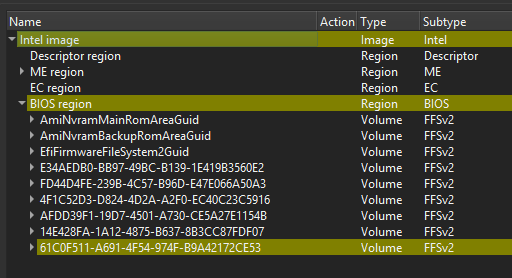


 . I wish i would be able to check such things…