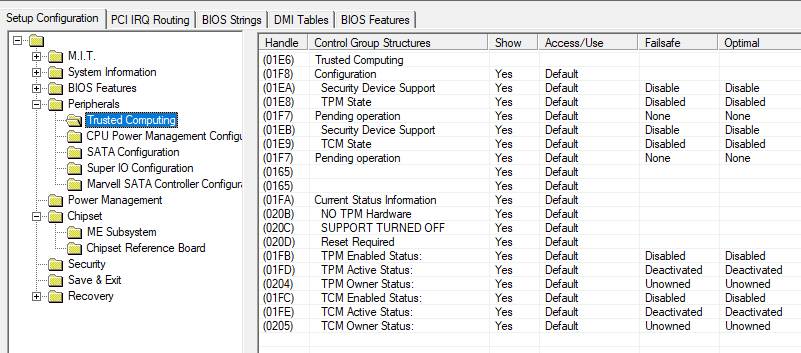
I have the Z97X-UD5H Gigabyte motherboard and it says it supports a TPM 2.0 module. I installed the GC TPM 2.0 module and the TPM setting shows up in the BIOS now and I was able to enable "Security Device Support", but right below that it says Current Status: Support Turned Off. It appears the BIOS simply doesn’t have TPM 2.0 enabled in it. I’ve tried BIOS versions F10 and F11d but both say Support Turned Off.
Is this something that someone can enable by modifying the BIOS?
Available settings in bios already set? How is GET-TPM in OS?
https://github.com/MicrosoftDocs/windows…dule/Get-Tpm.md
U sure its supports TPM2.0 and not only 1.2?
Several owners of older Intel chipsets with TPM1.2, got a bios update from requests to Gigabyte, this is wot u can try.
EDIT: I doubt that it supports 2.0 or any beta bios with it, the screen cap is using the AMIBCP tool. By the way…just to clarify wot u see is only available if a TPM module is present/connected in the motherboard header…
No I am not sure. Gigabyte Support’s initial reply is that it does not support TPM 2.0 but I thought I heard others with this board (or similar board Z97X-UD5H-BK) that there is a beta BIOS that enables TPM 2.0 support.
How did you get that screen in the screenshot you provided?
Continuing the discussion from Gigabyte Z97X-UD5H TPM 2.0 Support:
Hi, I have installed a TPM 2.0 Module to my Z97X-UD5H Gigabyte MB. Bios Version is F10, the lastest Version I could find. How can I get a newer version that supports TPM 2.0 and how to install it to the bios. I´m not using X.M.P. or overclocking.
Help is very much appreciated!
I know this topic has been around…

Contact Gigabyte eSupport for a new internal BIOS. If they somehow refuse to, be persistent and ask again.
2 Likes
I contacted Gigabyte eSupport and they said that the MB is very old… but sent me a f11d zipfile. When Q-flashing I receive the message “invalid BIOS image” I alread wrote this to eSupport. Any guess on your side?
Can you upload the BIOS up here?
As a new user I´m not allowed to upload… what about wetransfer?
Yes, but if you could, use mediafire or mega or gdrive, as time pass by, a user might need the bios.
1 Like
TPM2.0 support is already present in the BIOS. If you can’t use Q-Flash, what about @ BIOS or EfiFlash?
Sorry I´m not so brief at this topic. Can you please explain?
It’s a 9 series… but you may try this also.
[Tool] EFIFlash v0.80/v0.85/v0.87 for Gigabyte Mainboards - BIOS/UEFI Modding / BIOS Modding/Flashing Tools - Win-Raid Forum
Read all cmd’s and notes.

I saw this notice on Tweaktown’s thread of Gigabyte beta BIOS. You may also try the @BIOS for Z97 (@BIOS is just a Gigabyte BIOS flashing tool in Windows environment)
After telling the eSupport about the error “invalid BIOS image” they have sent me 2 new ones: Z97XUD5H.11d and Z97XUD5H.F11d here is the link:
I have got 2 new ones from Gigabyte eSupport:
I did not try them yet…
2 Likes