NVMe is the currently latest and best performing data transfer protocol. That is why users, who want to run their system with the highest possible speed, should buy an NVMe SSD (or more than 1 of them combined as RAID0 array) and install the OS onto it.
On the other hand all NVMe SSD users should keep in mind, that the effective/real performance of such system depends on
a) the size and the model of the NVMe SSD(s),
b) the installed OS,
c) the age/quality of the used mainboard and its PCIe/M.2 connections,
d) the size and quality of the in-use Memory (RAM) modules,
e) the individual BIOS and OS settings (look >here<) and
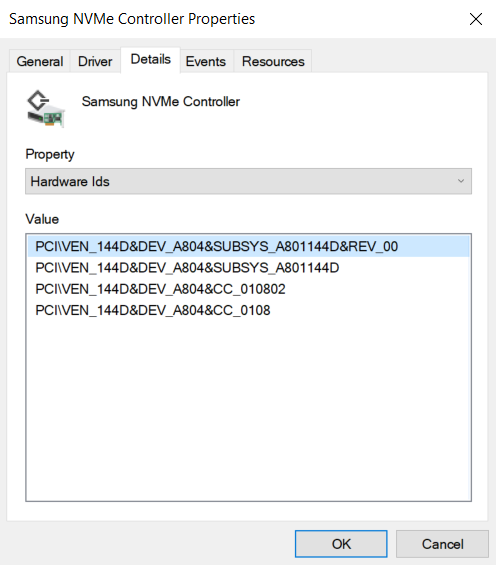
f) the specific NVMe driver, which is managing the NVMe Controller of the SSD.
Conclusion: Since each system is different, there is no NVMe driver available, which is the best for everyone.
Own Benchmark Comparison Tests:
(completely updated on 01/31/2022)
Recently I had access to 2 PCs with completely different chipsets (Intel Z170 resp. AMD X570) and additionally to 2 x 1 TB Samsung 980 Pro SSDs.
This gave me the opportunity to do some NVMe driver benchmark comparison tests with both Intel/AMD systems running the same OS version on the same NVMe SSD model by using different NVMe drivers.
Notes:
- The natively extremely performant Samsung 980 Pro SSDs were chosen to make benchmark differences better visible.
- It was not my intention to compare the performance of a PCIe 3.0 with a PCIe 4.0 connection or of an Intel with an AMD chipset system.
Test systems:
A. Intel Z170 chipset PC (with Skylake CPU + PCIe 3.0 support) running Win11 x64 Pro v21H2 Build 22000.469, freshly installed onto a 1 TB Samsung 980 Pro NVMe SSD
B. AMD X570 chipset PC (with Ryzen 5 5600X CPU + PCIe 4.0 support) running Win11 x64 Pro v21H2 Build 22000.469, freshly installed onto another 1 TB Samsung 980 Pro NVMe SSD
These were the drivers I have tested until now:
- Microsoft's generic Win11 in-box NVMe driver v10.0.22000.348 named STORNVME.SYS dated 11/17/2021 (the shown date is wrong)
- Samsung's NVMe driver v3.3.0.2003 WHQL dated 01/21/2020 (installation had to be forced)
- Phison's generic NVMe driver v1.5.0.0 WHQL dated 02/23/2018
- Micron's NVMe driver v2.1.18.0 WHQL dated 03/02/2021 (installation had to be forced)
- Intel's RST NVMe driver v17.11.0.1000 WHQL dated 09/30/2021 (installation had to be forced, matching are the iaStorAC.inf file and the device "Intel(R) NVMe Controller")
- Set a "Restore Point" before starting the driver replacement (to be able to restore at any time your currently running OS and boot configuration).
- If you should have installed any storage driver related Software (e.g. the Intel RST Management Console), uninstall it from within the Control Panel and reboot thereafter.
- An NVMe driver should be manually replaced from within the "Storage Controllers" section of the Device Manager (don't try to update the driver of any device, which is listed within the "Disk Drives" section, or to uninstall any in-use storage driver!).
- If your desired NVMe driver is WHQL certified and the HardwareIDs of the related NVMe Controller is listed within its *.INF file, the installation procedure is easy and very safe:
- Right-click onto the listed NVMe Controller, which is currently managing the related NVMe SSD.
- Choose the "Update Driver" > "Browse my Computer" options, navigate to the folder with the extracted "pure" NVMe driver files and click onto the "Continue" button. The rest will be done automaticly by the Device Management of the OS.
- After having completed the installation you have to restart the PC/Notebook. This is the critical point of the storage driver installation, because the real replacement happens during the restart procedure.
- If the desired driver replacement should end with the message "The best driver is already installed", you may have to force the installation:
- Restart the driver update by using the "Browse my Computer" option, but choose the "Let me pick..." option thereafter.
- Press the "Have Disk" button and navigate to the folder with the desired driver files.
- If the Device Management should show more than 1 *.INF file and/or Controller names, choose the (best) matching ones.
Here are the benchmark results I got:
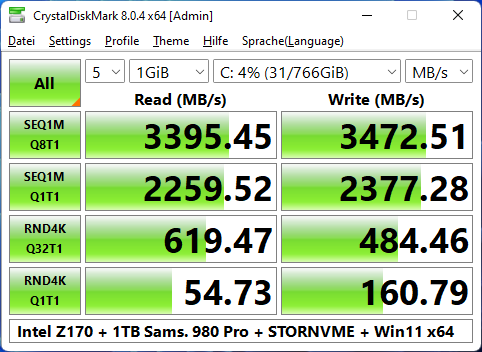
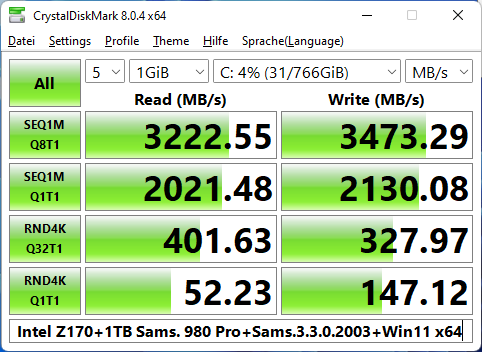
(left/upper Pic: MS Win11 generic in-box NVMe driver, right/lower Pic: Samsung’s specific NVMe driver v3.3.0.2003)
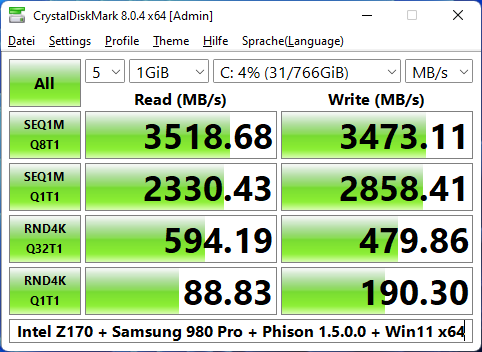
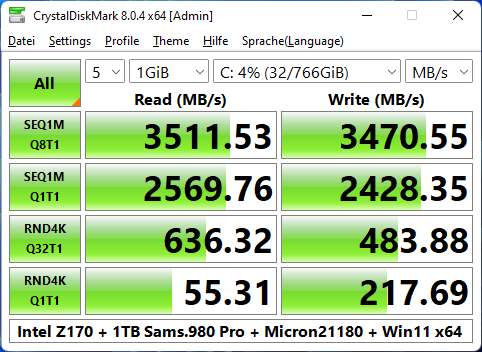
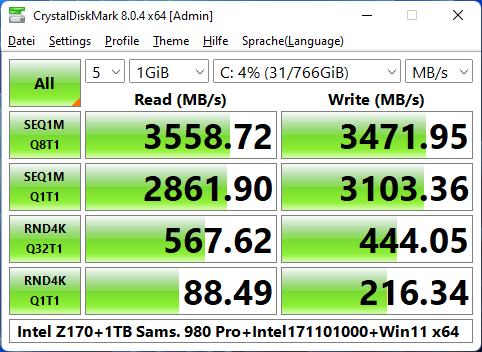
(left/upper Pic: Phison’s generic NVMe driver v1.5.0.0, right/lower Pic: Micron’s specific NVMe driver v2.1.18.0)
(Intel’s generic RST NVMe driver v17.11.0.1000)
B. AMD X570 Chipset System (PCIe 4.0)
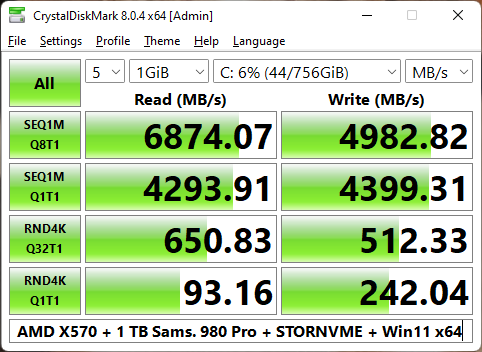
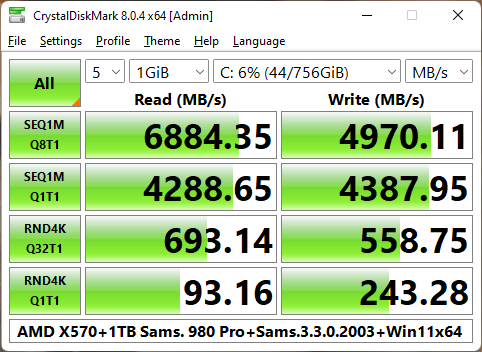
(left/upper Pic: MS Win11 generic in-box NVMe driver, right/lower Pic: Samsung’s specific NVMe driver v3.3.0.2003
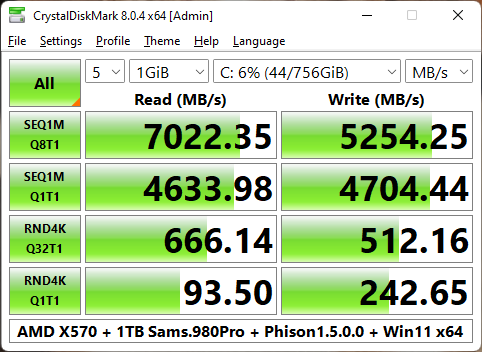
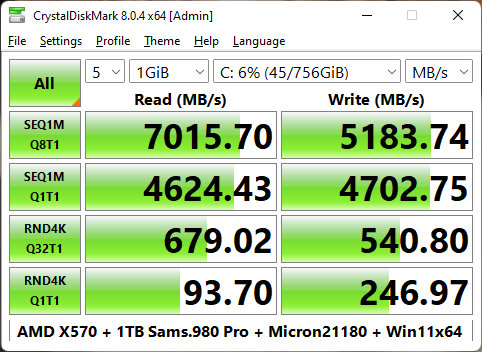
(left/upper Pic: Phison’s generic NVMe driver v1.5.0.0, right/lower Pic: Micron’s specific NVMe driver v2.1.18.0)
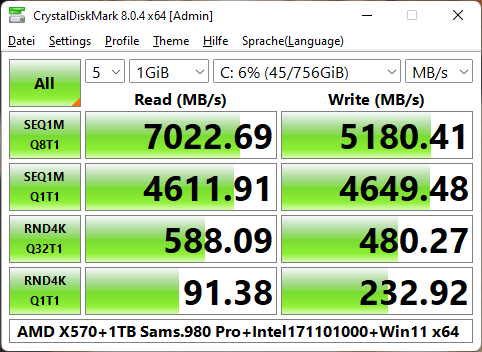
(Intel’s generic RST NVMe driver v17.11.0.1000)
Evaluation of my test results:
- All 5 tested NVMe drivers are very performant while running Win11 v21H2.
- On both PCs (with an Intel resp. AMD Chipset) the Phison, Micron and Intel NVMe drivers were better performant than the in-box MS and the latest Samsung NVMe drivers.
- Surprisingly it was the Intel RST NVMe driver, which was the benchmark winner while running on my Intel Z170 chipset system (due to the outstanding Q1T1 Sequential Read/Write numbers).
- Regarding my AMD X570 system it were the Phison and the Micron drivers, which were the best, but the performance differences to the other tested drivers were much lower and probably not even noticeable by the user.
My recommendation: Choose the driver, which gives your system the best stability or the lowest power consumption (important for notebooks).
If you want to get any other NVMe driver tested, please let me know it within the next days (as long as the test systems are usable).
Good luck with these NVMe drivers!
Dieter