My X99-TF V6.0 uses cFeon QX128A SPI chip and NCT5567D-B SuperIO.
Sure, here is a link to a merged X79 BIOS for you to test. External programmer is mandatory, since flash chip layout changes
- ME region from the 4MT
- Descriptor+BIOS region from VG4
If this does not work, then you can continue trying with another BIOS region. How to swap a region with UEFITool 0.28.0 is described in this post. The difference being that you would want to swap the BIOS region, instead of the ME region like in that example post.
from what i see is prety similar from the v2 will ry to flash he new bios on the old board if somone tried it give returnes
People on overclockers.ru forum have already reported successful flashing on TF v2.0 and v3.0, so I think you’re good to go.
Good and interesting information, do you know what is the exact SPI ID on that flash chip?
If we are unlucky then there will another way of new chips, which will create incompatibility with older BIOS on newer boards. I will research a bit now.
Can someone send me a BIOS for the Jingsha X99S D4 Plus? I need one that’s not the original, I can’t find it anywhere. If anyone knows a version from another brand that works, please let me know….
Hello and welcome! Let us start in this end:
- To help you, can you start by uploading a full 16M dump of the BIOS you are currently using? Upload to a site that does not require any type of login for people to download, like for instance mega.nz
- And most importantly, I need to ask what is your goal here? Am I correct in assuming full TPM support, since you are posting in a TPM thread?
Hi, thanks, yes I want TPM support too, but I’m looking for a new version for my BIOS that has TPM 2.0 firmware. I saw some conversations about someone with the same motherboard who found a BIOS version that worked – do you think it will work for me too? here is my current bio Download X99SD4JS.rom | LimeWire
Ok, after a quick check I think the probability is very high that you can easily add TPM support through BIOS update. Just follow what I wrote in this post. The BIOS you uploaded has a 9.X ME region, so this is essentially “Example 4”. Remember to check IIO 0 as well.
A question: if I use the same one that this person used in this post and said it worked, will it work too? here Download X99BD4_v1.36.rom.zip | LimeWire
If it is based on Huananzhi BD4, then very likely yes.
The major advantage with the BIOS I just linked to, is that it has up to date Secure Boot certificates. Which you will probably want as well.
Good afternoon. Is there any way to get TPM 2.0 on this Machinist X99 B9? I’m using a 2680 v4 and the D1_Mx_B1_260614.bin BIOS; I flashed it exactly as downloaded without making any changes, and so far it’s working normally. Do you happen to know if I can get a module for this boar
d?

How do we do this? What do I need? I’m using your BIOS on my X99 B9—`D1_Mx_B1_260614.bin`—and I haven’t made any changes to it; I’m using it exactly as I downloaded it from MEGA.
Please read through the first two posts in this thread, they have all the answers. In particular, I am adding a TPM on a X99D3M4/X99-B9 in the second post. Note that soldering is needed for that board.
About BIOS, you should change the ME region as instructed. You only got lucky that it worked.

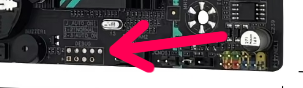
Hello, I’m interested in soldering a TPM 2.0 module onto the X99 B9 motherboard (using BIOS D1_Mx_B1_260614.bin and a Xeon 2680 v4). What is the pinout order for this board, or will I have to figure it out myself? It’s a 20-pin module, right?
I will basically ask you to read the first two posts in this thread again. In summary:
- The DEBUG pinout is already shown in the second post
- It is in my opinion a much better idea that you solder on a typical header on these boards rather than the module itself, but feel free to do things any way you want
- With regards to TPM module, I recommend that you go for a “long” rather than a “flat” module. This will very likely make motherboard installation a lot easier. See for instance this post
1 Like
Okay, so is this the correct pinout? I was a bit concerned because you mentioned that each board has different voltages and pinouts; I saw the X99D3M4, but I didn’t see anything confirming that the B9 would be the same.
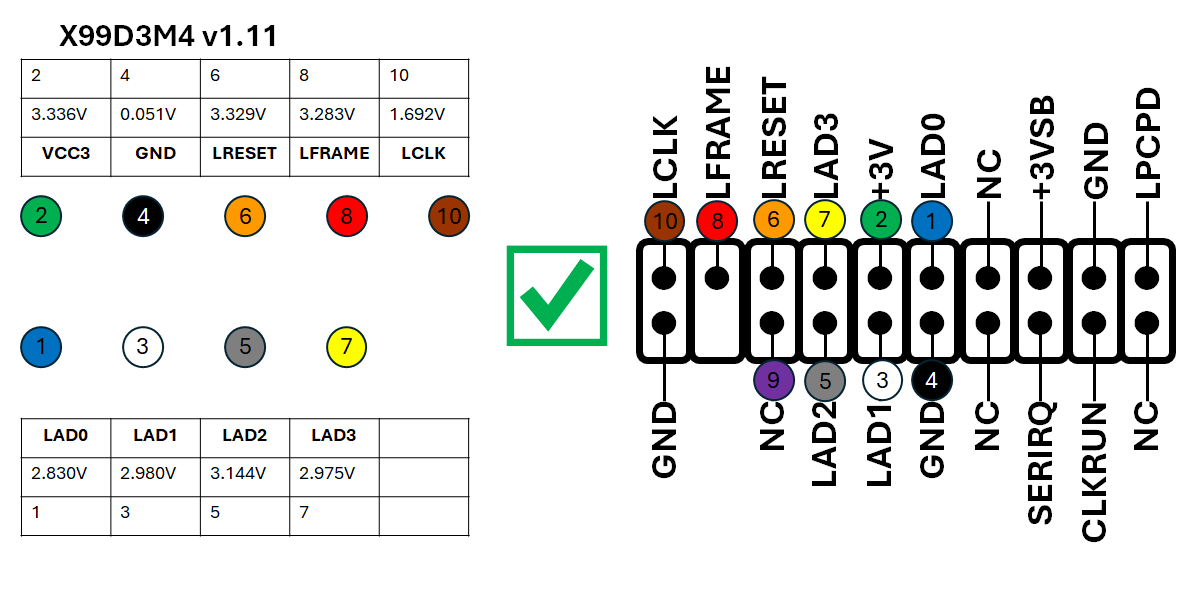
B9 is essentially a rebrand, but if you’re still in doubt then grab a cheap multimeter and do the measurements yourself.
1 Like
Good evening. I took the measurements and they checked out; however, although it is enabled in the BIOS, it shows “device not found.” The BIOS I’m using is D1_Mx_B1_260614.bin. I didn’t make any region changes because I didn’t quite understand how to do it; I flashed D1_Mx_B1_260614.bin directly onto my X99 B9 board—since I’m using a 2680v4—and it worked, but it didn’t recognize the SLB9665TT20 chip. What should I do?


Did I connect something wrong? Or could it be my BIOS? Or an incompatible module?
Let us start with BIOS
- In essence, just follow the instructions fully. Otherwise it is going to be really hard to help, and you may have other weird and new problems as a consequence
- With regards to the ME region, what to do is already shown with an actual screenshot. If it is anyhow not clear after that, then I am afraid I cannot help you further. For instance, a video showing the exact same thing would not add anything more.
Regarding TPM connection
- The module you bought does not have NC (Not Connected) filled in with for instance plastic. In other words: It is possible that you have the TPM module rotated wrongly by 180 degrees
- Proposed way forwards: You have three ground (GND). Put your multi-meter in beep/continuity mode and verify the orientation. As a matter of fact: This is what I did already in the first post in this thread. Please read that post carefully again
- Keep in mind that is also possible that you have already fried the TPM module and/or the motherboard connections due to wrong wiring