It might be your graphics card being unable to boot in pure UEFI mode?
Of course it doesn’t support UEFI…a 2005 architecture.
Hello and welcome! Yes, the problem is indeed that the GPU does not support a pure UEFI environment. You have some options in my preferred order:
-
Use AMIBCP and change the BIOS so that it boots in CSM mode instead of pure UEFI
-
Update the GPU vBIOS so that it supports UEFI (extremely unlikely to work on such an old GPU)
-
Put in a GPU that supports UEFI instead
Below are the default settings of the Huananzhi BD4 BIOS, which boots in CSM mode. You can simply change the BIOS you put together to the same default values using AMIBCP, and it should work fine. Remember to also turn off Secure Boot for both Failsafe and Optimal defaults. This is located at: “Security/Secure Boot Menu/Secure Boot”.
And, you may also need to disable “Above 4G decoding” and “Re-Size BAR support”, located under “PCI Subsystem Settings”.

Thank you so much! I was also thinking about CSM and tried changing the same parameters (changing amibcp and flashing), but not everything you recommended worked.
I’ll try your advice and give you feedback!
Thank you.
Report 
I got a GTX 1060, installed it, and the first time I tried to boot it, the same thing happened: the system wouldn’t start. I decided to reset the BIOS, removed the battery, shorted out the JCMOS, and everything started. Then, from Windows, I flashed the BIOS using your recommendations, reset the BIOS again, installed the x1600xt, and everything started on the first try, perfect!
Thank you so much! I installed everything for the SMART FAN, and everything is great!
Can you advise me on what needs to be done to get the system to boot without a graphics card? How difficult is that? I’m building a server with Proxmox, so a graphics card is completely unnecessary.
Glad you got it working!
Earlier I did indeed verify headless boot with the default configuration (CSM=off ; Secure Boot=on), see more info here and here. So you probably do not need to change anything.
What drivers are needed for overclocking?
Hello and welcome!
In my latest BIOS then no drivers are needed for any Operating System. The overclocking is simply done within the BIOS.
Did you mean the BIOS drivers in UEFI Tool—the ones you injected to get overclocking working from within the BIOS?
You right! I Simply get out GPU, setting bios not change. Loading, beeper sound error (1 long, 5 short - GPU error), but system start is ok, remote control is work, all is good.
Thanks for you work, bios is great!
1 Like
Hello and welcome!
I am not really sure what the question is, and for whom it is addressed. I will therefore answer very generally:
- The quite detailed changelog lists exactly what GUID is changed, why, and the source. If you are genuinely interested, start looking there for more details
- In particular for CPU multiplier overclocking to work, OcInit (6540F933-425F-464B-B4AD-B93A6ED0A8F5) was swapped
Please start by uploading a full 16M dump of you current BIOS. If you cannot upload it directly on this site, then put it on a filehost that does not require username/login to download files.
After that, it will be either “Example 4” or “Example 5” from my guide. If it is 5, then you need to do some work yourself, I simply cannot help since I do not have your specific hardware on hand.
Edit: If you are talking about Jginyue X99M GAMING D4/ARGB, then this is “Example 5”. You need to try different ME regions until it works. For reference, “M1” works perfectly on X99-XD4, which is a similar looking board.
Another thing to note: Your motherboard ARGB control might stop working after changing BIOS. I have no experience with this.
Hello,
I would like to request a BIOS modification for my Jingsha X99-D8 motherboard.
Hardware:
- Motherboard: Jingsha X99-D8
- CPU: Intel Xeon E5-2699 v3
- RAM: DDR4
- BIOS: AMI Aptio V
- Core Version: 5.11
- UEFI: 2.4 / PI 1.3
- Aptio Setup Utility: 2.18.1263
- BIOS date: 05/25/2020 16:27:23
- Project Version shown in BIOS: HUANANZHI X99_15 x64
- Current ME: 9.1.37.1002
- ME SKU: 1.5 MB
- ME Type: Workstation/HEDT
Current BIOS version/file:
HNX99F8_200525_kot
I have a complete 16 MiB SPI dump of my motherboard.
I would like to have a stable modified BIOS with the following features, if technically possible:
- Resizable BAR / ReBAR
- Add/enable ReBarDxe or an appropriate implementation
- Enable Above 4G Decoding
- Make the required PCI/MMIO configuration changes
- Preserve compatibility with modern NVIDIA/AMD GPUs
- PCIe bifurcation
Please investigate whether the Jingsha X99-D8 hardware supports PCIe bifurcation.
If supported, I would like the following options exposed:
- x8/x8
- x8/x4/x4
- x4/x4/x4/x4
I am particularly interested in x4/x4/x4/x4 for a PCIe-to-4x-NVMe adapter.
Please do not force bifurcation if the physical PCIe routing does not support it.
- BIOS hidden settings
Please unlock useful hidden settings, especially:
- IntelRCSetup
- IIO / IOU configuration
- PCIe configuration
- CPU configuration
- Memory configuration
- PCH configuration
- CPU power management
- PCIe ASPM / Link Speed
- Above 4G Decoding
- ReBAR
- memory timing options
- CPU / Xeon E5-2699 v3
If supported by this BIOS/platform:
- Turbo-related options
- All-core Turbo / Turbo Unlock
- CPU power limits
- CPU current limits
- relevant Haswell-EP performance options
- UEFI modules
Please check for safe updates/replacements of:
- CPU microcode
- Intel GOP
- NVMe DXE
- Intel RST/RSTe EFI/Option ROM
- PCIe/DXE modules
- USB/SATA modules
- other relevant outdated UEFI modules
Please use versions compatible with X99/C612/Haswell-EP rather than simply the newest available versions.
- Intel ME
Current ME is:
9.1.37.1002, 1.5 MB, Workstation/HEDT.
Please check whether this is the correct ME for this board.
If an update is recommended, please determine the latest compatible version and preserve the correct ME configuration.
Please do not replace the ME blindly.
- Board-specific data
Please preserve all original board-specific data, including:
- MAC address
- UUID
- SMBIOS/DMI
- serial numbers
- NVRAM
- GbE data
- ME configuration
- other calibration/board-specific data
Important:
The BIOS internally identifies itself as:
HUANANZHI X99_15 x64
Although the motherboard is sold as Jingsha X99-D8.
I have also found another modified BIOS for Jingsha X99-D8:
JNS_X99-D8_v1.0(TF).bin
This image contains ReBarDxe/ReBarState and appears to be a useful reference for this board.
I would like to use my own full SPI dump as the base rather than flashing this reference BIOS directly.
I can provide:
- Full 16 MiB SPI dump
- Current BIOS file
- BIOS region
- BIOS screenshots
- HWiNFO/CPU-Z information
- the JNS_X99-D8_v1.0(TF).bin reference BIOS
Please let me know which dump/files you need before starting the modification.
The main goals are:
- ReBAR + Above 4G
- PCIe bifurcation if the hardware supports it
- modern NVMe/GPU compatibility
- useful hidden BIOS options
- Xeon E5-2699 v3 optimization
- maximum stability
Thank you!
Hello and welcome!
It seems you have used AI to create a forum post. In essence, the six final points you list are all fulfilled by the modded BIOS I provide. Some comments:
- Please do some real research. D8 does not use 1.5M ME region, but instead close to 8M like on almost all Chinese X99 boards
- You clearly state that you have flashed an old Huananzhi F8 BIOS on it. Yet somehow you are surprised that it does not identify as Jingsha D8 any longer. I wonder if there is a simple explanation for that?
- You will put together your own BIOS, not me. In your particular case it is very easy, just follow “Example 4”. As a matter of fact, this is all I needed to do myself for my Jingsha D8I
- Bifurcation is hardware dependent. Since I do not own the hardware, I do not know how IIO maps to the physical PCIe slots. BIOS certainly supports it, but you have to try yourself
- TBU is provided by BIOS “B2”. Undervolting is set in the BIOS instead of hardcoded in a separate driver like in most guides
This is “Example 5”, so just follow my guide accordingly. Please note that you must do the testing yourself. I would start with “M1” ME region, since it works perfectly on X99-XD4.
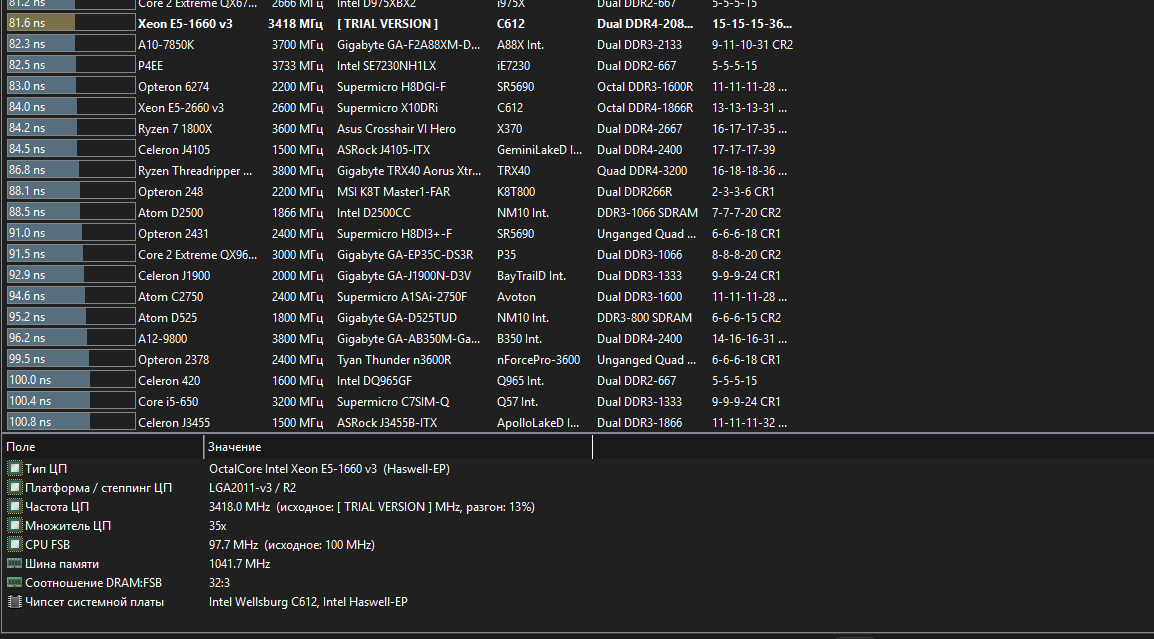
I am sorry, but what is the actual question here? And what have you changed?
It seems that this is some sort of RAM latency benchmark. Can you run AIDA64 instead? With a lot of tuning I manged to get latency just below 60ns, as shown in the very first post in this thread.
This is an English speaking forum, so please use English. On a personal level I do not speak Russian or Portuguese, but I use translation tools to get information.
Please explain a lot more in detail:
- What is your motherboard? Is it “Jginyue X99M GAMING D4/ARGB” ?
- What BIOS are you using? Stock, or did you for instance put on a “D1_M1_B1” BIOS following my guide?
Hello. Yes, I have the X99M ARGB D4. I tried the latest version with the built-in BIOS overclocking feature; I used “ME Region 1”—specifically the one intended for the X99 XD4 that was included in the BIOS file.